HIKSEMI BLADE SERIES USB 3.2 FLASH DRIVES (HS-USB-E301)
Official Data Sheet & Enterprise Deployment Guide
Product Overview
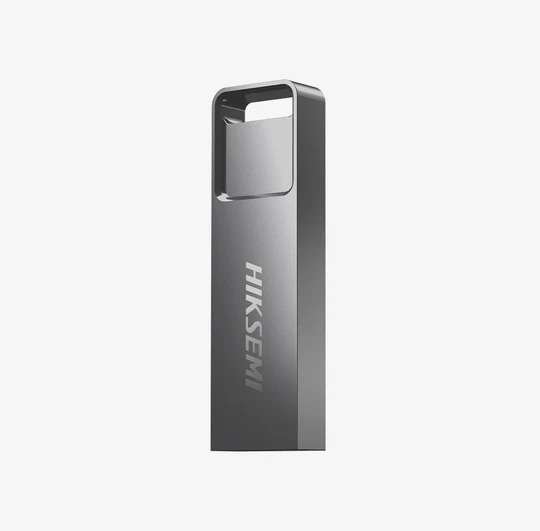
The HIKSEMI Blade Series (E301) represents the next evolution in high-speed, portable corporate storage. Combining an ultra-slim, minimalist gray aesthetic with advanced UDP (USB Disk in Package) technology, the Blade Series delivers up to 6x the data transfer velocity of standard legacy USB 2.0 drives. Engineered for demanding environments, its unibody architecture offers premium protection against physical and environmental hazards.
Technical Specifications
The Blade Series balances high-tier USB 3.2 Gen 1 bandwidth with physical resilience across all capacity options.
| Specification | Technical Parameters (All Variants) |
| Available Capacities | 16GB, 32GB, 64GB, 128GB |
| Interface | USB 3.2 Gen 1 Type-A (Fully backwards compatible with USB 3.0/2.0) |
| Maximum Read Speed | 30 MB/s to 130 MB/s (Variant & file-size dependent) |
| Maximum Write Speed | 15 MB/s to 45 MB/s (Variant & file-size dependent) |
| Hardware Core Architecture | Integrated UDP (Waterproof, Dustproof, and Anti-shock) |
| Dimensions | 42mm × 12mm × 4.5mm |
| Weight | Super-lightweight 6.1g |
| Operating Temperature | -5°C to 55°C |
| Warranty Policy | 5-Year Comprehensive Commercial Replacement Warranty |
Key Hardware Advantages
UDP Structural Core: Unlike traditional multi-piece internal flash drives, the Blade utilizes a unified piece of silicon. This renders the drive fully waterproof and dustproof, safeguarding sensitive business data from spills or harsh field environments.
Streamlined Blade Chassis: The ultra-thin 4.5mm profile ensures it plugs seamlessly into tightly aligned laptop side-ports without blocking adjacent USB or Type-C connections.
Cross-Platform Support: Native architectural compatibility across Windows, Mac OS X, and Linux distributions without requiring localized third-party drivers.
Deployment, Installation, and Configuration
The HIKSEMI Blade is engineered for immediate workspace deployment, reducing onboarding times for IT personnel.
Physical Installation
Identify any functional USB Type-A port on a workstation, thin client, server, or digital media display.
Insert the HIKSEMI Blade drive securely.
The host system’s Operating System will instantly recognize the hardware using standard integrated mass storage protocols.
File System Configuration
Depending on your enterprise deployment targets, reformatting the drive may optimize performance:
FAT32 (Default for low capacities): Best for broad compatibility across legacy hardware, embedded industrial machines, and media media consoles.
NTFS: Recommended for dedicated Windows environments to enable advanced access control lists (ACLs) and file compression.
exFAT: Highly recommended for large deployments (64GB/128GB variants) handling individual file payloads greater than 4GB across mixed Windows and macOS office networks.
Security Configuration
To meet regional and corporate data governance policies, IT administrators can easily deploy native BitLocker encryption or software-defined secure partitions over the volume root directory.
Exclusive SKYRS Availability in Pakistan
Procurement & Supply Notice: The complete range of authentic HIKSEMI Blade USB 3.2 variants, along with authorized bulk commercial pricing tiers and the official 5-year replacement package, is available in Pakistan only at SKYRS.
SKYRS functions as the exclusive verified pipeline for genuine Hiksemi consumer and enterprise storage products nationwide. This protects local commercial operations, government offices, and educational institutes from counterfeit stock and gray-market supply lines.
Skyrs proudly operates as the only vendor in Pakistan that has HIKSEMI equipment for call center call centre and software houses with different variants of HIKSEMI equipment for zoom ringcentral. Consequently, we provide high-density hardware to ensure smooth enterprise communications.
If you want to buy HIKSEMI equipment Lahore/Islamabad, we offer rapid deployment services. We also supply a premium HIKSEMI pack price for bulk buyers. Customers looking for a reliable HIKSEMIUSB BLADE used price 2026 will find unbeatable value here.
Alternatively, you can choose a Refurbished HIKSEMI unit or a premium Branded used HIKSEMI module. We deliver the best HIKSEMI equipment straight to your doorstep. Therefore, you can easily buy used HIKSEMI in different cities like karachi , lahore , islamabad, rawalpindi , Faisalabad , quetta , Peshawar , Multan , Hyderabad, sialkot with full confidence.
(Original physical picture from the manufacturer official website)
The HIKSEMIUSB BLADE all variants provide high-speed data transmission and secure storage. Specifically, this drive implements quick data sharing across enterprise networks. Furthermore, the HIKSEMIUSB BLADE throughput limit guarantees stable read speeds up to 80MB/s.
If you want to upgrade your hardware, please view our detailed HIKSEMIUSB BLADE memory upgrade option. Users can also review official specifications by initiating a HIKSEMI HIKSEMIUSB BLADE datasheets download.
In terms of advanced networking, you can secure your ecosystem via the HIKSEMIUSB BLADE security license activation. Additionally, the durable HIKSEMIUSB BLADE rack mount kit allows neat server room deployment. If you need system modification, apply the latest HIKSEMIUSB BLADE update immediately.
To set up efficient office networks, engineers can consult our HIKSEMI equipment configuration guide. Moreover, managing complex local networks becomes simple through a standard HIKSEMI VLAN configuration.
The following table summarizes current regional availability and pricing:
| Regional Keyphrase | Available Solutions & Equipment Services |
| HIKSEMI price in Pakistan | Full pricing sheets available online for all tech gadgets. |
| HIKSEMI equipment series distributor Pakistan | Skyrs provides nationwide logistics and warranty fulfillment. |
| HIKSEMI HIKSEMI USB BLADE price in Karachi | Available for immediate same-day office delivery. |
| HIKSEMIUSB BLADE price in peshawar | Special shipping options for corporate software hubs. |
| HIKSEMI HIKSEMIUSB BLADE price in faisalabad | Reduced rates for industrial and textile data centers. |
| HIKSEMI HIKSEMI USB BLADE price in kpk | Comprehensive public sector supply chains are active. |
| HIKSEMI Switch HIKSEMIUSB BLADE price in quetta | Reliable delivery options for remote command systems. |
If your enterprise needs a large volume order, please request a HIKSEMIUSB BLADE bulk quote directly from us.
If you face deployment issues, look up online guides explaining how to reset HIKSEMI equipment. Afterwards, you can safely perform a HIKSEMI firmware update download from the official portal. When establishing modern infrastructures, checking the network switch HIKSEMIUSB BLADE PoE power budget remains absolutely crucial.
Compared to generic plastic drives, HIKSEMIUSB BLADE all variants feature a robust metal alloy casing. Consequently, they offer better heat dissipation during long data transfers. While competitor drives often drop speeds, HIKSEMI maintains sustained performance. For advanced routing setups, the seamless HIKSEMI Migration protocol allows instant system replication. Thus, routing HIKSEMI equipment ensures higher reliability than rival brands.
They serve as high-speed data transmission tools to expand the storage capacity of office workstations.
You can easily request a HIKSEMIUSB BLADE bulk quote via our online form.
You can complete an official HIKSEMI HIKSEMIUSB BLADE datasheets download from the manufacturer web link.
Yes, we supply used HIKSEMI in different cities like karachi , lahore , islamabad, rawalpindi , Faisalabad , quetta , Peshawar , Multan , Hyderabad, sialkot seamlessly.