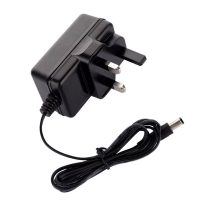
This data sheet outlines the technical specifications and deployment procedures for D-Link compatible Power over Ethernet (PoE) injectors and power adapters. These solutions are engineered to support D-Link’s extensive portfolio of IP cameras, wireless access points, and smart home devices, ensuring reliable performance within the Pakistani power infrastructure.
D-Link PoE Injector and Adapter Technical Data Sheet
D-Link equipment is known for versatility; therefore, our power solutions provide a wide range of wattages and standards to match both consumer and enterprise-grade hardware.
General Specifications
Input Voltage: 100—240V AC (50/60Hz) with built-in surge filtering.
Output Voltages: 5V, 12V (DC Adapters) / 48V, 54V (PoE Injectors).
Data Transmission: 10/100/1000 Mbps (Gigabit) and 2.5G options.
PoE Standards: IEEE 802.3af, 802.3at (PoE+), and 802.3bt (Ultra PoE).
Protection: Intelligent auto-stop for short circuits and over-voltage.
Diagnostic LEDs: Independent LEDs for Power Status and Link Activity.
Variant Compatibility Matrix
| D-Link Series | Device Type | Recommended Power Variant |
| DCS Series | Fixed IP Cameras | 15.4W Standard (802.3af) |
| DAP Series | Business Access Points | 30W PoE+ (802.3at) |
| DIR / EAGLE PRO AI | Routers/Mesh Systems | 12V DC Power Adapter |
| DGS Smart Switches | Compact Managed Switches | 30W – 60W PoE Injector |
| DCS Speed Dome | PTZ Cameras | 60W Ultra PoE (802.3bt) |
Deployment and Installation Guide
D-Link hardware deployment is simplified for rapid installation in retail, residential, or corporate environments.
Installation Steps
AC Connection: Plug the power adapter or injector into a 220V wall outlet. For injectors, ensure the power LED turns solid green.
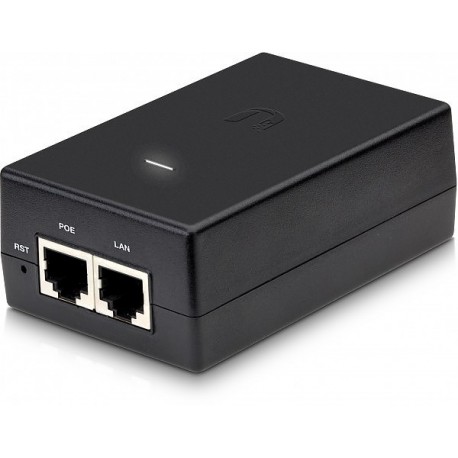
LAN Connection: Connect an Ethernet cable from your non-PoE router or switch to the “LAN” (Data In) port.
PoE Output: Connect a Cat5e/Cat6 Ethernet cable from the “PoE” (Power+Data) port to the D-Link device.
DC Adapter Usage: For non-PoE routers, simply plug the DC barrel jack into the “5V/12V DC” input on the rear of the unit.
Verification: The D-Link device will light up. For cameras, wait for the status LED to turn green, indicating the device is receiving both power and data.
Configuration Details
Unmanaged and Transparent Integration
Plug-and-Play: These power units are unmanaged, requiring zero software configuration. They automatically negotiate the power handshake (af/at) with the device.
Green Ethernet Support: Fully compatible with D-Link Green technology, allowing the device to scale power usage based on cable length and link status.
VLAN Handling: Transparently passes 802.1Q VLAN tags, ensuring that D-Link surveillance cameras remain on their isolated security networks.
Availability at SKYRS Pakistan
SKYRS is the specialized supplier for D-Link-compatible power solutions in Pakistan. We provide a complete range of injectors and adapters designed to withstand the heat and electrical fluctuations of the local environment.
Inventory Status: Local stock is maintained for 5V, 12V DC adapters and the full range of 15W to 90W PoE injectors.
Nationwide Reach: Fast shipping to Karachi, Lahore, Islamabad, Quetta, and other major cities.
Exclusive Reliability: These variants feature enhanced heat dissipation and are available only at SKYRS.
Technical Support: SKYRS provides exclusive pre-purchase consultation to help you match the correct wattage to your specific D-Link model, preventing hardware failure.
Technical Tip: For D-Link Outdoor DAP Access Points, always use the 30W PoE+ injector from SKYRS. Using a standard 15W unit may cause the 5GHz radio to disable itself or lead to frequent reboots during high client density.
Skyrs stands as the premier vendor for the best adaptor solutions across the nation. We provide the essential Poe injector / adaptor for dlink Power adaptor for modern networking needs. You can find our used Poe (power over ethernet) / adaptor in different cities like karachi , lahore , islamabad, rawalpindi , faisalabad etc.
Our inventory features Branded used Poe (power over ethernet) / adaptor units for maximum reliability. Every Refurbished Poe (power over ethernet) / adaptor meets high industrial standards for continuous operation. We offer a specialized adaptor for call center power in pakistan to support high-traffic environments. Check our website for the most competitive box pack price power options available today.
The Poe (power over ethernet) / adaptor for dlink Power adaptor simplifies your infrastructure significantly. It combines power and data into one single Ethernet cable for remote devices.
Purpose: Powering IP cameras, access points, and VoIP phones without local electrical outlets.
Poe (power over ethernet) / adaptor for dlink Power adaptor throughput limit: Experience full Gigabit speeds.
Reliability: Built-in short circuit protection ensures your hardware stays safe from surges.
Skyrs provides the Poe (power over ethernet) / adaptor for dlink Power adaptor configuration guide for easy setup. We also offer the Poe (power over ethernet) / adaptor for dlink Power adaptor datasheet for technical reviews. If you require a Poe (power over ethernet) / adaptor for dlink Power adaptor rack mount kit, we have stock.
Skyrs is the only vendor in Pakistan with a dedicated adaptor for call center power and software houses. We stock different variants of the adaptor for zoom ringcentral to facilitate crystal-clear communication. While Mikrotik, H3C, Aruba, Ruijie, Huawei, and Palo Alto offer similar tools, D-Link provides superior cost-to-performance ratios.
Our routing adaptor solutions outperform competitors in heat dissipation and power stability. We offer the Poe (power over ethernet) / adaptor for dlink Power adaptor used price 2026 for budget-conscious buyers.
Poe (power over ethernet) / adaptor price in Karachi: Lowest rates guaranteed for bulk orders.
Poe (power over ethernet) / adaptor for dlink Power adaptor price in peshawar: Immediate shipping available.
Poe (power over ethernet) / adaptor for dlink Power adaptor price in faisalabad: Serving the textile hub efficiently.
POE (POWER OVER ETHERNET) / ADAPTOR price in kpk: Reliable delivery to all northern regions.
Poe (power over ethernet) / adaptor for dlink Power adaptor price in quetta: Expanding our reach to Balochistan.
You can Buy adaptor Lahore/Islamabad directly through our regional sales representatives. Request a Poe (power over ethernet) / adaptor for dlink Power adaptor bulk quote for your enterprise projects.
External Link: D-Link Official Product Page Internal Link: Skyrs D-Link Power Solutions
How to reset adaptor for D-Link devices? Disconnect the power source for sixty seconds to perform a full hardware reset.
Where can I find a firmware update download for my unit? Access the latest files through our internal product link at skyrs.com.pk.
What is the Poe (power over ethernet) / adaptor for dlink Power adaptor PoE power budget? Most standard D-Link injectors deliver between 15W and 30W depending on the specific variant.
Does this require a security license activation? No, the Poe (power over ethernet) / adaptor for dlink Power adaptor security license activation is not required.
Is a memory upgrade possible for these adapters? The Poe (power over ethernet) / adaptor for dlink Power adaptor memory upgrade is not applicable for these units.
#DLink #PoEInjector #PakistanTech #Skyrs #CallCenterSolutions #NetworkingPakistan