Linksys W80 DECT IP Multi-Cell System Datasheet
Exclusively Distributed and Supported by SKYRS Pakistan
The Linksys W80 DECT IP Multi-Cell System, engineered in collaboration with Yealink technology, provides organizations across Pakistan with seamless, scalable, and enterprise-grade wireless communication. Designed for large warehouses, multi-floor offices, and expansive commercial campuses, this system completely eliminates coverage blind spots while ensuring uninterrupted high-definition voice mobility.
Linksys W80 Product Variants Available at SKYRS
The Linksys W80 ecosystem is split into targeted hardware variants to fit custom deployment architectures:
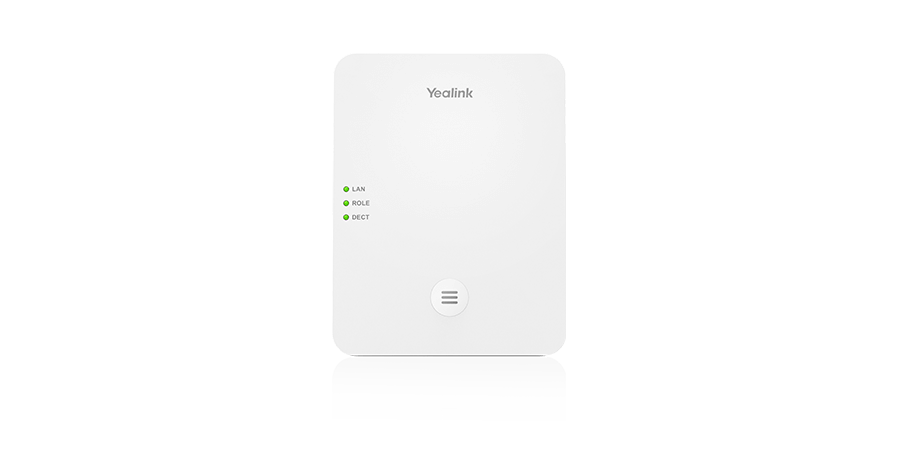
Linksys W80DM (DECT Manager): The central intelligence unit of your wireless network. It manages up to 30 base stations, coordinates seamless roaming/handover strategies, and handles centralized SIP provisioning. It does not emit RF signals itself but manages the entire infrastructure.
Linksys W80B (DECT Multi-Cell Base Station): The hardware unit responsible for providing actual wireless coverage. It links back directly to the W80DM to handle wireless handovers and communication.
Key Technical Specifications and Performance Capabilities
System Scalability: Supports up to 30 base stations and 100 synchronized cordless handsets per system deployment.
Concurrent Operations: Up to 100 parallel HD voice calls across the network (up to 8 narrowband or 4 wideband calls per individual W80B base station).
Range Dynamics: Reliable indoor radio frequency radius between 20 meters to 50 meters, and outdoor line-of-sight range up to 300 meters.
Audio Standards: Features full-duplex speakerphone capabilities combined with HD Voice performance using the advanced Opus audio codec.
Hardware Sync Redundancy: Integrates Level 1 base backup. If the primary base goes offline, a secondary base automatically steps into the syncing role within 60 seconds.
Enterprise Deployment and Site Installation Blueprint
SKYRS provides complete localized engineering support in Pakistan for full turn-key setup:
1. Site Surveying and RF Planning Before hardware mounting, the physical environment must be mapped using the specialized deployment toolkit to verify proper signal overlap. To guarantee smooth roaming handovers, base stations must be positioned so that their wireless bubbles intersect reliably.
2. Hardware Mounting and Power Placement
The compact, premium chassis design supports flat-surface placement or integrated wall mounting.
Linksys W80 units leverage Power over Ethernet (PoE 802.3af Class 1), eliminating the need for local AC wall sockets at high mounting positions. Alternatively, a standard DC 5V/1.2A power adapter can be deployed.
System Configuration Protocol and Provisioning
The deployment configuration is streamlined using localized network infrastructure:
1. Auto-Provisioning and Redirection The system features zero-touch provisioning within multicast network environments. For large enterprise environments, SKYRS configures automated mass deployment via Redirection and Provisioning Service (RPS) templates.
2. Centralized Web Interface Management System administrators do not need to configure base stations individually. By accessing the unified web GUI hosted on the W80DM DECT Manager IP address, operators can centrally balance firmware upgrades, assign up to 100 individual VoIP SIP accounts, and manage centralized corporate directories (LDAP/XML Remote Phonebooks).
3. Handset Syncing Wireless endpoints—including premium Yealink mobile DECT handsets and conferencing terminals—are paired over-the-air to the system using a quick registration technique that ensures no ongoing call interruptions on neighboring handsets.
Exclusive Procurement and SKYRS Availability in Pakistan
Availability Notice: The full Linksys W80 Multi-Cell portfolio, inclusive of official local warranties, replacement components, pre-sales RF site mapping, and post-installation technical SLA support, is available in Pakistan exclusively through SKYRS.
Skyrs proudly stands as the premier provider of enterprise telecommunication systems across Pakistan. We deliver unmatched communication infrastructure for any modern call center call centre, vibrant software houses, or complex corporate networks. Consequently, businesses can upgrade operations using high-performance setups. Skyrs is the only vendor in Pakistan supplying specialized Yealink equipment for call center call centre ecosystems with diverse hard disk, SSD, and RAM configurations.
Furthermore, our tailored hardware optimizes platforms like UCM PBX, Grandstream, Dintar, Asterisk, and hosted call center operations. These variants adapt seamlessly to factory floor communication, Zoom rooms, and RingCentral configurations.
Our comprehensive stock covers essential parts from Yealink rack mount kit systems to deep Yealink memory upgrade kits. Additionally, we provide the latest Yealink firmware update download files and secure Yealink security license activation protocols.
Skyrs satisfies local demand effectively by distributing premium communications hardware nationwide. Our supply network covers all regional hubs, providing competitive corporate options directly to your facility:
Federal Capital & Punjab: Buy Yealink equipment Lahore/Islamabad through our direct fulfillment channels. We maintain an official inventory to provide an affordable Yealink price in Pakistan.
Southern Hubs: Request a specialized Yealink Linksys W80 price in Karachi for multi-cell wireless deployments.
KPK & Northern Areas: Find a reliable Yealink Linksys W80 price in kpk or request a Yealink price in peshawar for premium corporate systems.
Industrial Zones: Request a targeted Yealink price in faisalabad or purchase standard equipment via our Yealink equipment series distributor Pakistan network.
Balochistan & South Punjab: Contact us for a fast Yealink Switch Yealink price in quetta or scalable deployments in Multan and Hyderabad.
Industrial Hubs: Secure reliable corporate models in Sialkot or request a fast Yealink bulk quote tailored for huge multi-site projects.
These corporate systems offer incredible data management and enterprise-grade stability. The premium enterprise hardware maintains an optimal Yealink throughput limit to protect critical voice data packets. Meanwhile, administrators can review performance metrics on the official Yealink Datasheet before deployment.
[Main Network Switch] ---> [Yealink Multi-Cell Base (W80B)] ---> Wireless Roaming Handsets
        |
        +------------> [DECT Manager (W80DM)] ------------> Advanced Call Routing
The hardware supports a generous Yealink PoE power budget, allowing clean installation over standard network cables. For secure data routing, administrators can implement a custom Yealink VLAN configuration to isolate voice traffic from general office workflows.
If you need to update deployment layouts, the official Yealink equipment configuration guide outlines simple steps to maintain continuous performance. You can quickly deploy a new Yealink update or handle a Yealink signals reset across multi-cell environments.
| Technical Parameters | Yealink W80 Multi-Cell Series | Basic Desktop IP Alternatives |
| Mobility Support | Seamless roaming and active handover | Stationary desktop placement only |
| Call Capacity | Up to 100 simultaneous calls per manager | Limited to individual lines |
| Deployment Fit | Hospital, office, home, industry, forces | Small office desk spaces |
| Power Management | Efficient Yealink PoE power budget | Traditional standalone wall adapters |
Whether you buy a pristine, Branded used Yealink setup or a certified Refurbished Yealink unit, Skyrs guarantees fully tested equipment. Every package delivers an economical Yealink used price 2026 structure without abandoning essential technical functionality. Secure the complete Yealink pack price deal through the Skyrs Internal Product Inventory today.
Q1: How to reset Yealink equipment to factory defaults?
Clear existing data by holding the connect button on the base station until the LED indicators flash sequentially. Alternatively, access the web user interface, navigate to the system settings tab, and click the factory reset option.
Q2: Where can I securely access a Yealink datasheets download?
You can download official technical specifications and mechanical documentation directly from our catalog at skyrs.com.pk or via the manufacturer’s resource portal.
Q3: How do I perform a Yealink firmware update download and installation?
First, retrieve the correct firmware binary file from the official portal. Next, log into your device web management interface, select the upgrade sub-menu, upload the system file, and initiate the update process.