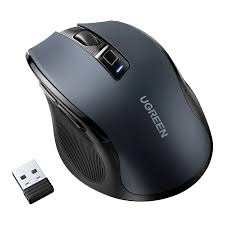
This data sheet outlines the technical specifications, variants, and deployment procedures for the UGREEN 4000DPI Wireless Mouse series. As a premium tech solution, these mice are curated for high-performance office environments and creative workflows, available exclusively for SKYRS clients in Pakistan.
The UGREEN wireless mouse range is engineered for precision and silent operation. Featuring an advanced optical sensor, these mice provide seamless tracking on various surfaces including wood, fabric, and even some glass types. The 4000DPI resolution is specifically optimized for high-definition 4K and 8K displays.
| Variant Model | Connectivity Type | Button Configuration | Best For |
| MU101 (90395) | Dual Mode (Bluetooth 5.0 + 2.4G) | 6 Buttons (Silent) | Multi-device switching (Laptop + Tablet) |
| MU006 (90372) | Single Mode (2.4G Wireless) | 5-6 Buttons (Silent) | Dedicated PC/Desktop setups |
| 25752 / 25753 | Dual Mode (Red/Blue editions) | 6 Buttons (Silent) | Ergonomic comfort & aesthetic variety |
DPI Sensitivity: 5-Level Adjustable (800, 1200, 1600, 2000, 4000 DPI)
Sensor Technology: Blue Optical Tracking
Click Noise: ≤ 40dB (90% noise reduction)
Transmission Distance: Up to 15 meters (2.4G) / 10 meters (Bluetooth)
Battery Life: Approx. 12–18 months (via 1x AA battery)
Compatibility: Windows 7/8/10/11, macOS, Linux, Chrome OS, Android, iPadOS
SKYRS provides pre-verified units to ensure immediate deployment in your workspace. The hardware follows a “Zero-Driver” protocol, meaning no software installation is required.
Open the battery compartment on the underside of the mouse.
Remove the USB Nano Receiver and insert it into an available USB-A port on your PC or Laptop.
Insert one AA battery (ensure correct polarity).
Slide the power switch to ON. The indicator will glow green briefly; the mouse is now active.
Turn the mouse power switch to ON.
Press the Mode Switch button (usually at the bottom) until the indicator light turns Blue.
Press and hold the Left, Right, and Scroll buttons simultaneously for 3 seconds to enter pairing mode (the blue light will flash rapidly).
On your device (MacBook/iPad/Laptop), search for “UGREEN B3.0” or “UGREEN B5.0” and select “Connect.”
Once installed, the mouse can be tailored to specific user needs:
DPI Adjustment: Press the dedicated DPI button located behind the scroll wheel. The LED will blink to indicate the current level (e.g., 4 blinks for 4000 DPI).
Lower DPI (800-1200): Best for precise design/Photoshop work.
Higher DPI (2000-4000): Best for 4K monitors and fast navigation.
OS Optimization: For macOS users on specific models, hold the mode switch button for 1 second to swap button functions (Forward/Back) to match Apple’s native navigation.
Sleep Mode: The mouse enters an automatic “Deep Sleep” after 30 minutes of inactivity to conserve power. Simply click any button to wake it up.
SKYRS is the specialized provider for these UGREEN variants in the Pakistani market, focusing on corporate and professional supply.
Authenticity: 100% Genuine UGREEN Global Version.
Support: Direct hardware replacement support for SKYRS corporate clients.
Bulk Deployment: Optimized for office-wide rollouts with pre-configuration services available upon request.
Skyrs stands as the exclusive distributor in Pakistan providing the best UGREEN Wireless Mouse 4000DPI equipment for modern IT infrastructures. We specialize in supplying high-density hardware for software houses and a call center call centre in Pakistan. Our inventory includes branded used UGREEN switches and premium refurbished UGREEN switches for cost-effective networking. You can find the latest UGREEN box pack price for new deployments across all major regions. We provide used UGREEN switches in different cities like Karachi, Lahore, Islamabad, Rawalpindi, and Faisalabad.
The UGREEN Wireless Mouse 4000DPI is a cornerstone for high-performance productivity in professional environments. Skyrs offers the all variants to suit diverse ergonomic needs.
Technical Functionality: It features 5 adjustable levels reaching a 4000DPI throughput limit for precision.
Purpose of Use: Ideal for Zoom and RingCentral setups requiring silent clicks and lag-free navigation.
Configuration & Maintenance: Access our configuration guide for seamless multi-device pairing.
Support: We facilitate the UGREEN firmware update download and update services.
| Region | Product Availability | Estimated Price 2026 |
| Karachi | UGREEN Wireless Mouse 4000DPI price in Karachi | Rs. 4,500 |
| Lahore | Buy UGREEN equipment Lahore/Islamabad | Rs. 4,600 |
| Peshawar/KPK | UGREEN Wireless Mouse 4000DPI price in Peshawar | Rs. 4,700 |
| Faisalabad | UGREEN Wireless Mouse 4000DPI price in Faisalabad | Rs. 4,550 |
| Quetta | UGREEN Wireless Mouse 4000DPI price in Quetta | Rs. 4,800 |
Skyrs leads UGREEN migration projects, integrating equipment with brands like MikroTik, H3C, Aruba, Ruijie, and Huawei. We offer the rack mount kit for specialized industrial workstations. Our team manages security license activation for enterprise-grade peripheral protection. You can request a bulk quote for large-scale corporate procurement.
| Feature | UGREEN 4000DPI | Competitor (Logitech/HP) |
| Max DPI | 4000 DPI | 1000-3200 DPI |
| Click Noise | < 40dB (Silent) | Standard Click |
| Battery Life | Up to 18 Months | 12 Months |
| Compatibility | Windows/macOS/Linux | Limited Linux Support |
For deep technical insights, download datasheets from the Official Manufacturer Website. Explore our local stock via the Skyrs Internal Product Portal. We provide a detailed UGREEN equipment configuration guide and VLAN configuration for integrated networking. Learn how to reset UGREEN equipment easily through our dedicated online helpdesk.
1. Does the mouse support PoE functionality?
The mouse is wireless; however, our switches maintain a high PoE power budget.
2. Where can I find the memory upgrade?
Peripherals use fixed internal memory; however, we offer used price 2026 for replacements.
3. Is Skyrs the authorized UGREEN equipment series distributor in Pakistan?
Yes, Skyrs is the premier vendor for authentic UGREEN price in Pakistan and official warranty support.
#UGREENPakistan #Skyrs #CallCenterEquipment #NetworkingPakistan #WirelessMouse4000DPI #RefurbishedSwitches