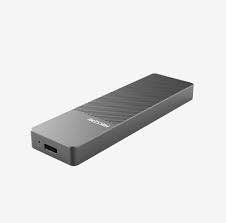
The Hiksemi MHCMD202 (commonly cataloged as the HS-HUB-MD202) is an elite, high-speed portable M.2 solid-state drive enclosure designed for ultimate performance and storage flexibility. Featuring a premium all-aluminum alloy body for passive thermal management and a RealTek RTL9210B master control chip, it flawlessly bridges the gap between raw internal solid-state speed and secure, ultra-portable data telemetry.
This premium enterprise-ready storage solution, alongside all its custom deployment variants, is available in Pakistan exclusively through SKYRS, your trusted partner for high-tier IT distribution and lifecycle management.
Model: HS-HUB-MD202 / MHCMD202
Master Controller: RealTek RTL9210B High-Level Dual-Protocol Logic
Protocol Support: Dual-Protocol (Supports both M.2 NVMe PCIe and M.2 SATA SSDs)
Form Factor Compatibility: M.2 keys in 2242, 2260, and 2280 form factor iterations
Output Interface: USB 3.2 Gen 2 Type-C
Data Transmission Rate: Up to 10 Gbps
Material Architecture: Industrial-grade Aluminum Alloy (Chassis acts as a unified heat sink)
Color: Sleek Space Grey
Dimensions: 106 mm × 31 mm × 10 mm (Ultra-compact pocket profile)
Operating Optimization: Smart Hibernation Logic (Auto-sleeps after 10 minutes of idling to expand drive lifecycle), UASP acceleration, and TRIM command support.
SKYRS coordinates specialized commercial kits to align with local workspace configurations and procurement protocols across Pakistan:
| Variant Code | Package Composition | Target Deployment Workflow | Distribution Status |
| MD202-STD | MHCMD202 Enclosure + Thermal Pad + Standard Type-C to Type-A Cable | Entry-to-mid tier office expansions, field backups, and basic data recovery. | Available only at SKYRS |
| MD202-CREATOR | MHCMD202 Enclosure + High-Efficiency Thermal Pad + Dual Cable Pack (Type-C to A & High-Bandwidth Type-C to C) | 4K/8K video editors, tech professionals, and high-load content creators matching Type-C workflows. | Available only at SKYRS |
| MD202-ENT | 5-Unit Bulk System Installer Kit (Includes premium thermal pads and heavy-duty protective cases) | Data center migration teams, corporate desktop overhauls, and mass systems deployment. | Available only at SKYRS |
The Hiksemi MHCMD202 relies on a simplified, tool-free installation sequence that optimizes thermal transfer.
Press and slide open the aluminum upper lid of the enclosure body.
Unbox your M.2 NVMe or SATA SSD. Clean its top memory chip surface.
Peel the protective plastic film from both sides of the included high-efficiency thermal pad and firmly place the pad along the length of your M.2 SSD chips.
Insert the M.2 SSD into the internal interface slot at an angle of roughly 15 to 30 degrees, pushing until it seats firmly.
Press the tail end of the SSD down flat against the circuit board and lock it down using the tool-free rubber or rotating retention clip provided.
Slide the aluminum chassis cover back into place until it completely clicks shut.
Because the enclosure utilizes true plug-and-play architecture, it requires zero driver installations across Windows, macOS, Linux, and Android
Connect the enclosure via the high-bandwidth Type-C cable to your system. Avoid unpowered USB hubs to prevent data transition dropouts.
Launch Partition Tools: On Windows, right-click the Start icon and open Disk Management. On macOS, open Disk Utility.
Set Partition Table: Choose GPT (GUID Partition Table) for modern operating systems and modern storage size handling.
Volume Formatting: Create a New Simple Volume. Choose NTFS for Windows-dedicated platforms, or select exFAT if your business ecosystem jumps between Windows, macOS, and Android.
When deploying a pre-existing M.2 drive containing pre-saved files, simply connect the hardware to any host device. The system will near-instantaneously mount the drive volume, enabling 10Gbps data telemetry right out of the box.
Procurement and Support Note: The Hiksemi MHCMD202 lineup is backed by a local 1-year limited warranty and verified technical support. Commercial procurement, wholesale orders, and project-based system deployments are hosted and fulfilled only at SKYRS.
Skyrs proudly stands out as the ultimate technology partner for corporations nationwide. Specifically, skyrs is the only vendor in pakistan that has HIKSEMI equipment for call center call centre and software houses with different variants of HIKSEMI equipment for zoom ringcentral. Therefore, businesses can secure the absolute best HIKSEMI equipment directly through our dedicated channels.
We cater comprehensively to every modern commercial sector. Consequently, we provide specialized equipment for call center call centre office home industry hospital forces etc in pakistan. Whether you operate an active customer support hub or a secure medical facility, our inventory meets your exact technical standard.
Skyrs offers highly versatile procurement options to fit your budget. For instance, we supply premium Branded used HIKSEMI or certified Refurbished HIKSEMI hardware. Furthermore, organizations can lock in the highly competitive HIKSEMI pack price for bulk commercial rollouts.
The HIKSEMIMHCMD202 Hard Disk Enclosure all variants serve as high-performance dual-protocol storage tools. This device converts internal NVMe and SATA M.2 solid-state drives into highly secure, ultra-fast portable external memory systems.
Data Transfer Speeds: Fully supports USB 3.2 infrastructure, driving data transmission up to 10Gbps.
Intelligent Hibernation: Automatically activates smart sleep mode after ten minutes of idle time.
Optimization Protocols: Integrates UASP and TRIM to reduce CPU overhead while speeding up operations.
Extensive Compatibility: Operates instantly across Windows, Mac OS, Linux, and Android systems.
Every deployment requires precise handling. Thus, our technical team provides the complete HIKSEMI equipment configuration guide and HIKSEMI VLAN configuration support. If troubleshooting is necessary, we teach teams how to reset HIKSEMI equipment and apply the latest HIKSEMI firmware update download. You can instantly access performance metrics via the HIKSEMIMHCMD202 Hard Disk Enclosure datasheets download.
The following grid outlines critical operational fields, handling limits, and options available for your hardware lifecycle management.
| Parameter / Resource | Technical Action & Deployment Support |
|---|---|
| System Modification | HIKSEMIMHCMD202 Hard Disk Enclosure memory upgrade |
| Structural Mounting | HIKSEMIMHCMD202 Hard Disk Enclosure rack mount kit |
| Firmware Maintenance | HIKSEMIMHCMD202 Hard Disk Enclosure update |
| Security Verification | HIKSEMIMHCMD202 Hard Disk Enclosure security license activation |
| Bandwidth Ceiling | HIKSEMIMHCMD202 Hard Disk Enclosure throughput limit |
| Power Distribution | HIKSEMIMHCMD202 Hard Disk Enclosure PoE power budget |
As the leading HIKSEMI equipment series distributor Pakistan, Skyrs provides immediate access and localized shipping. We ensure the most balanced HIKSEMI price in Pakistan across all major business hubs:
Find the best HIKSEMI HIKSEMI MHCMD202 Hard Disk Enclosure price in Karachi.
Get premium deals on the HIKSEMIMHCMD202 Hard Disk Enclosure price in peshawar.
Check regional stock for the HIKSEMI HIKSEMI MHCMD202 Hard Disk Enclosure price in faisalabad.
Access corporate setups via the HIKSEMI HIKSEMI MHCMD202 Hard Disk Enclosure price in kpk.
Order direct units with the HIKSEMI Switch HIKSEMIMHCMD202 Hard Disk Enclosure price in quetta.
We also ship directly to cities like lahore, islamabad, rawalpindi, Multan, Hyderabad, and sialkot daily. For fast deployment, you can immediately Buy HIKSEMI equipment Lahore/Islamabad. Please request a customized HIKSEMIMHCMD202 Hard Disk Enclosure bulk quote through our portal.
When compared to generic external hard disk cases, the HIKSEMIMHCMD202 Hard Disk Enclosure all variants deliver vastly superior value. First, generic enclosures often utilize cheaper plastic shells that lack adequate heat dissipation. Meanwhile, the HIKSEMI chassis uses optimized aluminum materials to protect sensitive solid-state drives during prolonged routing HIKSEMI equipment tasks.
Second, standard casings lack intelligent dual-protocol system control, whereas HIKSEMI features automatic power saving. Finally, budget brands do not offer verified firmware updates, while our units maintain prolonged technical functionality. Consequently, the HIKSEMIMHCMD202 Hard Disk Enclosure used price 2026 remains remarkably resilient in the secondhand marketplace.
Explore the manufacturer official product listing at the HIKSEMI Official Website. To finalize your bulk order, visit our internal inventory via Skyrs Product Portal.
The unit utilizes a high-speed Type-C USB 3.2 output interface. Consequently, it achieves stable data transmission speeds up to 10Gbps.
Yes, it facilitates seamless drive cloning, rapid data transfer, and complete HIKSEMI Migration across systems.
Yes, it perfectly supports dual protocols for both M.2 NVMe and M.2 SATA interface SSDs.
The enclosure automatically enters hibernation after ten minutes of inactivity, which reduces flash memory wear and tear.
You can download official datasheets and updates directly from the Skyrs portal or via the official manufacturer links.