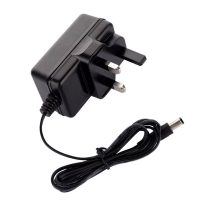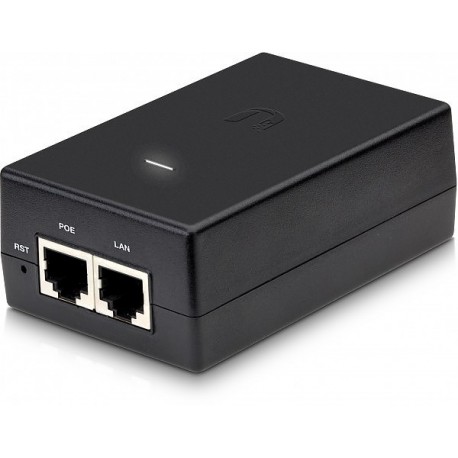
This data sheet outlines the TP-Link Power over Ethernet (PoE) and Power Adaptor solutions specifically curated for SKYRS in Pakistan. These solutions eliminate the need for electrical outlets at device locations, making them ideal for professional networking deployments.
The following table summarizes the primary variants available for deployment in the Pakistani market through SKYRS.
| Model | Type | Standard | Output Power | Data Speed |
| TL-POE150S | Injector | 802.3af | 15.4W | Gigabit (1000 Mbps) |
| TL-POE160S | Injector | 802.3at | 30W | Gigabit (1000 Mbps) |
| TL-POE170S | Injector | 802.3bt | 60W | Gigabit (1000 Mbps) |
| TL-POE4824G | Passive | Proprietary | 48V / 24W | Gigabit (1000 Mbps) |
| TL-POE2412G | Passive | Proprietary | 24V / 12W | Gigabit (1000 Mbps) |
| TL-POE10R | Splitter | 802.3af | 12V / 9V / 5V | Gigabit (1000 Mbps) |
The deployment of these adaptors at SKYRS sites follows a standardized Plug-and-Play methodology to ensure high uptime and reliability.
Ensure Category 5e (Cat5e) or Category 6 (Cat6) cabling is used for optimal performance.
Verify the power requirements (Voltage/Wattage) of the PD (Powered Device), such as an IP Camera or Access Point, against the injector’s output.
Step A: Connect the TP-Link PoE Injector to a standard AC power outlet using the provided power cord.
Step B: Connect an Ethernet cable from your non-PoE network switch or router to the “LAN” (Data In) port of the injector.
Step C: Connect a second Ethernet cable from the “PoE” (Power + Data Out) port of the injector to the remote device (AP, Camera, or VoIP phone).
For clean rack or wall installations, use the built-in wall-mount slots on the underside of the adaptor.
Always install the adaptor with ports facing downward or sideways to prevent dust accumulation.
TP-Link PoE adaptors are unmanaged hardware components, meaning they do not require software configuration or IP addressing.
Auto-Sensing Technology: The TL-POE150S/160S/170S variants automatically detect if the connected device is PoE-compatible. If a non-PoE device is connected, the injector will only transmit data to prevent electrical damage.
Voltage Selection (Splitter Only): If using the TL-POE10R Splitter, ensure the physical toggle switch is set to the correct voltage ($5\text{V}$, $9\text{V}$, or $12\text{V}$) before connecting it to your non-PoE device.
SKYRS is the designated provider for these TP-Link variants within Pakistan, offering:
Localized Warranty: Full 1-year or 2-year (model dependent) replacement warranty.
Bulk Deployment Support: Specialized pricing for large-scale surveillance and office networking projects.
Technical Compliance: All units are tested for Pakistan’s specific voltage stability (220V/50Hz) to ensure longevity against local power fluctuations.
Does your current project require high-power PoE++ (60W) for PTZ cameras, or are you looking for standard 15W solutions for office Access Points?
Skyrs provides the best adaptor solutions for modern networking needs across Pakistan. We offer the premier Poe (power over ethernet) / adaptor for tplink Power adaptor for diverse business environments. This Poe (power over ethernet) / adaptor ensures seamless power and data transmission for your critical devices.
Skyrs is the leading adaptor series distributor Pakistan offering high-quality hardware for every sector. You can find the best Poe (power over ethernet) / adaptor price in Karachi and Lahore at our outlets. We maintain a huge stock of branded used Poe (power over ethernet) / adaptor units for budget-conscious buyers. Our refurbished Poe (power over ethernet) / adaptor inventory undergoes rigorous testing to ensure enterprise-grade reliability.
We are the exclusive vendor providing the specific adaptor for call center power in Pakistan for 24/7 operations. Our specialized adaptor for zoom ringcentral ensures crystal clear communication for remote teams and global software houses. Whether you need a Poe (power over ethernet) / adaptor price in Peshawar or Quetta, Skyrs delivers excellence. We also provide competitive Poe (power over ethernet) / adaptor price in Faisalabad and the KPK region.
The Poe (power over ethernet) / adaptor for tplink Power adaptor supports high-speed data transfer without power loss. Check the Poe (power over ethernet) / adaptor for tplink Power adaptor datasheet for detailed electrical parameters.
Poe (power over ethernet) / adaptor for tplink Power adaptor throughput limit: Up to 1000Mbps.
Poe power budget: Optimized for high-density PD devices.
Design: Optional Poe (power over ethernet) / adaptor for tplink Power adaptor rack mount kit available.
| Feature | TP-Link PoE Injector | Competitor (Generic) |
| Build Quality | Industrial Grade | Standard Plastic |
| Stability | High Voltage Protection | Basic Protection |
| Warranty | Official Skyrs Warranty | No Warranty |
| Support | adaptor configuration guide | Limited Support |
Users can easily follow our Poe (power over ethernet) / adaptor for tplink Power adaptor configuration guide for setup. If you encounter issues, learn how to reset adaptor units through our online technical knowledge base. For enhanced security, we assist with Poe (power over ethernet) / adaptor security license activation. Always keep your hardware efficient with the latest firmware update download from official channels.
Skyrs offers the most competitive Poe (power over ethernet) / adaptor used price 2026 in the local market. For new deployments, request a Poe (power over ethernet) / adaptor for tplink Power adaptor bulk quote directly. We provide the latest box pack price for all new TP-Link and Mikrotik variants.
Internal Link: View Inventory at Skyrs.com.pk
External Link: TP-Link Official Product Page
Q: Where can I Buy adaptor Lahore/Islamabad?
A: You can purchase directly from Skyrs branches or order online via our website for nationwide delivery.
Q: Does the Poe (power over ethernet) / adaptor for tplink Power adaptor support memory upgrade?
A: Most injectors are fixed-configuration, but check the Poe (power over ethernet) / adaptor memory upgrade logs for specific controller models.
Q: Is this adaptor compatible with brands like Aruba or Huawei?
A: Yes, our routing adaptor solutions work seamlessly with Mikrotik, H3C, Aruba, Ruijie, Huawei, and Palo Alto.
Q: How do I perform a Poe (power over ethernet) / adaptor for tplink Power adaptor update?
A: Access the management interface to upload the latest firmware file for improved stability and security.
Tags: #PoeInjector #TPLinkAdaptor #SkyrsPakistan #CallCenterPower #NetworkingPakistan #PoePrice2026 #LahoreTech #KarachiElectronics