Here is the deployment and technical data sheet for the Hiksemi Future RGB Portable Solid State Drive (PSSD), tailored for SKYRS in Pakistan.
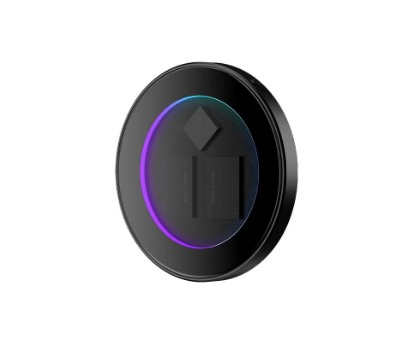
The Hiksemi Future RGB PSSD is a high-performance, ultra-portable NVMe external storage drive engineered for gamers, content creators, and power users. Featuring a unique hollow-glass design with dynamic RGB lighting and a built-in magnetic function, it delivers internal-SSD level speeds in a pocket-sized form factor.
Internal Interface: NVMe PSSD
External Interface: USB 3.2 Gen 2×2 Type-C
Max Read Speed: Up to 2000 MB/s
Max Write Speed: Up to 1800 MB/s
Master Control: Silicon Motion SM2320
Form Factor / Dimensions: 64 mm (Diameter) × 7 mm (Thickness)
Weight: 47.1 g
Operating Temperature: 0°C to +40°C
Warranty: 5-Year Limited Warranty
The Hiksemi Future RGB PSSD is available across Pakistan through SKYRS in three distinct capacity variants to suit different storage demands:
| Variant Capacity | Approx. Game/File Capacity (100GB AAA Titles) | Target Audience | SKYRS SKU Status |
| 512GB | ~5 Triple-A Games / Massive Document & Photo Libraries | Casual gamers, daily office backup, on-the-go students. | Available |
| 1TB | ~10 Triple-A Games / 4K ProRes Video Projects | Core gamers, content creators, and video editors. | Available |
| 2TB | ~18-20 Triple-A Games / Complete System Backups | Professional studio workflows, hardcore game libraries. | Available |
Because the Hiksemi Future RGB PSSD is built as a plug-and-play external storage device, physical deployment is streamlined for both desktop, console, and mobile environments.
Ensure your SKYRS retail or enterprise package contains the following standard items:
Hiksemi Future RGB PSSD Unit
9mm Type-C to Type-C High-Speed Data Cable
Auxiliary Magnetizing Ring (for non-MagSafe compatible smartphones or surfaces)
User Instruction Manual
For Smartphones (iPhone MagSafe / Android): Align the circular PSSD with the back of a MagSafe-compatible phone. The built-in magnetic array will lock it in place. For non-magnetic devices, adhere the included magnetizing ring to the center back of your phone case before attaching the PSSD.
For Desktop/Laptop/Consoles: Place the drive on a flat, well-ventilated surface adjacent to the host device. Avoid stacking components on top of the hollow-glass chassis to preserve optimal heat dissipation.
Using the provided high-speed Type-C cable, connect one end to the Hiksemi PSSD and the other directly to the host device’s fastest available USB port.
Important Note: To achieve the maximum 2000 MB/s transmission speed, the host device must feature a USB 3.2 Gen 2×2 port. Connecting to standard USB 3.0 or USB 3.1 Gen 1 ports will throttle performance to 500 MB/s or 1000 MB/s respectively.
The drive comes pre-formatted and ready for immediate deployment across Windows, macOS, Linux, Android, iOS, and HarmonyOS operating systems.
Depending on your enterprise or gaming deployment framework, you may want to reformat the drive to suit a specific environment:
exFAT (Default Factory Setting): Best for cross-platform workflows. Keeps the drive fully compatible between Windows PCs, Macs, and Android/iOS smartphones without data restrictions.
NTFS: Recommended if deploying exclusively within a Windows Active Directory / Windows Enterprise network for enhanced file permissions.
APFS / Mac OS Extended: Recommended for permanent dedicated Mac deployment or specialized Final Cut Pro video scratch disks.
The dynamic RGB profile initializes automatically as soon as the drive receives bus power from the USB connection. There is no external software required; lighting sequences cycle dynamically to reflect power and data transmission status.
Plug the drive into the rear high-speed USB ports of the console.
Navigate to Settings > Storage > Extended Storage.
Select Format as USB Extended Storage to allow the console to migrate and archive game data seamlessly.
Exclusive Distribution: The entire capacity matrix (512GB, 1TB, 2TB variants) of the Hiksemi Future RGB PSSD is distributed and available exclusively through SKYRS authorized channels in Pakistan.
All units purchased through SKYRS carry official localized distribution tags, verifying eligibility for the comprehensive 5-year official product warranty and direct technical troubleshooting support across Pakistan.
Skyrs presents the ultimate premium data infrastructure solutions for modern enterprise workloads across Pakistan.
Skyrs is the only vendor in pakistan that has HIKSEMI equipment for call center call centre and software houses with different variants of HIKSEMI equipment for zoom ringcentral. Consequently, organizations can easily build reliable communication frameworks.
Therefore, corporate clients can deploy the best HIKSEMI equipment to achieve uninterrupted workflow operations. We serve clients who need used HIKSEMI in different cities like karachi , lahore , islamabad, rawalpindi , Faisalabad , quetta , Peshawar , Multan , Hyderabad, sialkot etc. Furthermore, Skyrs delivers specialized storage equipment for call center call centre office home industry hospital forces etc in pakistan.
Whether you require a Branded used HIKSEMI or a Refurbished HIKSEMI, we maintain extensive local stock. Additionally, every HIKSEMI pack price reflects competitive market value. We provide full support for complex tasks like HIKSEMI Migration.
+---------------------------------------------------------------------------------+
|                                 PRODUCT IMAGE                                   |
|  [Official Technical Source: https://www.hiksemitech.com/en/hiksemi/ ]          |
+---------------------------------------------------------------------------------+
Businesses can easily utilize the HIKSEMIElite Magnet Portable SSD configuration guide to optimize hardware deployment parameters. Meanwhile, network administrators can verify the HIKSEMIElite Magnet Portable SSD throughput limit directly from the official datasheet.
If your enterprise needs a HIKSEMIElite Magnet Portable SSD memory upgrade, our engineers provide complete deployment assistance. Similarly, we offer the custom HIKSEMIElite Magnet Portable SSD rack mount kit for clean server room installations.
Clients can easily request the latest HIKSEMIElite Magnet Portable SSD update to maintain top system security. Furthermore, our team handles every formal HIKSEMIElite Magnet Portable SSD security license activation safely. Because of currency shifts, please contact our sales desk for the actual HIKSEMIElite Magnet Portable SSD used price 2026.
Our professional routing HIKSEMI equipment handles massive concurrent data packets smoothly. Meanwhile, the hardware provides excellent technical functionality by lowering latency for intense data processes.
Therefore, the primary purpose of use centers on securing fast, reliable, and redundant business data storage. Our stock features broad compatibility in comparison with competitor brands like Samsung T7 or SanDisk Extreme.
| Hardware Feature | HIKSEMIElite Magnet Portable SSD all variants | Competitor Portable Drives |
|---|---|---|
| Max Transfer Rate | Up to 2000 MB/s | Up to 1050 MB/s |
| Mobile Attachment | Integrated Magnetic Alignment | External Clips / Adhesive |
| Form Factor Optimization | Lightweight Compact Build | Standard Heavy Chassis |
Skyrs maintains an extensive nationwide supply network across all provinces. Consequently, you can check the HIKSEMI price in Pakistan online daily.
Get the best HIKSEMI equipment series distributor Pakistan deals through our portal.
Request the latest HIKSEMI HIKSEMI Future RGB PSSD price in Karachi for gaming setups.
Check the current HIKSEMIElite Magnet Portable SSD price in peshawar online.
Find updated HIKSEMI HIKSEMIElite Magnet Portable SSD price in faisalabad inventory lists.
Order now to view the HIKSEMI HIKSEMI Future RGB PSSD price in kpk today.
We offer the HIKSEMI Switch HIKSEMIElite Magnet Portable SSD price in quetta directly.
Customers can quickly utilize our shortcut phrase “Buy HIKSEMI equipment Lahore/Islamabad” for immediate priority delivery. Similarly, purchasing managers can request a HIKSEMIElite Magnet Portable SSD bulk quote online.
Our resource center offers the HIKSEMI equipment configuration guide and complete steps for HIKSEMI VLAN configuration. If troubleshooting is necessary, read our guide on How to reset HIKSEMI equipment. Finally, you can access the HIKSEMI firmware update download page along with HIKSEMI HIKSEMIElite Magnet Portable SSD datasheets download links. Don’t forget to calculate the available PoE power budget before connecting multiple active system nodes.
First, visit the HIKSEMI Official Web Portal. Then, enter your precise model number in the support section to download the authentic file.
First, hold down the physical reset button for ten seconds while the device powers up. Consequently, the system clears current configurations and returns to original settings.
First, navigate directly to Skyrs Internal Product Inventory. After that, submit your quantity requirements through the corporate procurement form to receive special pricing.
Tags: #HiksemiPakistan #PortableSSD #DataStorage #SkyrsPakistan #CallCenterHardware #BusinessInfrastructure