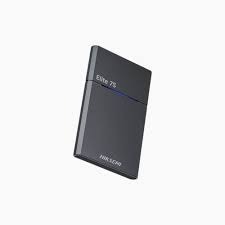
The HIKSEMI ELITE 7S (HS-ESSD-ELITE 7S) is a flagship, heavy-duty external storage solution designed around extreme-performance NVMe technology. Engineered for professional media pipelines, content creators, and enterprise data transfers, it combines an ultra-fast USB 3.2 Gen 2×2 interface with a rugged design that boasts an IPX7 waterproof rating and 1.5-meter drop protection.
| Feature | Details |
|---|---|
| Model Series | ELITE 7S Portable SSD (HS-ESSD-ELITE 7S) |
| Available Variants | 512GB | 1TB | 2TB | 4TB |
| Interface Protocol | USB 3.2 Gen 2×2 Type-C (Backward Compatible) |
| Storage Technology | PCIe NVMe Architecture with 3D NAND Flash |
| Max Read Speed | Up to 2000 MB/s |
| Max Write Speed | Up to 2000 MB/s |
| Rugged Protection | IPX7 Waterproof Rating & 1.5M Drop-Proof Shock Resistance |
| Chassis Material | Premium Textured Aluminum Body (Dark Grey) |
| Physical Dimensions | 83.5 mm × 53.5 mm × 7.9 mm |
| Device Weight | ~66.8 g |
| Platform Ecosystems | Windows, macOS, Linux, Android, iOS |
| Box Accessories | USB Type-C to Type-C Cable, USB Type-C to Type-A Cable |
For production studios, server backup offloads, and rugged field operations in Pakistan, SKYRS executes targeted, turn-key deployment configurations for the HIKSEMI ELITE 7S series.
Hardware Assessment: Unbox the ELITE 7S device. Select either the high-speed Type-C to Type-C or Type-C to Type-A cable based on your system topology.
Interface Pairing: * To hit the maximum throughput threshold of 2000 MB/s, connect the Type-C terminal directly to a native USB 3.2 Gen 2×2 host port.
Threading the drive into standard USB 3.0 or Gen 1 ports will reduce operating speeds down to host interface limitations.
Environmental Verification: Ensure the physical link is solid. Thanks to the IPX7 rating, this unit can be confidently deployed in demanding industrial environments or outdoor recording sets.
The ELITE 7S features plug-and-play engineering across all modern operating systems. Specialized configurations maximize its 2GB/s data pooling capabilities.
Windows Performance Protocol: Connect the drive, right-click This PC, and go to Manage > Device Manager. Under Disk Drives, right-click the HIKSEMI ELITE 7S to open Properties. Navigate to the Policies tab and toggle Better Performance to enable local write-caching.
macOS / iOS Video Recording Setup: The drive is ideal for direct Apple ProRes recording. For cross-compatibility with Windows without software degradation, access Disk Utility on macOS and format the layout partition table to exFAT with an allocated 1024K cluster index.
Linux Enterprise Data Staging: For local server block syncing or database migrations, mount the volume via the terminal using optimized file allocation trees like EXT4 or XFS depending on corporate backup standards.
Exclusive Provisioning Notice: > Complete structural deployment, certified enterprise installation, on-site environment integration, and specialized technical configuration for all variants of the HIKSEMI ELITE 7S Portable SSD are available exclusively through SKYRS across Pakistan.
SKYRS certifies supply-line authenticity, provisions multi-year localized warranty management, and offers bespoke hardware optimizations for specialized professional data tiers nationwide.
Skyrs stands as the exclusive premium provider in Pakistan delivering advanced enterprise storage solutions to tech-driven environments. Consequently, we address critical data demands for modern software houses and busy communication centers.
Skyrs proudly operates as the ultimate HIKSEMI Elite 7S Portable SSD equipment series distributor Pakistan trusts for high-density infrastructure. Therefore, we supply elite storage across Karachi, Lahore, Islamabad, Rawalpindi, Faisalabad, Quetta, Peshawar, Multan, Hyderabad, and Sialkot. If you need to Buy HIKSEMI Elite 7S Portable SSD equipment Lahore/Islamabad solutions, our stock offers unmatched reliability.
Furthermore, Skyrs serves as the premier HIKSEMI Elite 7S Portable SSD all variants and hard disk ssd ram and other gadgets supplier. This inventory fulfills the needs of call center call centre office home industry hospital forces environments across Pakistan. Thus, we ensure every organization acquires stable hardware configurations.
(Image Source: Official Manufacturer Gallery)
This premium hardware utilizes NVMe technology to deliver ultra-fast data transmission speeds up to 2000MB/s. Furthermore, it supports high-density storage workflows for systems like Zoom and RingCentral. Therefore, operations remain continuous without experiencing lag.
Organizations can securely integrate these drives into enterprise setups. If you require deployment details, please view the HIKSEMI equipment configuration guide. Additionally, network administrators can download resources directly via the HIKSEMI datasheets download portal.
We offer comprehensive B2B options. Please request a bulk quote to receive special fleet pricing.
| Region / Product Segment | Available Solutions & Inclusions | Local Procurement Links |
| National Pricing Overview | Branded used HIKSEMI & Refurbished HIKSEMI | Check HIKSEMI price in Pakistan |
| Sindh Province | High-speed external NVMe storage drives | View HIKSEMI HIKSEMI Elite 7S Portable SSD price in Karachi |
| Punjab Region | Storage units & HIKSEMI pack price options | Explore HIKSEMI Elite 7S Portable SSD price in faisalabad |
| Khyber Pakhtunkhwa (KPK) | Enterprise hardware deployment kits | Check HIKSEMI Elite 7S Portable SSD price in peshawar |
| KPK Regional Access | Solid state drives & server upgrades | Review HIKSEMI HIKSEMI Elite 7S Portable SSD price in kpk |
| Balochistan Province | Commercial network storage solutions | Find HIKSEMI Switch HIKSEMI Elite 7S Portable SSD price in quetta |
Speed Efficiency: The Elite 7S variant utilizes advanced NVMe architecture. Conversely, standard alternative models rely on traditional SATA frameworks.
Data Throughput: It achieves high transmission rates. However, typical portable hard drives often face a strict throughput limit under load.
Physical Protection: This variant features a robust metallic body. On the other hand, generic plastic enclosures fail to protect components during drops.
System Integration: It supports rapid HIKSEMI Migration protocols. Meanwhile, competing standard external drives require third-party cloning tools.
Maintaining optimal hardware health requires regular software updates. Consequently, administrators must acquire the HIKSEMI firmware update download package to protect data. If system changes occur, users can find documentation on how to reset HIKSEMI equipment securely.
Furthermore, large installations can utilize the rack mount kit for organized server placement. Memory expansions are also straightforward via the memory upgrade module. Lastly, security protocols remain active through the security license activation pipeline. For cost-effective scaling, review the competitive used price 2026 indexes.
Technical Notice: For optimized infrastructure setup, verify your HIKSEMI VLAN configuration and evaluate your HIKSEMI Elite 7S Portable SSD PoE power budget limits. Please access full technical schematics via the Official HIKSEMI Global Support Portal.
You must review the HIKSEMI equipment configuration guide to set proper partitions. Additionally, ensure correct system alignment for software environments like Zoom and RingCentral.
You can access files directly via the HIKSEMI firmware update download link on the manufacturer platform. Alternatively, view the HIKSEMI datasheets download archive for structural details.
Yes, Skyrs is the only vendor in Pakistan that has HIKSEMI equipment for call center call centre operations. We supply reliable products across Karachi, Lahore, Islamabad, and other major cities.
First, backup all existing data safely. After that, follow the steps in the guide explaining how to reset HIKSEMI equipment to restore factory defaults.
Certain premium enterprise encryption features require specific validation steps. Therefore, you must trigger the HIKSEMI Elite 7S Portable SSD security license activation through authorized corporate portals.
Top Search Tags: #BestHIKSEMIEquipment #HIKSEMIPriceInPakistan #HIKSEMIElite7S #UsedHIKSEMIKarachi #BuyHIKSEMILahore #HIKSEMIDistributorPakistan #SkyrsPakistan