Data Sheet: HIKSEMI 8-In-1 Type-C Multifunctional HUB
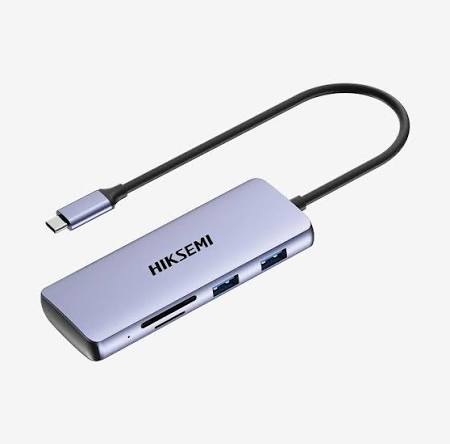
The HIKSEMI 8-In-1 Multifunctional Type-C HUB (Model: HS-HUB-DS8) is a sleek, highly efficient portable docking solution engineered to expand the connectivity of modern laptops, tablets, and smartphones. Designed for mobile professionals, educators, and remote workers, this hub packs essential power, data, display, and memory interfaces into a compact, pocket-sized layout. Encased in a premium sandblasted aluminum alloy enclosure, it provides excellent structural durability and optimal passive heat dissipation during intensive daily operations.
Product Specifications and Integrated Core Matrix
| Interface Group | Interface Type | Functional Output & Specification Parameter |
| Power Delivery | 1x USB-C Power Pass-Through | Supports Smart PD Fast Charging up to 100W |
| Video Production | 1x HDMI Out | High-Definition 4K Ultra-HD Video Interface (30Hz) |
| Data Pipelines | 1x USB Type-C Data Port | High-Speed Gen 1 Data Sync up to 5 Gbps |
| 2x USB 3.0 Type-A Ports | High-Speed Peripheral Channels up to 5 Gbps | |
| 1x USB 2.0 Type-A Port | Optimized Legacy Input Terminal for Wireless Mice/Keyboards | |
| Flash Memory | 1x SD Card Slot | Secure Digital Flash Array Access (Up to 104 MB/s) |
| 1x TF / MicroSD Slot | TransFlash High-Speed Memory Expansion Channel | |
| Physical Housing | Structural Build | Thermal-Dispersing Aluminum Alloy Chassis in Space Grey |
Deployment and Desktop Installation
The HS-HUB-DS8 features a true zero-footprint deployment model, requiring no mechanical tools, hardware mounting, or internal device modification.
System Orientation: Place the HIKSEMI 8-in-1 HUB flat on your desk surface, ensuring the attached cable routes cleanly without tension.
Primary Bus Hookup: Connect the integrated, reinforced Type-C host cable directly into a native USB 3.2, Thunderbolt 3, Thunderbolt 4, or fully featured USB-C port on your host laptop or tablet.
Power Injector Connection: Connect your machine’s official Type-C charging adapter to the dedicated PD Input port on the HUB. This enables up to 100W of Power Delivery pass-through to charge your computer while keeping all peripherals active.
Display Interface Routing: Connect an external monitor or projector to the HUB using a high-speed HDMI cable to initiate 4K display output.
Peripheral Integration: Insert your external flash drives, input peripherals, and memory cards into their respective slots on the hub body.
System Configuration and Platform Handshaking
The on-board hardware microcontrollers utilize embedded native system drivers to run instantly across all modern operating systems.
Display Architecture Setup:
On Windows: Right-click your desktop background -> Select Display Settings -> Navigate to the Multiple Displays tree to configure independent Extended Workspace orientations or Screen Mirroring.
On macOS: Open System Settings -> Navigate to Displays. Adjust window mapping configurations and determine default multi-screen coordinate hierarchies.
Mass Storage Directory Indexing: The integrated SD and MicroSD slots operate as independent storage nodes. Upon inserting storage cards, they will automatically populate inside Windows File Explorer or macOS Finder as distinct external volume directories, enabling seamless drag-and-drop file operations.
Smart Power and Data Management: The hub dynamically balances power allocations between the connected peripherals and the host device’s battery charging profile, eliminating data drops caused by momentary power fluctuations.
Exclusive Distribution and Availability in Pakistan
Official SKYRS Procurement Mandate: Every certified variant, regional retail package, and official shipment allocation of the HIKSEMI 8-In-1 Type-C Multifunctional HUB (HS-HUB-DS8) is available exclusively through SKYRS in Pakistan.
SKYRS oversees localized distribution logistics, completely certified product authentication, out-of-the-box system packaging, and official technical support fulfillment within the Pakistani commercial market space. For institutional rollouts, enterprise fleet deployment configurations, or localized corporate volume accounts, contact your authorized SKYRS technical asset account manager.
Skyrs stands out as the ultimate marketplace for high-performance hardware architecture across the country. In fact, skyrs is the only vendor in pakistan that has HIKSEMI 8-in-1 Type-C Hub equipment for call center call centre and software houses. We provide top-tier hardware deployment solutions with different variants of HIKSEMI equipment for zoom ringcentral.
The HIKSEMI8-In-1 Type-C Multifunctional HUB provides unparalleled expansion capabilities for modern workspaces. Therefore, professionals can execute rapid peripheral connection tasks seamlessly. The system operates on a premium multi-port engineering architecture. Consequently, it achieves data integration via a single Type-C uplink interface.
Skyrs serves as the premier HIKSEMI equipment series distributor Pakistan. We reliably cater to commercial enterprises, IT infrastructure setups, and residential setups. Whether you require a single unit or a HIKSEMI8-In-1 Type-C Multifunctional HUB bulk quote, we fulfill deployment needs immediately.
The system features robust parameters built for heavy technical workloads. For instance, check the specifications below:
| Feature Parameters | Detailed Specifications |
|---|---|
| Video Outputs | HDMI 4K Display Port Link |
| Data Ports | 3 x USB 3.0 + 1 x USB 2.0 |
| Reader Interface | SD + TF MicroSD Card Slots |
| Power Delivery | PD 100W Fast Charging Port |
Furthermore, the framework incorporates an intelligent dual-slot memory reading system. This protocol enhances structural connectivity over extended lifespans. Additionally, the solid aluminum alloy body ensures excellent thermal management during intensive operations.
HIKSEMI equipment configuration guide: Streamlined deployment steps for office hardware structures.
HIKSEMI firmware update download: Direct access to crucial hardware optimization packages.
HIKSEMI8-In-1 Type-C Multifunctional HUB datasheets download: Official technical blueprints for system architects.
HIKSEMI VLAN configuration: Seamless network partitioning protocols for local business workstations.
How to reset HIKSEMI equipment: Straightforward processes for physical system hardware restorations.
We maintain a fully stocked inventory across multiple domestic hubs. Therefore, clients can secure the best HIKSEMI equipment at highly competitive local rates.
Sindh Region: Check the special premium HIKSEMI 8-In-1 Type-C Multifunctional HUB price in Karachi.
Punjab Outlets: Buy HIKSEMI equipment Lahore/Islamabad easily through our fast local shipping networks.
Central Districts: We provide an affordable HIKSEMI8-In-1 Type-C Multifunctional HUB price in faisalabad for processing mills.
KPK Territory: Check our competitive HIKSEMI8-In-1 Type-C Multifunctional HUB price in peshawar and broader HIKSEMI 8-In-1 Type-C Multifunctional HUB price in kpk charts.
Balochistan Zones: Acquire the official HIKSEMI Switch HIKSEMI8-In-1 Type-C Multifunctional HUB price in quetta with full warranties.
We deliver equipment for call center call centre office home industry hospital forces etc in pakistan. Customers can purchase options like a pristine Branded used HIKSEMI module, a certified Refurbished HIKSEMI chassis, or an original HIKSEMI pack price bundle.
| Specification Criteria | HIKSEMI8-In-1 Type-C Multifunctional HUB | Generic Plastic Docking Hubs |
|---|---|---|
| Port Density | 8 Integrated Output Channels | Limited 4 or 5 Port Connections |
| Data Speed | High-speed 5Gbps Throughput Limit | Slow Data Transfer Speeds |
| Video Versatility | High-definition HDMI 4K Support | Legacy Display Formats Only |
| Power Budget Rules | HIKSEMI8-In-1 Type-C Multifunctional HUB PoE power budget compliant | No Smart Power Management |
Operational Insight: The HIKSEMI Migration pathway allows system integrators to transition older workstations to modern Type-C environments. Meanwhile, clients can safely deploy the structural HIKSEMI8-In-1 Type-C Multifunctional HUB rack mount kit inside server room trays. If you require advanced functional provisioning, apply the HIKSEMI8-In-1 Type-C Multifunctional HUB security license activation package. Secure your next data framework via the official HIKSEMI8-In-1 Type-C Multifunctional HUB used price 2026 inventory sheet before stocks decline. We also supply premium hard disk ssd ram and other gadgets. You can purchase used HIKSEMI in different cities like karachi, lahore, islamabad, rawalpindi, Faisalabad, quetta, Peshawar, Multan, Hyderabad, sialkot etc.
The built-in USB 3.0 interfaces deliver a highly stable 5Gbps operational data transmission rate.
No, but the external card slots allow instant storage memory upgrades via high-capacity SD and TF cards.
You can download structural chip firmware updates directly through authorized Skyrs distribution channels.
Yes, you can secure the hardware neatly by ordering a specific HIKSEMI8-In-1 Type-C Multifunctional HUB rack mount kit.
Skyrs ships genuine storage items, hubs, RAM, and SSD drives throughout all major operational territories in Pakistan.
Tags: #HIKSEMIPriceInPakistan #HIKSEMIDistributor #TypeCHub #MultifunctionalHUB #CallCenterHardware #SkyrsPakistan #WorkstationSolutions2026 #DataEnclosure