DATA SHEET: ANKER USB-C TO HDMI ADAPTER VARIANTS
This datasheet outlines the premium Anker USB-C to HDMI connectivity variants available for specialized enterprise deployment through SKYRS Pakistan. These solutions bridge high-performance computing hardware with modern digital displays, ensuring loss-free video transmission.
PRODUCT VARIANTS
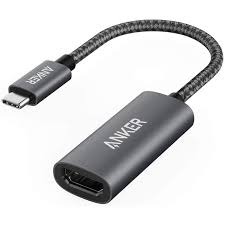
Anker 310 USB-C to HDMI Adapter (Model: A8312 / PowerExpand+)
Form Factor: Portable adapter with a built-in 0.5 ft flexible cable.
Material: Matte, scratch-resistant aluminum exterior.
Performance: Standard high-definition projection for corporate boardrooms.
Anker Nano USB-C to HDMI Cable (Model: A87E0)
Form Factor: All-in-one 3-foot integration cable (eliminates the need for a secondary HDMI cable).
Material: Premium double-braided nylon jacket with nickel-plated aluminum connectors.
Performance: Engineered for dynamic workstation environments; rated for up to 10,000 insertion cycles.
TECHNICAL SPECIFICATIONS
| Feature | Anker 310 Adapter (A8312) | Anker Nano Cable (A87E0) |
| Max Resolution | 4K @ 60Hz (2K @ 60Hz on iPad Pro) | 4K @ 60Hz with HDR Support |
| Input Interface | USB-C (Thunderbolt 3 / 4 / 5 compatible) | USB-C (Thunderbolt 3 / 4 / 5 compatible) |
| Output Interface | HDMI Female Port | HDMI Male Connector |
| Cable Structure | Standard TPE jacket (0.5 ft) | Ultra-durable Braided Nylon (3 ft) |
| Dynamic Range | Standard SDR / Crystal Clear Audio | High Dynamic Range (HDR) Video |
| Shielding | Multi-layer internal shielding | Tinned copper conductor + Dual-layer Al/TPE |
DEPLOYMENT, INSTALLATION, AND CONFIGURATION
Pre-Deployment Requirements
Before setting up the hardware, verify that the host device’s USB-C port natively supports DisplayPort Alternate Mode (DP Alt Mode) or is rated as a Thunderbolt 3, 4, or 5 port. Standard USB-C ports intended solely for data transfer or charging will not output a video signal.
Physical Installation steps
Inspect the host machine (Laptop, MacBook, Tablet, or Smartphone) and locate the designated video-enabled USB-C or Thunderbolt slot.
Insert the USB-C male interface of the Anker hardware securely into the host device.
For the Anker 310 Adapter: Connect a certified High-Speed HDMI cable to the adapter’s female slot, and connect the opposite end to the display unit.
For the Anker Nano Cable: Direct route the 3 ft cable and plug the HDMI male lead directly into the display monitor or projector.
System Configuration
Both variants function via architecture-level Plug-and-Play (PnP) design. No external drivers, proprietary software, or independent power sources are required.
Windows Configuration: Press Windows Key + P to toggle through visual modes: Duplicate (Mirror mode for presentations), Extend (Workspace expansion), or Second Screen Only.
macOS Configuration: Navigate to System Settings -> Displays. Choose to arrange the layout or check the option to mirror the built-in screen. For MacBooks, Clamshell Mode can be engaged by closing the laptop lid while connected to external peripherals and power.
Display Tuning: Access the native menu system (OSD) of the connected monitor or TV to select the matching input source (e.g., HDMI 1 or HDMI 2). Ensure the refresh rate is configured to 60Hz within your OS settings for fluid visual output.
SKYRS PAKISTAN AVAILABILITY ONLY
These specialized Anker variants, tailored for seamless commercial and residential integration, are supplied directly within Pakistan exclusively through SKYRS.
Procured items are accompanied by official verification seals ensuring genuine global-tier product tracking.
Comprehensive technical consultation and enterprise tier batches are coordinated entirely through local SKYRS logistics and deployment teams.
Skyrs stands proudly as the premium vendor in Pakistan providing top-tier routing Anker equipment for call center call centre infrastructures. Moreover, we actively supply cutting-edge digital agencies and software houses with different variants of Anker equipment for zoom ringcentral. High-performance communication hubs require durable video components to minimize display lag. Therefore, our inventory features the highly sought-after Anker Anker USB-C to HDMI Adapter all variants.
Furthermore, IT professionals can review technical specifications directly via the official Anker Datasheets Download Portal. Local buyers can also browse inventory updates via our internal product link at skyrs.com.pk.
Managing workspace displays requires solid hardware configurations to prevent costly meeting drops.
System Deployment: Engineers can follow our comprehensive Anker equipment configuration guide to set up local office grids.
Video Segmentation: Administrators easily isolate media streams using an advanced Anker USB-C to HDMI Adapter configuration guide.
System Maintenance: If hardware conflicts occur, administrators can easily resolve them by learning how to reset Anker equipment safely.
Firmware Compliance: Security teams must maintain the latest updates by utilizing the verified Anker firmware update download files.
Memory Management: Heavy enterprise displays run seamlessly after implementing an official Anker Anker USB-C to HDMI Adapter memory upgrade.
Physical Setup: Server displays are easily organized by utilizing the specialized Anker Anker USB-C to HDMI Adapter rack mount kit.
Throughput Metrics: Display blueprints remain efficient because the hardware respects the strict Anker Anker USB-C to HDMI Adapter throughput limit.
Power Optimization: Large operations safely monitor power distribution using the specified Anker PoE power budget limits.
Feature Licensing: Enterprise protection layers are unlocked instantly following the successful Anker security license activation.
Consequently, these robust workflows allow smooth system updates using the Anker Anker USB-C to HDMI Adapter update protocols.
| Feature / Specifications | Anker USB-C to HDMI Adapter All Variants | Competitor Brands (Mikrotik, H3C, Aruba, Ruijie, Huawei, Paloalto) |
| Primary Deployment Focus | High-density 4K/60Hz video streaming & ultra-durable workspace display bridging | Core routing, hardware switching, enterprise firewalls & wireless matrices |
| Physical Outer Construction | Premium aluminum shell with reinforced connector joints | Heavy industrial metal casing or standard hardened PVC chassis |
| Interconnect Lifespan | Industry-leading design built to survive extensive daily plugging cycles | Fixed communication ports engineered for static long-term rack deployment |
| Signal Attenuation | Zero signal degradation due to ultra-short physical length profiles | Variable signal degradation depending on shielding over long cables |
We serve enterprise networks across all major economic territories in Pakistan. You can easily buy Branded used Anker or Refurbished Anker units at the best Anker pack price. Furthermore, clients can securely source used Anker in different cities like karachi , lahore , islamabad, rawalpindi , faisalabad etc today. Our regional pricing structure ensures optimal affordability for equipment for call center call centre in pakistan:
Anker price in Pakistan: Optimized countrywide rates for growing businesses.
Anker equipment series distributor Pakistan: Skyrs ensures authentic supply pipelines during an Anker Migration.
Anker price in Karachi: Competitive corporate rates for coastal businesses.
Buy equipment Lahore/Islamabad: Instant deployment packages for premium software houses.
Anker price in peshawar: Solid distribution networks for northern enterprises.
Anker price in faisalabad: Industrial-grade connectivity tools for manufacturing hubs.
Anker price in kpk: Affordable tech updates for regional public offices.
Anker Switch Anker price in quetta: Secure supply routes for western infrastructure projects.
Organizations can contact our sales desk directly to request an official Anker bulk quote.
Engineers can securely access comprehensive performance metrics through the official Anker datasheets download hub.
Clients can check the Anker used price 2026 guide for accurate market values.
Yes, you can manage advanced media paths using a custom Anker VLAN configuration protocol.