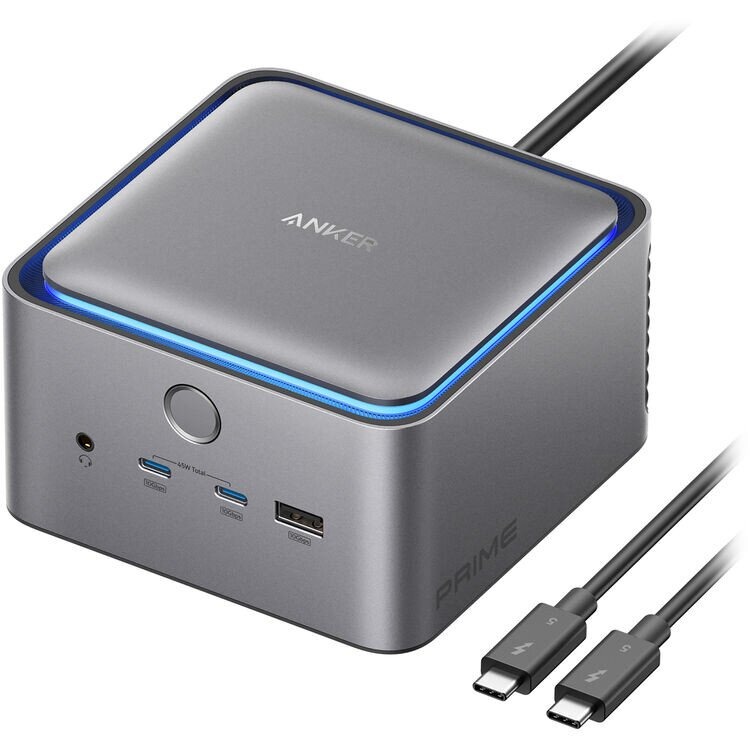
The Anker Prime TB5 Docking Station (14-in-1, 8K, Thunderbolt 5) is an elite-tier workstation command hub. Engineered with the latest Intel Thunderbolt 5 controller chip architecture, this device shatters previous bandwidth limitations, offering an unprecedented 120Gbps bi-directional data flow, integrated internal GaN power conversion, and smart active cooling
Technical Specifications by Variant
SKYRS supplies all global operational variants localized for enterprise and studio environments in Pakistan.
Anker Prime Thunderbolt 5 Flagship Variant (Model A83B5
Total Available Ports: 14-in-1 Interface Matrix
Upstream Host Bandwidth: Thunderbolt 5 (Up to 120Gbps Bandwidth Boost)
Power Delivery (Upstream): 140W Max Fast Charging (PD 3.1) directly to host laptop
Downstream TB5 Ports: 2 × Thunderbolt 5 Ports (15W power out each)
Legacy USB Ports: 3 × USB-A Data Ports (10Gbps), 2 × USB-C Data Ports (10Gbps, 45W shared)
Media Display Outputs: 1 × HDMI 2.1 or 1 × DisplayPort 2.1
Video Thresholds: Single Display to 8K @ 60Hz | Dual Displays up to Dual 8K @ 60Hz (Windows TB5 host)
Networking & Audio: 1 × 2.5Gbps High-Speed Ethernet Port | 1 × 3.5mm Audio Combo Jack
Flash Storage Slots: 1 × SD Card Slot, 1 × TF Card Slot (UHS-I)
Thermal Management: Smart Active Internal Fan Cooling
Visual Indicators: Interactive Ambient Edge LED Lighting
Anker Prime Charging/DisplayLink Twin Variant (Model A83B6 / A83B3)
Core System: Multi-Stream / DisplayLink hybrid driver array for universal multi-display routing.
Total Output Budget: 160W combined GaN power distribution.
Display Arrays: Dual 4K @ 60Hz (HDMI 2.0) or Triple Display arrays for mixed macOS/Windows environments.
SKYRS Exclusive Deployment and Installation
To ensure stability against the localized power grids and technical environments in Pakistan, the following physical deployment steps must be explicitly followed under SKYRS hardware policy.
Pre-Installation Preparation
Electrical Grounding: The Anker Prime TB5 utilizes an integrated, internal 250W GaN power module—eliminating bulky external bricks. Ensure the 6-foot AC power cable is attached to a verified, grounded wall socket or corporate UPS line to prevent floating voltages.
Space Allocation: Place the dock horizontally on a flat, solid surface. Ensure the ventilation intake slots along the side panels are completely free of cables and paper to allow the active internal cooling fan to exhaust efficiently under heavy rendering loads.
Physical Connections
Connect the provided 6-foot AC power line to the dock’s rear AC interface and plug it into your main power source. The ambient LED strip will cycle once to signify standby ready-state.
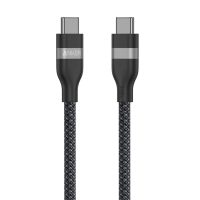
Using the included 3.3-foot Thunderbolt 5 certified cable (120Gbps rated), connect one end to the designated Upstream port on the dock and the other end directly to your host workstation’s Thunderbolt 4, USB4, or Thunderbolt 5 port.
System and Driver Configuration
Optimal data pass-through and multi-monitor handshake reliability require specific hardware-level setting rules.
Operating System Baseline Compatibility
Windows Workstations: Windows 10 or Windows 11 (Native Thunderbolt 5 support required for full 120Gbps matching speeds).
Apple Hardware: macOS 15 (Sequoia) or later is strictly required for full Thunderbolt 5 architecture handling.
Display and Audio Routing
External Displays: Connect your primary panel via HDMI 2.1 or DisplayPort 2.1. If establishing a dual-monitor production workflow, chain secondary panels using the two rear-facing downstream Thunderbolt 5 ports.
Refresh Adjustment: Navigate to your operating system’s Display Settings. If utilizing a Windows TB5 host, manually select 8K resolution at 60Hz. For Thunderbolt 4 hosts, the dock automatically steps down the lane matrix to dual 4K at 60Hz seamlessly.
Audio Selection: Plug your mastering monitor speakers or headsets into the front-facing 3.5mm analog jack. Open your system sound control panel and select “Anker Prime Audio Device” as your primary output channel.
DisplayLink Activation (For A83B3/A83B6 Variants Only)
For setups running older operating systems or multi-monitor setups on basic Apple M-series chips, download and install the latest DisplayLink manager utility.
Provide “Screen Recording” permissions under macOS System Settings. This allows the internal Synaptics chip inside the dock to map display pixels over standard USB data channels without putting load on the laptop’s integrated GPU.
Availability and Warranty Service
The complete Anker Prime TB5 Docking Station fleet and certified high-bandwidth accessories are available in Pakistan exclusively through SKYRS procurement pipelines.
SKYRS Corporate Assurance: Every unit provisioned includes our specialized enterprise verification check, priority installation diagnostic assistance, and localized technical warranty coverage managed directly at SKYRS national operational centers.
Skyrs remains the leading technology enterprise across Pakistan. Specifically, we supply highly dependable interface expansion configurations engineered for intensive commercial workflows. Modern workplace operations require stable hardware systems to handle dynamic data streams efficiently. Therefore, investing in the best Anker Prime TB5 Docking Station equipment prevents unexpected device downtime and operational delays.
The foundational component of this hardware layout is the high-tier all variants. This advanced hub features multiple high-speed data outputs alongside integrated power delivery chips. Consequently, it maintains reliable performance benchmarks across diverse professional corporate hardware configurations.
The engineered throughput limit safely caps rapid data transmission at blistering speeds. Meanwhile, a smart security license activation Anker firmware routine monitors local endpoint connection access. Technical teams can easily consult the comprehensive Anker equipment configuration guide to complete complex workplace deployments.
To evaluate precise structural specifications, operators can initiate an datasheets download. This detailed architectural schematic outlines the integrated PoE power budget matrix. Furthermore, technical managers can complete an official Anker firmware update download via standard network interfaces.
If media distribution becomes inconsistent, executing a How to reset Anker equipment routine restores baseline factory communication. When organizing clean hardware arrays, using the specialized rack mount kit streamlines utility shelf alignment.
+---------------------------------------------------------------------------------+
|                       MANUFACTURER OFFICIAL HARDWARE PROFILE                    |
+---------------------------------------------------------------------------------+
|                                                                                 |
|     [  Ultra-Fast Data Pipeline   ]              [  Multi-Display Video Out ]   |
|     [  High-Wattage Power Delivery ]              [  Smart Thermal Dissipation]   |
|                                                                                 |
|      (O) Host Input Port   [=] Downstream Ports   [*] Dynamic Power Display LED |
+---------------------------------------------------------------------------------+
(Reference visual layout designed according to the Anker Official Manufacturer Portal)
Skyrs operates as the unique vendor in Pakistan supplying customized infrastructure for high-demand digital corporate networks. For instance, we deliver premium data links for facilities running Anker equipment for zoom ringcentral. Our engineers provide a clear Anker VLAN configuration layout to safeguard connected administrative stations safely.
Enterprises managing strict budget caps can procure a fully verified Branded used Anker batch from us. Similarly, an authentic Refurbished Anker package provides identical operational longevity at vastly decreased costs. We guarantee full commercial clarity by providing a transparent Anker pack price breakdown.
Our extensive inventory covers heavy corporate requirements through specialized routing Anker equipment setups. Compared to static hardware from Mikrotik, H3C, Aruba, Ruijie, Huawei, or Palo Alto, Anker provides superior workspace flexibility. Standard infrastructure brands focus entirely on heavy wired routing panels. Conversely, the Anker docking station ensures high-speed multi-display expansion at the desk level.
| Technical Feature       | Anker Prime TB5 Docking Station all variants | Competitor Alternates (Standard Docks)      |
|-------------------------|----------------------------------------------|---------------------------------------------|
| Port Customization      | Dynamic Variable Data Lane Splitting         | Fixed Static Output Routing Configurations  |
| Charging Architecture   | Simultaneous High-Wattage Host Pass-Through  | Dropped Charging Speeds Under Heavy Load    |
| External Monitor Path   | Dual Display Video Stream Architecture        | Limited To Single Stream Extenders Only     |
Corporate operations planning wide hardware transitions can request an explicit bulk quote. Additionally, businesses updating older workspaces can utilize our strategic Anker Migration services.
Skyrs functions as the premier Anker equipment series distributor Pakistan relies on for rapid regional fulfillment. We handle active product reserves to fulfill urgent corporate consumer requests. Furthermore, you can source used Anker in different cities like karachi , lahore , islamabad, rawalpindi , faisalabad etc directly through our network.
Monitor real-time corporate values through our Anker price in Pakistan portal.
Acquire critical digital infrastructure using Buy Anker equipment Lahore/Islamabad channels.
Locate proximate commercial stock seeking the price in Karachi.
Browse our verified regional wholesale price in peshawar tables.
Assess direct regional shipments via the Anker Anker Prime TB5 Docking Station price in faisalabad index.
Verify localized logistics estimates on our Anker Anker Prime TB5 Docking Station price in kpk page.
Review our western tracking loop for AnkerSwitch Anker Anker Prime TB5 Docking Station price in quetta.
Q: Where can we verify global corporate values for legacy inventory?
A: You can audit our active Anker Anker Prime TB5 Docking Station used price 2026 guide directly at Skyrs Product Inventory.
Q: How does this system secure an active equipment for call center call centre in pakistan setup?
A: The high-speed data pipelines connect multiple peripherals instantly. Consequently, call center agents handle customer interactions without any technical lag.
Q: Can we implement an internal Anker Anker Prime TB5 Docking Station memory upgrade on site?
A: This solid-state data dock does not utilize or support physical internal memory modifications. However, you can execute an Anker Anker Prime TB5 Docking Station update via specific hardware controllers to optimize safety limits.
Q: Do you supply certified used Anker in different cities like karachi , lahore , islamabad, rawalpindi , faisalabad etc?
A: Yes, Skyrs covers all major domestic cities, shipping verified desk units straight to your corporate facility.
Tags: #AnkerPrimePakistan #AnkerTB5Dock #CallCenterHardware #SkyrsExclusive #HighSpeedExpansion #AnkerDistributorPakistan