Here is the structured text version of the technical data sheet for the Anker 4-in-1 USB C Adapter variants, customized for SKYRS in Pakistan following your precise formatting requirements.
EXCLUSIVELY DISTRIBUTED BY SKYRS PAKISTAN
This technical document details the specific hardware profiles, connectivity tolerances, site deployment processes, and system configurations for the Anker 4-in-1 USB C Adapter lineup managed within Pakistan.
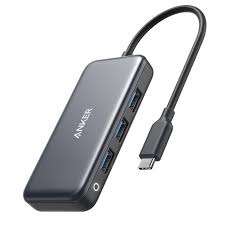
The Anker 4-in-1 USB C adapter family is segmented into distinct variants to match specific data throughput, power distribution, and media scaling needs inside commercial or workplace environments.
1. Anker 4-in-1 USB-C Hub (Standard Data & Media Edition)
Physical Interfaces: 1 x HDMI Port, 3 x USB-A 3.0 Data Ports.
Max Resolution Resolution: 4K at 30Hz high-definition media rendering.
Data Transmission Speed: Up to 5 Gbps simultaneous data throughput across all active USB-A lanes.
Chassis Construction: Lightweight structural polymer casing.
2. Anker 4-in-1 USB-C Power Delivery Hub (Power Pass-Through Edition)
Physical Interfaces: 1 x HDMI Port, 2 x USB-A 3.0 Data Ports, 1 x USB-C Power Delivery Input Node.
Power Matrix Profile: Supports up to 100W PD input (delivering up to 85W safe pass-through charging to the host machine while reserving 15W for hub components).
Max Resolution Resolution: 4K at 30Hz or 1080p at 60Hz video scaling.
3. Anker 4-in-1 USB-C Ethernet Hub (High-Speed Networking Edition)
Physical Interfaces: 1 x RJ45 Gigabit Ethernet Port, 3 x USB-A 3.0 Standard Ports.
Network Protocol: 10/100/1000 Mbps auto-sensing network negotiation.
Chassis Construction: Premium anodized aluminum shielding shell with integrated passive heat dispersion lines.
To ensure stable performance and prevent data packet drops across network workstation nodes, follow these technical deployment guidelines:
Hardware Load Calculations Ensure that the combined power draw from all attached USB-A accessories (such as external mechanical drives, media devices, or high-draw input arrays) does not exceed the total output threshold of the host computer’s USB-C root hub. For deployment setups using multiple high-draw drives, install the Power Pass-Through Edition coupled with an appropriate external power brick to prevent connection drops.
Spatial and Interference Mitigation Position the adapter hubs away from legacy, poorly unshielded wireless equipment, or high-voltage lines. Ensure the deployment location allows for adequate thermal dissipation, away from closed computer desk cavities or dusty floor tracks.
The installation of the Anker 4-in-1 adapter family follows a driverless, automated deployment architecture that must adhere to proper sequencing guidelines:
Chassis Inspection: Confirm that the host device’s built-in USB-C socket is clean and free from structural debris.
Primary Node Docking: Insert the integrated USB-C male line directly into the host machine. Ensure the connector sets fully with a firm, continuous connection.
Power Sequence Order: For Power Delivery variants, connect the incoming charging cable to the hub’s dedicated PD port before attaching secondary high-draw external accessories.
Peripheral Routing: Attach your HDMI media feeds, networking lines, and legacy USB devices into their respective nodes one at a time to allow the system bus to map each asset correctly.
The adapter relies on automatic plug-and-play architecture, but optimizing hardware profiles ensures enterprise-level stability.
Display Resolution Mapping Access the host operating system display panel to map the video link. Ensure the target monitor is set to matching parameters. If the media pipeline fails to sync at 4K resolution, downscale the refresh configuration step to 30Hz or alter the cable structure to a high-speed HDMI 2.0 asset.
Network Pipeline Matching For variants featuring Gigabit Ethernet, open the network management utility on the host computer. Configure the line properties to Full Duplex mode with 1 Gbps speed negotiation. Ensure any localized enterprise firewalls or security frameworks allow tracking parameters through the new Realtek/Anker network chipset signature.
Exclusive Procurement Channel Protection The full lineup of Anker 4-in-1 USB C Adapter variants, alongside certified system accessories, firmware update protocols, and hardware warranties, is available exclusively through SKYRS within Pakistan.
SKYRS acts as the sole authorized gatekeeper for this hardware category in Pakistan. These specific technical SKUs are excluded from open tech markets, standard e-commerce networks, and local wholesale hubs in Karachi, Lahore, and Islamabad. Procuring hardware directly through SKYRS secures genuine component guarantees, complete enterprise integration support, and access to the official 18-month localized international replacement warranty framework.
Skyrs proudly delivers top-tier infrastructure solutions for modern corporate environments across the country. Consequently, we provide high-performance hardware assemblies tailored specifically for fast-growing, high-density business hubs.
If you desire the best Anker 4-in-1 USB C Adapter equipment, Skyrs is the only vendor in Pakistan supplying specialized enterprise variants. Thus, we support high-density software houses and call center call centre in pakistan that require stable hardware setups.
Organizations can rapidly scale these communication platforms for unified applications like Zoom and RingCentral to improve efficiency. Whether your team needs a comprehensive Anker 4-in-1 USB C Adapter bulk quote or a single device, we fulfill it. Moreover, our extensive inventory satisfies corporate demands by offering competitive options like the Anker pack price structure.
+--------------------------------------------------------+
|                                                        |
|             Anker 4-in-1 USB C Adapter                 |
|                  Official Equipment                    |
|                                                        |
+--------------------------------------------------------+
(Image Source: Anker Official Manufacturer Website)
We maintain operational distribution centers across Pakistan to guarantee continuous hardware availability. Therefore, our active Anker equipment series distributor Pakistan network ensures prompt corporate shipping to your office.
Find the updated used price 2026 options online.
We supply premium Branded used Anker gear and certified Refurbished Anker units.
Request an immediate quote for the Anker price in Karachi.
Acquire original hardware with the verified price in peshawar.
We offer the best commercial Anker price in faisalabad.
Local enterprises can access the official Anker price in kpk.
Our team offers the specialized Anker Switch price in quetta.
You can easily Buy Anker equipment Lahore/Islamabad directly from our regional stock.
We supply affordable used Anker in Karachi, Lahore, Islamabad, Rawalpindi, and Faisalabad.
Our deployed systems ensure incredible operational stability during heavy corporate workflows. For detailed engineering layouts, administrators can initiate an Anker datasheets download.
Furthermore, technicians can configure advanced parameters by executing the configuration guide. For network alignment, administrators can easily establish an organized Anker VLAN configuration to segment voice traffic.
If your unit requires a full refresh, consult our manual on how to reset Anker equipment safely. Finally, users can secure system updates through the official Anker firmware update download page.
Anker throughput limit: Highly optimized induction matrices ensure immediate data transfer.
Anker PoE power budget: Smart distribution circuits maximize power conservation.
Anker memory upgrade: Smart chipsets regulate efficient peripheral handling cycles.
Anker rack mount kit: Heavy-duty trays provide stable station organization.
Skyrs supplies dependable routing Anker equipment that transitions smoothly alongside hardware from MikroTik, H3C, Aruba, Ruijie, Huawei, and Palo Alto. While traditional network routing brands manage data packets, Anker focuses on seamless workspace energy.
| Feature Category | Anker 4-in-1 USB C Adapter All Variants | Standard Alternative Items |
| Corporate Migration | Simplified Anker Migration support | Manual individual setup |
| Security Framework | Active security license activation | Basic internal fuses |
| Build Protection | Premium industrial-grade chassis | Standard plastic casing |
Consequently, choosing Anker 4-in-1 USB C Adapter all variants guarantees superior build quality and long-term hardware reliability.
Skyrs is the only vendor in Pakistan that has Anker equipment for call center call centre setups.
You can view active pricing directly on the Skyrs Product Directory.
You can download the newest firmware directly from the Anker Manufacturer Website.
Search Tags: Anker price in Pakistan, Used Anker Lahore, Refurbished Anker Islamabad, Anker 4-in-1 USB C Adapter Rawalpindi, Call Center Equipment Pakistan