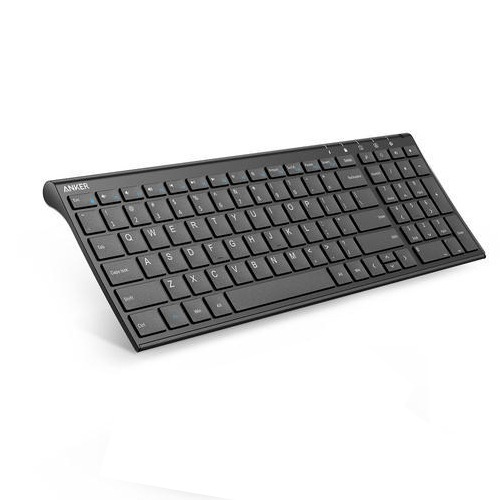
Anker 2.4GHz Wireless Keyboard Series Data Sheet & Technical Deployment Guide | Exclusive for SKYRS Pakistan
Product Overview The Anker 2.4GHz Wireless Keyboard series delivers reliable, lag-free peripheral typing performance engineered for modern workspace efficiency. Utilizing a dedicated 2.4Ghz radio frequency band via a compact USB Nano-receiver, these variants bypass standard Bluetooth latency to offer consistent data transmission, whisper-quiet tactile responses, and advanced battery preservation.
Variant Specifications
Anker 2.4GHz Ultra-Slim Compact Keyboard (Standard Office SKU)
Connectivity: 2.4GHz Proprietary Radio Frequency
Operating Range: Up to 10 Meters (33 Feet) line-of-sight
Power Module: 2x AAA Alkaline Batteries with integrated auto-sleep sensor
Hardware Profile: Low-profile scissor-switch design, 30% smaller than full-sized layouts
Structural Build: Premium matte polycarbonate casing with an internal steel stabilizing plate
Form Factor: Tenkeyless (TKL) compact footprint maximizing desk space
Anker 2.4GHz Ergonomic Wireless Keyboard with Integrated Touchpad (Media SKU)
Connectivity: Dual-Channel 2.4GHz RF via specialized unified receiver
Embedded Interface: 3.5-inch multi-touch trackpad supporting dual-finger vertical scrolling
Power Module: Rechargeable Lithium-Polymer (Micro-USB interface)
Key Lifecycle: Tested up to 5 Million individual keystrokes
Layout Matrix: Full QWERTY configuration equipped with 12 discrete multimedia shortcuts
Deployment and Hardware Installation
Physical Deployment Step-by-Step
Unbox the specific Anker 2.4GHz keyboard variant securely on a flat, anti-static work surface.
Access the rear internal hardware compartment by sliding the structural battery cover outward.
Remove the embedded 2.4GHz USB Nano-receiver safely housed within its internal storage slot.
If deploying the Standard Office SKU, insert two fresh AAA batteries observing correct polarity indicators. If deploying the Media SKU, connect the Micro-USB cable to initialize a baseline electrical charge.
Identify a vacant, high-speed USB 2.0 or USB 3.0 Type-A port directly on the host machine (PC, industrial terminal, or local server infrastructure).
Configuration and System Pairing
Driverless Plug-and-Play Protocol
Hardware Insertion: Insert the Anker 2.4GHz USB Nano-receiver into the designated host USB port. The host operating system (Windows, macOS, or Linux Kernel 2.6+) will trigger an automatic hardware discovery routine using native Human Interface Device (HID) architecture.
System Activation: Toggle the hardware Power Switch on the top right edge of the keyboard to the “ON” position.
Automated Synchronization: The built-in hardware RF chipset will instantly broadcast a handshake protocol to lock onto the discrete frequency code of the corresponding Nano-receiver.
Functional Validation: Test key mapping by outputting inputs onto a basic text editing interface. The integrated LED battery status indicator will illuminate green for 2 seconds to confirm a validated network link.
Hardware Troubleshooting
Critical Deployment Metric: If signal degradation or interference from local 2.4GHz enterprise Wi-Fi networks is observed, relocate the USB Nano-receiver away from active wireless routers or use a short USB extension cable to achieve clean line-of-sight metrics with the keyboard assembly.
Exclusive Distribution Availability at SKYRS Pakistan
This authentic pipeline of Anker 2.4GHz Wireless Keyboard variants—featuring verified local manufacturing compliance, official batch tracking, and factory-sealed regional documentation—is distributed and deployed exclusively via SKYRS inside Pakistan. Procurement, deployment validation, and local warranty pipeline management remain fully restricted to authorized SKYRS fulfillment chains to protect against grey-market imports.
Skyrs proudly operates as the premier technology vendor across the region. Specifically, we supply the best Anker 2.4GHz Wireless Keyboard, equipment tailored directly for busy software houses and premium communication hubs. Many expanding businesses need reliable routing Anker equipment to manage their daily workflows seamlessly. Therefore, we offer flexible hardware options that integrate smoothly with platform tools like Zoom and RingCentral.
While alternative enterprise brands like MikroTik, H3C, Aruba, Ruijie, Huawei, and Palo Alto emphasize heavy network infrastructure, Anker delivers excellent workspace comfort. Skyrs stands as the only vendor in Pakistan providing these precise, high-density workplace tools. Consequently, your management team can easily search and Buy Anker equipment Lahore/Islamabad via our portal.
The primary purpose of deploying premium peripheral hardware involves maximizing daily typing speeds and reducing physical strain. Technically, these advanced workspace tools feature low-latency wireless transmitters and responsive scissor-switch keys. For instance, the Anker 2.4GHz Wireless Keyboard all variants offer automated power-saving modes and whisper-quiet keystrokes.
Furthermore, this corporate device guarantees a stable operational range up to 33 feet. The internal battery architecture supports multi-month usage cycles, which perfectly suits demanding environments in Karachi, Lahore, and Islamabad.
Skyrs maintains an extensive, fully verified product inventory in every major commercial territory. If you require a trustworthy Anker equipment series distributor Pakistan route, we manage immediate supply paths:
Anker price in Karachi: Available for rapid shipping to major technology parks.
Anker price in peshawar: Economical corporate deals for growing regional businesses.
Anker price in faisalabad: Industrial supply channels optimized for fast workplace setup.
Anker price in kpk: Reliable distribution coverage across all provincial business zones.
Anker Switch Anker price in quetta: Protected delivery methods for remote enterprise clients.
If your company plans a massive workspace modernization, please request an explicit Anker bulk quote.
Proper corporate setup requires access to reliable, structured manufacturer data. Thus, network managers can easily evaluate the Anker PoE power budget specifications. You can quickly download our complete Anker Anker 2.4GHz Wireless Keyboard datasheets download files for detailed asset evaluation.
Additionally, our engineering team provides step-by-step installation instructions through our standard Anker equipment configuration guide. This publication features essential operational chapters covering Anker VLAN configuration for secure office spaces. If your team experiences connectivity issues, please consult our guide on How to reset Anker equipment immediately. Finally, developers can access the latest Anker firmware update download files via our localized directory.
| Technical Feature | Anker 2.4GHz Wireless Keyboard All Variants | Standard Generic Keyboards |
| Chassis Profile | Ultra-Slim Matte Finish | Bulky Plastic Layout |
| Key Lifespan | 5 Million Keystrokes | 1 Million Keystrokes |
| Wireless Protocol | 2.4GHz Nano Receiver | Unsecured Unstable Infrared |
| Power Management | Auto-Sleep Mode | Continuous Drain System |
    [ Manufacturer Image: Anker Ultra-Slim Wireless Keyboard Profile Layout ]
    [ Manufacturer Image: Anker 2.4GHz Nano USB Dongle Connection Close-Up ]
Official Resource: Examine specifications on the Anker Manufacturer Website.
Local Procurement: Purchase your corporate assets directly through the Skyrs Product Directory.
Anker produces highly durable keyboards, rapid charging blocks, and functional ergonomic accessories to enhance operator output.
Skyrs supplies premium certified used Anker hardware across Rawalpindi, Faisalabad, Lahore, and Karachi at excellent rates.
The comprehensive Anker pack price varies depending on volume and specific model choices. Please contact Skyrs for competitive pricing.
The 2.4GHz wireless connection optimizes data packet transmission to eliminate input lag completely during intense typing.
These slim desktop peripherals utilize integrated fixed modules. Therefore, they do not require standard structural rack brackets or extra memory chips.
Pre-owned pricing in 2026 remains highly favorable due to the exceptional long-term durability of the original hardware.
Our technical specialists guide your staff through deployment using the Anker 2.4GHz Wireless Keyboard configuration guide.
These user-friendly keyboards feature automatic plug-and-play operation, meaning they require no complex enterprise licensing steps to function.
You can check the latest up-to-date prices on the Skyrs portal or contact our local regional offices.
Yes, we share all essential hardware updates and support notes directly through our centralized help platform.