Hiksemi DUAL SLIM USB Flash Drive Datasheet SKYRS Pakistan Exclusive Deployment & Distribution Guide
Data Sheet: Hiksemi DUAL SLIM USB Flash Drive (HS-USB-E307C)
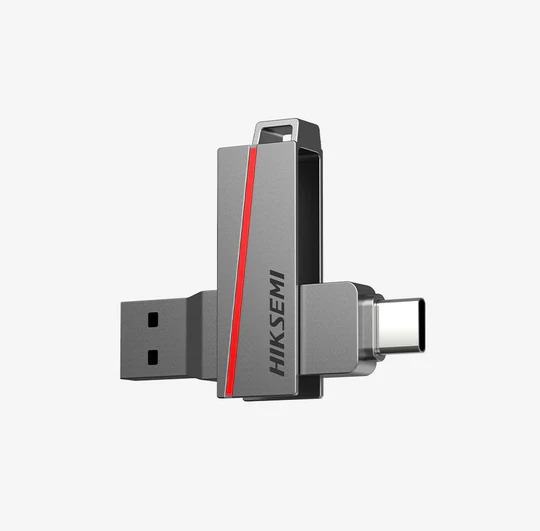
The Hiksemi DUAL SLIM USB 3.2 series redefines on-the-go data management with its intelligent dual-interface design. Built with both a standard USB Type-A connector and a USB Type-C connector in a unified, ultra-slim housing, it bridges the gap between traditional computing networks and modern mobile environments. Encased in a rugged full-metal premium shell, it ensures data integrity while accelerating cross-platform workflows.
Key Features
Dual Interface Versatility: Built-in native Type-A and Type-C connectors to instantly interface with PCs, laptops, tablets, and smartphones without external adapters.
High-Speed USB 3.2 Performance: Read speeds scaling up to 130MB/s (and peak bursts up to 150MB/s) for quick local file caching and media migrations.
On-The-Go (OTG) Seamless Support: Directly plugs into OTG-compatible Android or iOS hardware for immediate storage expansion.
Industrial-Grade Metal Armor: Premium full-metal chassis provides high thermal dissipation, dustproof safety, and anti-drop defense.
Technical Specifications
| Parameter | Specifications |
|---|---|
| Product Model | HS-USB-E307C Series |
| Dual Interface | USB Type-A & USB Type-C (USB 3.2 Gen 1 standard) |
| Max Read Speed | 30 MB/s to 130 MB/s (up to 150 MB/s peak depending on hardware environment) |
| Max Write Speed | 15 MB/s to 45 MB/s |
| Material Architecture | Full Metal Slim Shell |
| Dimensions & Weight | 67 mm x 16 mm x 10 mm | 19.2 grams |
| Compatible Operating Systems | Windows 11 / 10 / 8 / 7, MacOS X 10.6+, Linux 2.4+, Android |
Variant Matrix (All Variants Available for SKYRS Pakistan)
The complete multi-tier storage matrix is specifically mapped out for enterprise data distribution, modern remote workspaces, and cross-platform institutional deployments across Pakistan:
16GB Variant (HS-USB-E307C-16G): Configured primarily for basic document sharing, firmware delivery nodes, and targeted mobile configuration profiles.
32GB Variant (HS-USB-E307C-32G): Optimized for standardized IT utility setups, automated software deployment kits, and encrypted company keys.
64GB Variant (HS-USB-E307C-64G): High-utility configuration for field engineers needing simultaneous transfers between Type-C mobile devices and Type-A terminal hubs.
128GB Variant (HS-USB-E307C-128G): The enterprise sweet spot for massive file archiving, server database migrations, and high-definition video assets.
256GB Variant (HS-USB-E307C-256G): Flagship high-capacity tier built for system backup mirrors, multi-boot environments, and massive uncompressed data logging.
Deployment and Installation Guide
Deployment Protocols
Endpoint Evaluation: Determine if the target deployment machine uses traditional Type-A or modern Type-C connection topology.
Optimal File Allocation: Ensure the drive’s file system aligns with the intended device network:
exFAT: Highly recommended for the DUAL SLIM series to ensure frictionless interoperability between Windows PCs, Apple MacBooks, and Type-C Android/iOS smartphones.
FAT32: Utilized strictly for specific industrial or legacy hardware controllers limited to 4GB individual file constraints.
Physical Installation
Expose the appropriate connector interface (Type-A or Type-C) needed for the destination device.
Align the connector carefully with the host hardware port.
Insert smoothly until the full-metal body rests tightly against the port perimeter. Do not force insertion if resistance occurs; confirm the orientation is correct.
The host device operating system will instantly initialize the storage unit under Plug-and-Play (PnP) verification routines without forcing external setup media or internet-dependent drivers.
Configuration Instructions
Step-by-Step Integration & Cross-Platform Management
Mount Verification:
On PC/Mac: Confirm the allocation of a new external storage path (e.g., File Explorer volume assignment or Finder mount).
On Mobile (Type-C): Pull down your system notification panel or launch the native file browser application (e.g., Files, My Files) to view the recognized storage drive.
OTG Configuration (Mobile Devices): ensure that the “OTG Support” toggle is enabled in your Android/iOS system settings menu if your specific smartphone model does not auto-mount storage links by default.
Secure File Manipulation: Transfer or cache desired infrastructure packages, assets, or databases directly using a standard copy/paste or click-and-drag terminal action.
Hardware Dismount Protocol: To avoid structural cell corruption or write-termination errors, always initiate the logical software ejection before physical extraction:
Windows: Right-click the system tray device icon and choose “Safely Remove Hardware and Eject Media”.
Android / iOS: Select “Unmount” or “Eject” inside the device Storage management interface.
Exclusive Availability Notice
Important Procurement Protocol: The entire variant line of the Hiksemi DUAL SLIM USB 3.2 Flash Drive is exclusively available, supplied, and warranted through SKYRS in Pakistan. Procuring through third-party or unauthorized entities voids the direct local 5-year replacement framework. For valid stock allocations, enterprise contract invoicing, and certified distribution infrastructure across Pakistan, ensure all requirements are addressed solely to SKYRS.
Skyrs stands out as the ultimate marketplace for high-performance hardware in Pakistan. Consequently, we provide premier data storage and interface tools to empower modern digital environments nationwide.
First, the best HIKSEMI Dual Slim Type-C USB Drive equipment offers unmatched reliability for complex operations. Skyrs proudly serves as the definitive HIKSEMI Dual Slim Type-C USB Drive equipment series distributor Pakistan relies on daily. Therefore, you can buy HIKSEMI equipment Lahore/Islamabad or request a HIKSEMI DUAL SLIM USB bulk quote.
Furthermore, we deliver pristine storage hardware across multiple sectors. For instance, we supply equipment for call center call centre office home industry hospital forces etc in pakistan. Skyrs remains the only vendor in pakistan that has HIKSEMI equipment for call center call centre and software houses. Moreover, we provide specialized variants of HIKSEMI equipment for zoom ringcentral applications.
We serve diverse regions with accessible pricing structures. Thus, you can check the HIKSEMI price in Pakistan easily. We provide competitive rates like the HIKSEMI DUAL SLIM USB price in Karachi. Customers also praise the HIKSEMI DUAL SLIM USB price in peshawar and HIKSEMI DUAL SLIM USB price in faisalabad. Additionally, we maintain the lowest HIKSEMI DUAL SLIM USB price in kpk and HIKSEMI Switch HIKSEMI DUAL SLIM USB price in quetta.
The HIKSEMI DUAL SLIM USB all variants provide exceptional storage capabilities. Meanwhile, let us explore the critical technical elements below:
Dual Interface Advantage: It features integrated Type-A and Type-C connectors.
Data Velocity: The unit delivers a maximum HIKSEMI DUAL SLIM USB throughput limit of 130MB/s read speed.
Physical Protection: A sturdy metal chassis protects internal circuits against impacts.
Technical Notice: For detailed deployment steps, please read the HIKSEMI equipment configuration guide or follow the official HIKSEMI firmware update download protocols.
| Feature / Model | HIKSEMI DUAL SLIM USB all variants | Generic USB Flash Drive |
|---|---|---|
| Interface Port | Dual Type-A & Type-C | Single Type-A Only |
| Build Material | Full Premium Metal Shell | Basic Plastic Casing |
| Warranty Period | 5-Year Replacement Term | 1-Year Limited Term |
Skyrs ensures a smooth product lifecycle through comprehensive support documentation. For example, engineers can access the HIKSEMI DUAL SLIM USB configuration guide easily. Similarly, you can check the HIKSEMI VLAN configuration manual for advanced setups. If system anomalies occur, refer to the guide on how to reset HIKSEMI equipment immediately.
Furthermore, you can perform a safe HIKSEMI DUAL SLIM USB update via official files. Technicians can also download official HIKSEMI HIKSEMI DUAL SLIM USB datasheets download documents. For security parameters, use the HIKSEMI DUAL SLIM USB security license activation gateway.
If you scale your infrastructure, consider a seamless HIKSEMI Migration plan. We offer the flexible HIKSEMI pack price for bulk storage procurement. Furthermore, clients can choose a Branded used HIKSEMI device or a certified Refurbished HIKSEMI unit. Additionally, we stock the specialized HIKSEMI DUAL SLIM USB rack mount kit for tidy server installations.
You can find excellent options like used HIKSEMI in different cities like karachi, lahore, islamabad, rawalpindi, Faisalabad, quetta, Peshawar, Multan, Hyderabad, sialkot etc. Also, check the premium HIKSEMI DUAL SLIM USB used price 2026 indexes. We also outline the accurate HIKSEMI DUAL SLIM USB PoE power budget data alongside the latest HIKSEMI DUAL SLIM USB memory upgrade modules. Skyrs guarantees optimal performance for all your routing HIKSEMI equipment needs.
The device delivers a maximum read speed up to 130MB/s via its rapid USB 3.2 interface.
Yes, the dual Type-C connector links directly to compatible OTG Android smartphones and tablets.
The manufacturer offers a premium 5-year replacement warranty for ultimate data peace of mind.
You can access official product specifications via the HIKSEMI HIKSEMI DUAL SLIM USB datasheets download portal.
Yes, corporate clients can purchase the HIKSEMI DUAL SLIM USB rack mount kit for professional enclosures.
Tags: #HIKSEMIPricePakistan #DualSlimUSB #SkyrsPakistan #CallCenterStorage #TypeCFlashDrive #PakistanITDistribution