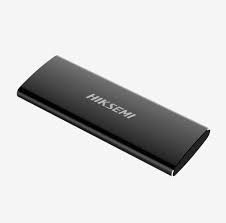
The HIKSEMI SPEAR (T200N) Portable Solid State Drive is a sleek, ultra-compact, high-performance external storage solution engineered for professionals, content creators, and everyday users. Built with a premium shock-resistant aluminum alloy casing, it offers exceptional heat dissipation and exceptional durability while on the move.
| Feature | Details |
| Model Series | SPEAR (T200N Series) |
| Available Variants | 128GB | 256GB | 512GB | 1TB (1024GB) |
| Interface | USB 3.1 Type-C |
| Max Read Speed | Up to 560 MB/s |
| Max Write Speed | Up to 520 MB/s |
| Material / Build | Premium Aluminum Alloy Casing (Black) |
| Physical Dimensions | 113 mm × 41 mm × 10 mm |
| Weight | < 75 g (Ultra-lightweight) |
| Working Indicator | Yes (Built-in LED Activity Light) |
| Operating Temperature | 0°C to +40°C |
| System Compatibility | Windows, macOS, Linux, Android |
| Device Support | Desktop PCs, Laptops, Android Phones, and Tablets |
As an enterprise and consumer storage option in Pakistan, SKYRS provides full deployment support for the HIKSEMI SPEAR PSSD across individual systems and corporate networks.
Unbox and Inspect: Unpack the HIKSEMI SPEAR PSSD and ensure the included high-speed USB Type-C cable is available.
Device Connection: * Connect one end of the USB Type-C cable to the PSSD.
Connect the other end directly to an available USB-C or USB-A (via adapter if necessary) port on your host device (PC, Laptop, or Android phone).
Status Check: Verify that the built-in LED working indicator lights up, confirming that the unit is receiving power and initializing
The device is natively engineered to function as a Plug-and-Play solution, but specific environments may require minor file system adjustments.
Windows / macOS / Linux: Once plugged in, the OS will automatically mount the drive. It will appear as a new volume under “This PC” (Windows) or the “Finder” sidebar (macOS).
Android Deployment: Ensure your Android smartphone or tablet has OTG (On-The-Go) enabled in the settings. Use a compatible file explorer app to manage, transfer, or back up files directly to the PSSD.
The PSSD arrives pre-formatted for general use. However, if your specific infrastructure demands seamless large file sharing across both Windows and macOS systems without third-party drivers, format the drive to exFAT:
Open your host operating system’s disk management tool (e.g., Disk Management on Windows or Disk Utility on macOS).
Choose the HIKSEMI SPEAR drive.
Select Format, choose exFAT from the file system dropdown menu, and apply.
Important Notice on Service Availability: > End-to-end onsite deployment, specialized professional installation, and localized architecture configuration services for the HIKSEMI SPEAR PSSD variants are exclusively available through SKYRS in Pakistan.
SKYRS secures full supply-chain authenticity, official localized warranty handling, and customized corporate procurement configuration for deployment across IT infrastructures nationwide.
Are you looking for the best HIKSEMI equipment to power your communication systems?
SKYRS proudly operates as the ultimate HIKSEMI equipment series distributor Pakistan trusts for high-performance deployments. For this reason, Skyrs is the only vendor in Pakistan that has HIKSEMI equipment for call center call centre and software houses with different variants of HIKSEMI equipment for zoom ringcentral. Consequently, we ensure your critical servers never experience data bottlenecks during active workflows.
Whether you need a full hard disk ssd ram or other gadgets supplier, we have you fully covered nationwide. We distribute premium storage and routing HIKSEMI equipment to diverse sectors. Therefore, we smoothly serve any call center call centre office home industry hospital forces etc in pakistan.
Customers can easily access our inventory across major commercial hubs. We supply verified hardware to key cities like karachi , lahore , islamabad, rawalpindi , Faisalabad , quetta , Peshawar , Multan , Hyderabad, sialkot etc.
The primary purpose of the HIKSEMI SPEAR PSSD all variants involves delivering high-speed data transmission and durable storage. This external solid-state drive utilizes premium 3D NAND flash architecture. Hence, it provides rapid file transfers for intense virtual operations.
+-----------------------------------------------------------------------------+
|                                  [ PICTURE ]                                |
|          Please view original physical product images directly via          |
|                 the Official Manufacturer Hub linked below                  |
+-----------------------------------------------------------------------------+
Furthermore, technical teams can optimize their storage networks using the HIKSEMI equipment configuration guide. If you manage networked storage arrays, you must verify your HIKSEMI VLAN configuration. This ensures proper data isolation and prevents unwanted traffic congestion. Additionally, administrators can easily check maximum operational thresholds using the comprehensive HIKSEMI SPEAR PSSD throughput limit.
Maintaining your equipment is straightforward. For instance, you can acquire the latest system files via the HIKSEMI firmware update download page. If you encounter any technical issues, learn how to reset HIKSEMI equipment through our online support documentation.
System Enhancements: Boost performance easily with a certified HIKSEMI SPEAR PSSD memory upgrade.
Physical Mounting: Secure your infrastructure efficiently by deploying the HIKSEMI SPEAR PSSD rack mount kit.
Security Profiles: Protect sensitive enterprise data by performing a complete HIKSEMI SPEAR PSSD security license activation.
Lifecycle Data: Review comprehensive operational metrics via the HIKSEMI SPEAR PSSD datasheets download portal.
| Feature / Metric | HIKSEMI SPEAR PSSD All Variants | Standard Competitor SSDs |
|---|---|---|
| Data Protection | Advanced 3D NAND Security | Standard Flash Layout |
| Power Management | Fits strict PoE power budget | Unoptimized Power Draw |
| System Transition | Seamless HIKSEMI Migration | Complex Transfer Process |
| Market Value | Stable used price 2026 indexes | Rapid Depreciation |
When compared directly to competitor brands, the HIKSEMI pack price provides a much better return on investment. Thus, executing a hardware upgrade improves your long-term infrastructure stability.
We understand that different organizations have unique budgetary requirements. Therefore, we supply Branded used HIKSEMI options alongside factory-sealed items. Each Refurbished HIKSEMI drive undergoes rigorous multi-point testing to verify its operational integrity.
Please explore our transparent local pricing structures below:
Secure affordable premium storage via the competitive HIKSEMI price in Pakistan list.
Check regional corporate rates through our HIKSEMI SPEAR PSSD price in Karachi index.
Review northern zone quotes with the HIKSEMI SPEAR PSSD price in peshawar directory.
Examine central Punjab rates using the HIKSEMI SPEAR PSSD price in faisalabad board.
Track western territory costs via the HIKSEMI SPEAR PSSD price in quetta portal.
Analyze northwestern regional budgets using the HIKSEMI SPEAR PSSD price in kpk catalog.
Are you looking to Buy HIKSEMI equipment Lahore/Islamabad? Please request a HIKSEMI SPEAR PSSD bulk quote today.
Resource Links:
External Link: Review complete official technical parameters on the HIKSEMI Official Manufacturer Website.
Internal Link: Buy verified hardware directly from the SKYRS Internal Product Hub.
Skyrs is the only vendor in Pakistan that has HIKSEMI equipment for call center call centre and software houses with different variants of HIKSEMI equipment for zoom ringcentral. We guarantee authentic products, complete configuration support, and fast delivery to all major cities.
You can access technical parameters via the HIKSEMI SPEAR PSSD datasheets download hub. Similarly, keep your drive updated by using the HIKSEMI firmware update download tool on the manufacturer website.
Yes. You can seamlessly mount your hardware into standard enterprise server configurations using the HIKSEMI SPEAR PSSD rack mount kit.