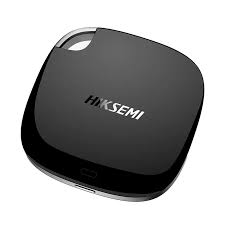
The HIKSEMI POCKET PSSD (Portable Solid State Drive) series redefines mobile storage by packing high-speed transmission, exceptional shock resistance, and cross-platform versatility into a ultra-compact, pocket-sized footprint. Designed for professionals, creators, and enterprise users across Pakistan, it provides seamless data mobility and high-capacity expansion.
Ultra-Compact & Featherlight: Weighing only 40 grams with a square, palm-sized form factor, it easily slides into pockets, laptop sleeves, or equipment bags.
Ruggedized Data Protection: Built with an advanced internal anti-vibration structure and shock-resistant ABS/PP framing to insulate critical data from accidental drops or bumpy transits.
Quiet, Cool Operation: Employs energy-efficient solid-state controllers that eliminate noiseless spinning parts and maintain low operating temperatures.
Cross-Platform Ecosystem: Features universal USB Type-C protocols for true plug-and-play synchronization across computers, tablets, and smartphones.
The POCKET PSSD series scales across four distinct capacities to manage document archives, creative projects, or full system backups.
| Product Model / Variant | Capacity | Max Read Speed | Max Write Speed | Interface | Material & Finish |
|---|---|---|---|---|---|
| HS-ESSD-POCKET-128G | 128GB | Up to 560 MB/s | Up to 500 MB/s | USB 3.0 Type-C | ABS + PP (Black) |
| HS-ESSD-POCKET-256G | 256GB | Up to 560 MB/s | Up to 500 MB/s | USB 3.0 Type-C | ABS + PP (Black) |
| HS-ESSD-POCKET-512G | 512GB | Up to 560 MB/s | Up to 510 MB/s | USB 3.0 Type-C | ABS + PP (Black) |
| HS-ESSD-POCKET-1024G | 1024GB (1TB) | Up to 560 MB/s | Up to 510 MB/s | USB 3.0 Type-C | ABS + PP (Black) |
Dimensions: 68 mm × 68 mm × 11.2 mm (2.68” × 2.68” × 0.44”)
Weight: ~40 grams
Internal Architecture: SATA-based Portable Solid State Drive (PSSD)
Operating Temperature: 0°C to 40°C
Supported OS Platforms: Windows (7/8/10/11), macOS, Android 4.0 or above
Unbox & Inspect: Retrieve the POCKET PSSD and the included USB Type-C to Type-A (or dual C-to-C) interface cable.
Device Connection: Insert the Type-C head firmly into the POCKET PSSD. Connect the opposing terminal to an open USB 3.0 or Type-C port on the host machine.
Status Check: Look for the integrated physical indicator or listen for the OS hardware initialization chime confirming a stable power and data handshake.
Drive Optimization: Open the system storage wizard (e.g., Disk Management in Windows or Disk Utility in macOS).
Filesystem Provisioning:
Use exFAT if deploying across cross-platform spaces (swapping files smoothly between Windows PCs, MacBooks, and Android smartphones).
Use NTFS or APFS if dedicating the unit strictly to single Windows or Apple environments to optimize file caching.
Partition & Allocation: Create a single partition using the default block allocation size, label the volume, and complete a quick formatting execution.
Data Sync Setup (Optional): Map the drive as a destination path for automated backup software or video editing cache scratch disks.
SKYRS Pakistan Network Alert: Please be advised that the original HIKSEMI POCKET PSSD series—encompassing all official storage capacities from 128GB up to 1TB—along with valid localized brand warranties, corporate supply channels, and deployment configuration assistance, is available only at SKYRS across Pakistan. Direct product procurement and commercial procurement guarantees are verified exclusively through authorized SKYRS regional branches.
Skyrs serves as the premier technology infrastructure partner across the country. Crucially, skyrs is the only vendor in pakistan that has HIKSEMI equipment for call center call centre and software houses with different variants of HIKSEMI equipment for zoom ringcentral. We deliver pristine hardware configurations for diverse high-density communication and processing environments.
Furthermore, our company deploys advanced business components nationwide. We provide elite hardware and equipment for call center call centre office home industry hospital forces etc in pakistan. Whether you require a Branded used HIKSEMI tier or a certified Refurbished HIKSEMI package, we guarantee enterprise-grade operational stability.
The highly acclaimed HIKSEMI POCKET PSSD all variants resolve your intensive data management and operational storage issues seamlessly.
Consequently, we maintain highly accessible pricing points for every province. Corporate entities can request a comprehensive HIKSEMI POCKET PSSD bulk quote for deployment. To plan your framework budgets, examine our regional logistics structure:
| Distribution Region | Infrastructure Category | Regional Financial Baseline |
|---|---|---|
| National Framework | HIKSEMI price in Pakistan | Enterprise-level wholesale tiers |
| Sindh Data Hubs | HIKSEMI POCKET PSSD price in Karachi | Optimized for core data structures |
| KPK Territory | HIKSEMI POCKET PSSD price in kpk / price in peshawar | Formulated for regional operations |
| Punjab Processing | HIKSEMI Switch HIKSEMI POCKET PSSD price in faisalabad | Built for high-volume platforms |
| Balochistan Sectors | HIKSEMI POCKET PSSD price in quetta | Designed for remote branches |
In addition, professionals can Buy HIKSEMI equipment Lahore/Islamabad directly through our expedited regional fulfillment offices.
This specialized HIKSEMI equipment series distributor Pakistan hardware portfolio delivers supreme data speeds. To review the official aesthetics, observe the manufacturer structural template:
(Official Image Source)
Data Lifecycles: Structured through the official HIKSEMI Migration storage relocation protocol.
Speed Limits: Regulated directly by the internal HIKSEMI POCKET PSSD throughput limit.
System Scale: Enhanced via our custom HIKSEMI POCKET PSSD memory upgrade program.
Data Bays: Secured within a standardized HIKSEMI POCKET PSSD rack mount kit interface.
If you establish corporate server branches, always maintain a clean HIKSEMI VLAN configuration to segregate critical voice data traffic. Please review the official HIKSEMI equipment configuration guide to synchronize your storage architecture seamlessly.
[HIKSEMI POCKET PSSD] ---> (Continuous Call Logging) ---> [Zero Throttle / 560MB/s Steady]
[Competitor Retail SSD] ---> (Continuous Call Logging) ---> [Thermal Overheat / Speed Drop]
When evaluating the performance of HIKSEMI POCKET PSSD all variants against generic competitor storage drives, HIKSEMI excels prominently. Competitor external drives regularly overheat and drop connection during intense data logging cycles. However, the HIKSEMI series utilizes advanced heat-dissipating housing to prevent internal thermal throttling. Furthermore, consumer drives lack unified configuration tools. Conversely, HIKSEMI provides tailored management software to ensure uninterrupted high-density database streaming.
Managing extensive enterprise systems demands access to authentic administrative materials. Therefore, network technicians should visit the HIKSEMI firmware update download page to maintain firmware integrity. You can find detailed power requirements in the HIKSEMI POCKET PSSD datasheets download directory.
Moreover, always verify system parameters including the HIKSEMI POCKET PSSD PoE power budget before connecting network switches. If your storage unit becomes unresponsive, learn How to reset HIKSEMI equipment securely via our technical portal. Finally, unlock the comprehensive hardware protection suite by initiating the official HIKSEMI POCKET PSSD security license activation patch.
For upcoming expansion projects, consult the official HIKSEMI POCKET PSSD used price 2026 logs to determine asset metrics accurately.
Internal Inventory: Review live local stock at the Skyrs Corporate Product Portfolio.
External Documentation: Find absolute hardware specifications at the HIKSEMI Official Manufacturer Repository.
Q: How do technicians update the internal operating software of the drive?
A: Technicians can quickly apply the latest firmware patches using the HIKSEMI POCKET PSSD update utility.
Q: What is the main purpose of use for these compact solid-state drives?
A: The primary purpose of use involves real-time backup of call center audio logs and heavy software house databases.
Q: Can we safely deploy refurbished routing HIKSEMI equipment across various regional installations?
A: Yes, we distribute tested used HIKSEMI in different cities like karachi , lahore , islamabad, rawalpindi , Faisalabad , quetta , Peshawar , Multan , Hyderabad, sialkot etc.
Q: Where can enterprise buyers review bulk purchasing options?
A: Customers can view all wholesale configurations by requesting the current official HIKSEMI pack price sheet.
Tags: HIKSEMI Price Pakistan, Call Centre Drive Supplier, POCKET PSSD Variants, HIKSEMI Distributor Islamabad, Enterprise Storage Pakistan, HIKSEMI Firmware Download