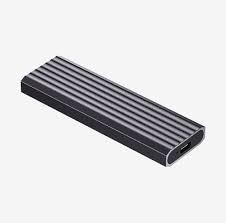
The HIKSEMI MDC1 (Model: HS-HUB-MDC1) is a premium, pocket-sized external storage enclosure built to transform an internal M.2 NVMe SSD into a high-speed ultra-portable drive. Featuring a tool-free design and robust thermal architecture, it is engineered for professionals, gamers, and content creators requiring swift data migration, external scratch disks, or immediate plug-and-play storage expansion.
| Feature | Specification Details |
| Model | HS-HUB-MDC1 |
| Core Chipset | Realtek RTL9210 High-Performance Controller |
| Output Interface | USB 3.2 Gen 2 Type-C |
| Data Transmission Rate | Up to 10 Gbps (Theoretical speed up to 1,250 MB/s) |
| Protocol Support | M.2 NVMe PCIe Protocol (M-Key / B+M Key) (Note: Does not support SATA/NGFF) |
| Supported Form Factors | 2230, 2242, 2260, and 2280 |
| Maximum Storage Capacity | Supports up to 4TB SSDs |
| Material & Build | Aircraft-grade Aluminum Alloy with ABS accents |
| Color Variants | Space Gray / Metallic Silver |
| Operating Systems | Driver-free on Windows, macOS, Linux, and Android |
| Power Features | Intelligent 10-minute Sleep Mode, UASP & TRIM accelerated protocols |
| Dimensions & Weight | 112.5mm × 39.5mm × 12.5mm | ~61.4g (excluding SSD) |
The HIKSEMI MDC1 features a 100% tool-free slide and click mechanism, omitting the need for screws or specialized instruments.
Open the Enclosure: Gently press down and slide open the top aluminum cover of the MDC1.
Align and Insert SSD: Take your compatible M.2 NVMe SSD (e.g., 2280 size) and align the notch with the M-key slot inside the enclosure. Insert it firmly at a slight angle (around 30 degrees) until seated.
Secure the Drive: Press the backend of the SSD flat down. Fasten it securely using the provided rubber retaining latch or toolless push-pin included in the packaging.
Apply Thermal Management: Peel off the protective film from both sides of the included high-conductivity silicone thermal pad. Lay it directly over the top of the bare SSD surface to gap the space between the drive and the aluminum shell.
Close the Chassis: Slide the aluminum outer cover back into place until you hear it snap securely closed.
The MDC1 relies on native operating system storage drivers, eliminating the need for any third-party installation packages.
If you have installed a completely new SSD inside the enclosure, it must be initialized before it appears in your file explorer:
For Windows: Right-click the Start Menu -> Select Disk Management. A prompt will automatically ask you to initialize the drive. Choose GPT, then right-click the unallocated space to create a New Simple Volume. Formating with NTFS or exFAT is recommended.
For macOS: Connect the unit, open Disk Utility, locate the external drive under the uninitialized tab, click Erase, and format it using APFS or exFAT (choose exFAT if you require cross-compatibility between Mac and Windows machines).
Ensure you connect the device via the included USB-C to USB-C cable directly to a native USB 3.2 Gen 2 or Thunderbolt 3/4 port on your computer to unlock the maximum 10 Gbps transmission rate. Using older USB 2.0 or 3.0 ports will limit throughput.
Exclusive Distribution Note: All official variants of the HIKSEMI MDC1 M.2 NVMe Enclosure are available exclusively through SKYRS in Pakistan.
SKYRS offers full supply-chain distribution, complete out-of-the-box accessories (including dual premium transmission cables: USB Type-C to C and USB Type-C to A), and localized warranty fulfillment across nationwide corporate tech hubs. For volume procurement or system tier configuration, contact the local SKYRS account representative.
Skyrs stands out as the ultimate marketplace for high-performance hardware architecture across the country. In fact, Skyrs is the only vendor in Pakistan that has HIKSEMI MDC1 M.2 NVMe Enclosure equipment for call center call centre and software houses. We provide top-tier hardware deployment solutions for Zoom and RingCentral environments.
The HIKSEMI MDC1 M.2 NVME Enclosure provides unparalleled high-speed storage capabilities for modern workspaces. Therefore, professionals can execute rapid data transfer tasks seamlessly. The system operates on a premium Realtek RTL9210 master control scheme. Consequently, it achieves a consistent 10Gbps transmission speed via a USB 3.2 Gen 2 Type-C interface.
Skyrs serves as the premier HIKSEMI equipment series distributor Pakistan. We reliably cater to commercial enterprises, IT infrastructure setups, and residential setups. Whether you require a single unit or a HIKSEMI MDC1 M.2 NVME Enclosure bulk quote, we fulfill deployment needs immediately.
The system features robust parameters built for heavy technical workloads. For instance, check the specifications below:
| Feature Parameters | Detailed Specifications |
| Interface Port | USB 3.2 Gen2 Type-C |
| Data Rate Max | 10Gbps Throughput Limit |
| Material Build | Aluminum Alloy Space Gray |
| Platform Architecture | Windows, Mac OS, Linux, Android |
Furthermore, the framework incorporates an intelligent dormancy mode after ten minutes of operational idleness. This protocol enhances structural durability over extended lifespans. Additionally, the solid aluminum body ensures excellent thermal management during intensive reads.
HIKSEMI equipment configuration guide: Streamlined deployment steps for network storage structures.
HIKSEMI firmware update download: Direct access to crucial software optimization packages.
datasheets download: Official hardware blueprints for data architects.
HIKSEMI VLAN configuration: Seamless partitioning protocols for business workstations.
How to reset HIKSEMI equipment: Straightforward processes for system hardware restorations.
We maintain a fully stocked inventory across multiple domestic hubs. Therefore, clients can secure the best HIKSEMI equipment at highly competitive local rates.
Sindh Region: Check the special premium price in Karachi.
Punjab Outlets: Buy HIKSEMI equipment Lahore/Islamabad easily through our fast local shipping networks.
Central Districts: We provide an affordable price in faisalabad for processing mills.
KPK Territory: Check our competitive price in peshawar and broader price in kpk charts.
Balochistan Zones: Acquire the official HIKSEMI Switch price in quetta with full warranties.
We deliver equipment for call center call centre office home industry hospital forces etc in pakistan. Customers can purchase options like a pristine Branded used HIKSEMI module, a certified Refurbished HIKSEMI chassis, or an original HIKSEMI pack price bundle.
| Specification Criteria | HIKSEMI MDC1 Enclosure | Generic Aluminum Enclosures |
| Controller Architecture | Realtek RTL9210 Scheme | Baseline Generic Bridges |
| Heat Management | Thermal Pad + Metal Housing | Plastic Trim Frame Only |
| Data Throughput | True 10Gbps Stability | Unstable Transmission Drops |
| Power Budget Rules | HIKSEMI MDC1 M.2 NVME Enclosure PoE power budget compliant | No Smart Power Management |
Operational Insight: The HIKSEMI Migration pathway allows system integrators to upgrade system drives seamlessly. Meanwhile, clients can safely deploy the structural HIKSEMI MDC1 M.2 NVME Enclosure rack mount kit inside server rooms. If you require advanced functional provisioning, apply the HIKSEMI MDC1 M.2 NVME Enclosure security license activation package. Secure your next data framework via the official HIKSEMI MDC1 M.2 NVME Enclosure used price 2026 inventory sheet before stocks decline.
The system utilizes a stable USB 3.2 Gen 2 protocol. Therefore, it delivers a 10Gbps structural data transfer rate.
Yes, the internal architecture accommodates various solid-state drive form factors. For example, it works with different M.2 NVMe card capacities.
You can download official firmware adjustments directly through authorized Skyrs distribution channels.
Yes, you can secure the hardware neatly by ordering a specific HIKSEMI MDC1 M.2 NVME Enclosure rack mount kit.
Skyrs ships genuine routing HIKSEMI equipment, storage items, RAM, and SSD drives throughout all major operational territories in Pakistan.
Tags: #HIKSEMIPriceInPakistan #HIKSEMIDistributor #M2NVMeEnclosure #CallCenterHardware #SkyrsPakistan #StorageSolutions2026 #DataEnclosur