PRODUCT DATA SHEET: HIKSEMI FUTURE SERIES DDR GAMING MEMORY
The HIKSEMI FUTURE Series DDR UDIMM memory modules are engineered specifically for high-performance PC enthusiasts, hardcore gamers, and heavy-workload content creators. Featuring high-qua
DATA SHEET: HIKSEMI PERSONAL CLOUD NAS MAGE20 PRO
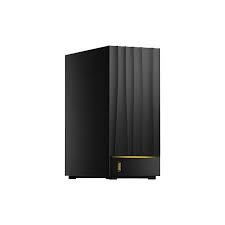
The Hiksemi Personal Cloud NAS Mage20 Pro is a high-performance, dual-bay network-attached storage solution engineered for secure data centralization, automated home and business backups, and seamless multi-device file sharing. Distributed natively in Pakistan, this flagship private cloud device balances consumer-friendly accessibility with enterprise-grade stability.
PRODUCT VARIANTS (SKYRS PAKISTAN EDITION)
Hiksemi distributes the Mage20 Pro through SKYRS in multiple localized variant setups to suit diverse storage demands.
Mage20 Pro (Diskless / Enclosure Only): The baseline hardware unit allowing users to supply their own compatible 2.5-inch or 3.5-inch SATA hard drives.
Mage20 Pro 8TB Bundle: Pre-fitted and optimized with 2 x 4TB Surveillance/NAS grade internal storage drives.
Mage20 Pro 16TB Bundle: Pre-fitted and optimized with 2 x 8TB High-Endurance NAS hard drives.
Mage20 Pro 40TB Max Bundle: Equipped with 2 x 20TB Enterprise-grade high-capacity drives for maximal data hoarding and dense backup archives.
TECHNICAL SPECIFICATIONS
Processor: High-efficiency Quad-Core ARM Cortex Architecture CPU
Memory: High-speed DDR4 System Memory
Storage Interface: Dual-Bay (2-Slots) supporting 2.5” / 3.5” SATA HDD or SSD
Maximum Internal Capacity: Up to 40TB (2 x 20TB drives)
Network Interfaces: 1 x 2.5Gbps High-Speed Ethernet Port (RJ45)
External Connectivity: 1 x USB-A 3.2 Gen 1 (Front Panel), 1 x USB-A (Rear Panel)
Cooling System: Smart Ultra-Quiet 4cm Internal Cooling Fan
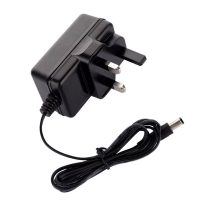
Power Supply: Compact 12V / 3A Low-Power Adapter
Operating System: Proprietary Hiksemi OS (Managed natively via Hikbox App)
DEPLOYMENT AND INSTALLATION
Physical Setup
Drive Unboxing and Insertion: Power down the enclosure. Remove the outer casing shell and mount your 2.5-inch or 3.5-inch SATA drives into the internal drive sleds. Fasten them securely using the provided mounting screws.
Network Connectivity: Connect one end of a Cat6 (or above) network cable to the 2.5G Ethernet port on the back of the Mage20 Pro, and connect the other end directly to a LAN port on your primary Wi-Fi router or network switch.
Powering On: Connect the 12V 3A power brick to the DC port at the back of the unit and plug it into a stable wall outlet. Press the power button; the LED indicators will blink as the device boots into a ready state.
SYSTEM CONFIGURATION
Software Initialization
App Installation: Download the official Hikbox Application from the Google Play Store or Apple App Store onto your mobile device. Alternatively, download the desktop application for Windows or macOS.
Device Pairing: Ensure your smartphone or computer is connected to the exact same local Wi-Fi/LAN network as the NAS. Open the Hikbox App, register a master account, and tap “Add Device.” The app will auto-scan the local network and discover the Mage20 Pro.
Storage Initialization: Follow the on-screen prompts to format the inserted hard drives. Choose your preferred storage mode (RAID 1 for complete data mirroring and safety, or Large/JBOD mode for combined maximum capacity).
Remote Access & Users: Enable remote access within the settings menu to connect to your files securely outside of the home network without complex port forwarding. Invite family members or team members by creating isolated individual accounts with private password-protected spaces.
AVAILABILITY NOTICE
The Hiksemi Personal Cloud NAS Mage20 Pro along with all official pre-configured storage bundles, official local warranty validation, and technical hardware support is available exclusively at SKYRS in Pakistan.
ality, rigorously screened IC chips and a heavy-duty metal aluminum heatsink (available with dynamic customizable RGB lighting profiles), this flagship series unlocks exceptional overclocking headroom, minimizes latency, and ensures system stability under extreme computing conditions.
TECHNICAL SPECIFICATIONS & VARIANT MATRIX
The FUTURE Series spans both established high-speed DDR4 and next-generation DDR5 platforms, offered in highly flexible single-module or dual-channel kit configurations to address diverse system architectures
| Memory Generation | Available Capacities | Frequency / Speeds | Voltage | Profile Support | Pin Count |
| FUTURE DDR4 |
8GB / 16GB / 32GB (Single)
16GB / 32GB / 64GB (Kits) |
3200 MHz
3600 MHz
4000 MHz |
1.35V – 1.4V | Intel XMP 2.0 | 288-Pin UDIMM |
| FUTURE DDR5 |
16GB / 32GB (Single)
32GB / 64GB (Kits) |
6000 MHz / 6400 MHz
7200 MHz / 8000 MHz |
1.1V – 1.4V | Intel XMP 3.0 / AMD EXPO | 288-Pin UDIMM |
ENVIRONMENTAL & MECHANICAL METRICS
Form Factor: Unbuffered DIMM (UDIMM) for Desktop Computing
Heat Dissipation: Premium Aviation-grade Metal Heatsink (with integrated RGB light guide diffuse bar)
Physical Dimensions: 133.25mm × 31.25mm × 3.77mm (With Heatsink structural assembly)
Operational Temperature Tolerance: 0°C to 85°C
DEPLOYMENT, INSTALLATION, AND CONFIGURATION
To fully capitalize on raw memory frequencies and maintain cross-component electrical stability, systemic handling rules must be carefully followed.
Physical Hardware Deployment
Static Elimination & Safety: Power off the computer entirely and isolate the power supply block (switch off PSU and unplug power cable). Discharge any remaining system capacitors by holding down the PC chassis power button for 5 seconds. Wear an anti-static wrist strap.
Slot Identification (Dual-Channel Architecture): For standard 4-slot motherboards, optimize memory channel loading by utilizing slots A2 and B2 (typically slots 2 and 4 from the CPU socket) to establish stable dual-channel operation.
Seating Layout: Open the mechanical retaining clips on the chosen memory channels. Match the physical gap notch on the bottom edge of the FUTURE DDR module with the mechanical alignment key inside the slot. Apply uniform downwards force on both corners of the stick simultaneously until the plastic clips engage with a distinct mechanical locking click.
System Configuration & Overclocking
Firmware Navigation: Boot up the machine and tap the ‘Del’ or ‘F2’ keys continuously to enter the motherboard’s UEFI/BIOS interface.
XMP / EXPO Profiling: Move to the Overclocking (OC) or Advanced Memory Settings page. Locate the Intel XMP (Extreme Memory Profile) or AMD EXPO option and toggle it from “Disabled” or “Auto” to “Profile 1”. This tells the system to automatically adjust voltage and primary timings to achieve target speeds (e.g., 3600MHz on DDR4 or 6000+MHz on DDR5).
Verification Validation: Save your setting modifications and restart the system. Open the Windows Task Manager (Performance tab) or CPU-Z software utility to verify that the RAM is fully recognized and clocking at its certified optimal operating speed.
EXCLUSIVE PAKISTAN CHANNEL AVAILABILITY NOTICE
Critical Distribution Directive: Premium system integration services, specialized hardware deployment, configuration execution, and official inventory distribution for all variants of the HIKSEMI FUTURE Series DDR Memory are available exclusively through SKYRS in Pakistan. SKYRS maintains sole operational oversight for genuine consumer warranties, certified technical support, and authentic product provisioning nationwide.
Skyrs is the only vendor in Pakistan that has HIKSEMI equipment for call center call centre and software houses. We supply the best HIKSEMI equipment to meet your modern enterprise demands. Consequently, we provide the HIKSEMIPersonal Cloud NAS Mage20 Pro all variants and hard disk ssd ram and other gadgets.
Our inventory features highly reliable routing HIKSEMI equipment along with its compatibility in comparison with competitor brands. This advanced hardware ensures smoother voice traffic than standard alternative brands. Therefore, business users can deploy these systems as dedicated equipment for call center call centre office home industry hospital forces etc in pakistan.
We offer cost-effective options including Branded used HIKSEMI and certified Refurbished HIKSEMI systems. Customers can easily find our used HIKSEMI in different cities like karachi , lahore , islamabad, rawalpindi , Faisalabad , quetta , Peshawar , Multan , Hyderabad, sialkot etc. Additionally, you can request an official HIKSEMIPersonal Cloud NAS Mage20 Pro bulk quote for your corporate deployment.
Please review the HIKSEMIPersonal Cloud NAS Mage20 Pro throughput limit to ensure optimal performance. Each unit comes with a clear HIKSEMIPersonal Cloud NAS Mage20 Pro configuration guide for deployment. For power allocation, check the HIKSEMIPersonal Cloud NAS Mage20 Pro PoE power budget data.
HIKSEMI firmware update download: Keep system operations stable via regular software enhancements.
HIKSEMIPersonal Cloud NAS Mage20 Pro security license activation: Protect sensitive communication files against external threats.
HIKSEMIPersonal Cloud NAS Mage20 Pro memory upgrade: Expand the hardware capacity up to 16GB DDR5 memory.
HIKSEMI VLAN configuration: Separate your voice data channels smoothly from standard local office traffic networks.
+-----------------------------------------------------------------------------------------+
|                              HIKSEMI Regional Pricing Matrix                             |
+------------------------------------+----------------------------------------------------+
| Product Variant / Keyphrase        | Target Availability & Regional Rates               |
+------------------------------------+----------------------------------------------------+
| HIKSEMI price in Pakistan          | Best competitive baseline rates nationwide         |
+------------------------------------+----------------------------------------------------+
| HIKSEMI equipment series           | Authorized distribution channels across Pakistan  |
| distributor Pakistan               |                                                    |
+------------------------------------+----------------------------------------------------+
| HIKSEMI Personal Cloud NAS         | Instant stock delivery rates for Sindh region     |
| Mage20 Pro price in Karachi        |                                                    |
+------------------------------------+----------------------------------------------------+
| HIKSEMIPersonal Cloud NAS          | Professional infrastructure supply rates in KPK    |
| Mage20 Pro price in peshawar       |                                                    |
+------------------------------------+----------------------------------------------------+
| HIKSEMI HIKSEMIPersonal Cloud NAS  | Industrial zone deployment and enterprise packages |
| Mage20 Pro price in faisalabad     |                                                    |
+------------------------------------+----------------------------------------------------+
| HIKSEMI HIKSEMI Personal Cloud     | Regional retail pricing options for Northern zones |
| NAS Mage20 Pro price in kpk        |                                                    |
+------------------------------------+----------------------------------------------------+
| HIKSEMI Switch HIKSEMIPersonal     | Secure storage hardware solutions for Balochistan  |
| Cloud NAS Mage20 Pro price in      |                                                    |
| quetta                             |                                                    |
+------------------------------------+----------------------------------------------------+
Customers can instantly Buy HIKSEMI equipment Lahore/Islamabad through our local rapid fulfillment offices. We also offer affordable packages like the HIKSEMI pack price for wholesale corporate buyers. To review hardware capabilities, please perform a HIKSEMI HIKSEMIPersonal Cloud NAS Mage20 Pro datasheets download.
| Feature / Model | HIKSEMIPersonal Cloud NAS Mage20 Pro | Competitor Entry NAS |
|---|---|---|
| System Memory | Pre-installed DDR5 High-Speed | Standard DDR4 Memory |
| Expansion Kit | HIKSEMIPersonal Cloud NAS Mage20 Pro rack mount kit | Standard desktop enclosure only |
| Value Rating | HIKSEMIPersonal Cloud NAS Mage20 Pro used price 2026 | Higher depreciation costs |
The Mage20 Pro offers better processing speeds than alternative storage enclosures. Furthermore, it supports platform integration with multiple variants of HIKSEMI equipment for zoom ringcentral. You can seamlessly execute a comprehensive HIKSEMI Migration using built-in system tools.
For technical details, visit the official HIKSEMI Manufacturer Portal. You can buy your corporate equipment directly via the Skyrs Product Catalog.
Locate the physical reset hole on the rear panel. Press it down firmly for ten seconds using a pin.
The technical configuration guides are fully available on the official manufacturer documentation drive and Skyrs internal support pages.
The device utilizes high-speed interfaces to deliver optimized local area network file sharing speeds for multiple concurrent business users.
#HIKSEMI_price_in_Pakistan #Mage20_Pro_Karachi #HIKSEMI_Distributor_Pakistan #Buy_HIKSEMI_Lahore #Call_Center_Storage #Skyrs_Patistan