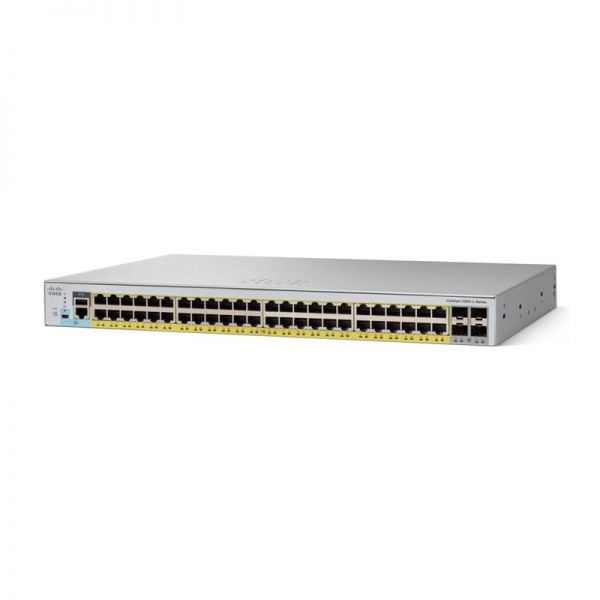
This datasheet provides a comprehensive overview of the Cisco Catalyst WS-C2960L-48PS-LL switch and its variants, specifically tailored for SKYRS operations in Pakistan.
The Cisco Catalyst 2960-L Series are fixed-configuration, Gigabit Ethernet switches that provide entry-level enterprise-class Layer 2 access. The WS-C2960L-48PS-LL is designed for operational simplicity to lower total cost of ownership, making it ideal for branch offices and conventional workspaces.
| Feature | WS-C2960L-48PS-LL Specifications |
| Ethernet Ports | 48 x 10/100/1000 Gigabit Ethernet PoE+ ports |
| Uplink Interfaces | 4 x 1G SFP (Small Form-Factor Pluggable) |
| PoE Power Budget | 370W (Supports IEEE 802.3at PoE+) |
| Forwarding Bandwidth | 52 Gbps |
| Switching Bandwidth | 104 Gbps |
| Forwarding Rate | 77.38 Mpps (64-byte L3 packets) |
| Memory | 512 MB DRAM / 256 MB Flash |
| Form Factor | 1U Rack-mountable |
| Software Feature Set | Cisco IOS LAN Lite |
In Pakistan, SKYRS typically utilizes these specific models depending on the power and uplink requirements of the site:
WS-C2960L-48PS-LL: The standard 48-port PoE+ model with 1G SFP uplinks.
WS-C2960L-48TS-LL: The non-PoE version of the same switch, used for data-only workstation connections to reduce power consumption.
WS-C2960L-48PQ-LL: A high-performance variant featuring 4 x 10G SFP+ uplinks for higher bandwidth backhaul to core layers.
WS-C2960L-48TQ-LL: 48-port non-PoE with 4 x 10G SFP+ uplinks.
SKYRS ensures professional deployment across Pakistan through the following standardized process:
Rack Mounting: Secure the switch into a standard 19-inch rack using the provided brackets.
Environmental Check: Ensure a minimum of 3 inches of clearance for airflow. Note that these switches are fanless up to 45°C, making them quiet but sensitive to trapped heat.
Powering: Connect the AC power cord to the rear panel. For the PS models, verify the total PoE load does not exceed 370W.
Downlinks: Use Cat6 or Cat6A cables for Gigabit speeds and PoE+ delivery.
Uplinks: Use Cisco-certified SFP modules (GLC-TE for copper or GLC-SX-MMD for fiber) to connect to the distribution layer.
Initial setup is performed via the Console port (RJ45 or USB Mini-B) or the Web UI.
Assign IP Address: Configure a Management VLAN (usually VLAN 1 or a dedicated MGMT VLAN).
VLAN Assignment: Segment traffic (e.g., Voice, Data, Security) across the 48 ports.
Security: Enable Port Security and 802.1X for authorized access.
PoE Management: Configure power inline commands to prioritize critical devices like IP Cameras or Access Points.
SKYRS maintains dedicated stock of the 2960-L series in major hubs including Karachi, Lahore, and Islamabad.
Local Support: 24/7 technical assistance for configuration and hardware replacement.
Ready Stock: Direct availability of new and refurbished units with local warranty.
On-site Services: Installation and configuration services are available at your facility through SKYRS certified engineers.
Skyrs stands as the premier vendor in Pakistan providing best Cisco WS-C2960L-48PS-LL switches for call center call centre in pakistan. We offer specialized calling cisco switches designed for high-density voice traffic in modern software houses. Every call center call centre switch in our inventory undergoes rigorous quality checks for 24/7 operational reliability.
The Cisco WS-C2960L-48PS-LL switch all variants provide 48 Gigabit ports for seamless data flow. These call center call centre cisco switches feature PoE+ power to drive your entire communication infrastructure. You can connect call center call centre cisco switches with mic setups effortlessly using standard RJ45 or RJ9 interfaces.
The switching routing cisco switches from the Catalyst series offer robust Layer 2 features and basic static routing. These units serve as the backbone cisco switches for call center call centre environments requiring stable connectivity. Skyrs ensures full compatibility with IP phones from Avaya, Alcatel, Polycom, Grandstream, Yealink, Dinstar, and Panasonic.
Our hardware supports leading platforms like Zoom and RingCentral for crystal-clear voice transmission. The WS-C2960L-48PS-LL PoE power budget of 370W handles multiple devices without power drops. You can deploy these cisco switches for call center call centre needs across Karachi, Lahore, and Islamabad.
While the 2960-L is a classic workhorse, the newer Catalyst 1000 series offers more modern management options.
| Feature | WS-C2960L-48PS-LL | Cisco Catalyst 1000-48P-4G-L |
| Ports | 48 x 1G PoE+ | 48 x 1G PoE+ |
| Uplinks | 4 x 1G SFP | 4 x 1G SFP |
| PoE Budget | 370W | 370W |
| Management | CLI, Web UI | CLI, Bluetooth, Web UI |
Skyrs is the leading Cisco Catalyst 1000 series distributor Pakistan for organizations seeking the latest hardware. We provide the most competitive Cisco C1000 switch price in Pakistan for bulk corporate requirements.
We offer the Cisco WS-C2960L-48PS-LL price in Karachi with same-day delivery options. Clients can also check the WS-C2960L-48PS-LL price in Peshawar or Faisalabad through our regional offices. We extend our reach to provide the best Cisco WS-C2960L-48PS-LL price in KPK and Quetta.
Buy Cisco Catalyst 1000 Lahore/Islamabad directly from our stock to ensure genuine manufacturer warranties. Contact us today for a Cisco WS-C2960L-48PS-LL bulk quote tailored to your business scale.
Manufacturer Link: Cisco Catalyst 2960-L Series Datasheet
Internal Link: Shop Cisco Solutions at Skyrs.com.pk
How do I access the Cisco Catalyst 1000 configuration guide?
You can find the official Cisco Catalyst 1000 configuration guide on the Cisco documentation portal or our resource page.
What are the steps for Cisco C1000 VLAN configuration?
Cisco C1000 VLAN configuration involves accessing the CLI and using the vlan [id] and name commands.
How to reset Cisco Catalyst 1000 switch to factory settings?
To learn how to reset Cisco Catalyst 1000 switch, hold the Mode button for 15 seconds during bootup.
Where can I find a Cisco C1000 firmware update download?
Visit the Cisco Software Central site to find the latest Cisco C1000 firmware update download for your model.
Can I get C1000-8T-2G-L datasheets download for small offices?
Yes, we provide C1000-8T-2G-L datasheets download links for all compact 8-port variant users.