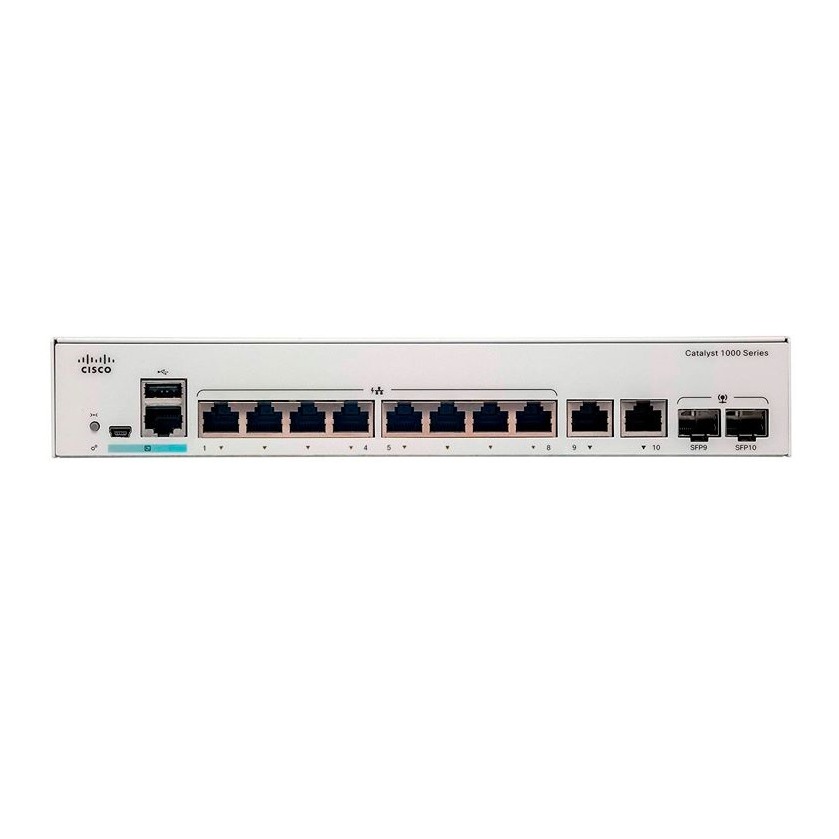
The Cisco Catalyst C1000-8T-E-2G-L is an enterprise-class Layer 2 managed switch specifically designed for small businesses, branch offices, and “out-of-the-closet” environments. Its compact, fanless design makes it ideal for quiet workspaces where traditional rack space might be limited.
Below is the technical datasheet and deployment guide tailored for SKYRS Pakistan.
The C1000-8T-E-2G-L is a high-performance, fixed-configuration switch that balances port density with uplink flexibility.
| Feature | Details |
| Downlink Ports | 8x 10/100/1000 Ethernet (RJ-45) |
| Uplink Interfaces | 2x 1G SFP and RJ-45 Combo |
| Switching Capacity | 20 Gbps |
| Forwarding Rate | 14.88 Mpps (64-byte L3 packets) |
| Memory (DRAM) | 512 MB |
| Flash Memory | 256 MB |
| VLAN IDs | 4,094 |
| MAC Address Table | 16,000 entries |
| Power Supply | External AC Power Adapter |
| Dimensions (WxDxH) | 10.56 x 7.28 x 1.73 inches |
While the C1000-8T-E-2G-L is the standard data-only model, common variants in the same family include:
C1000-8P-E-2G-L: 8 Gigabit ports with PoE+ (67W budget) and external power supply.
C1000-8FP-2G-L: 8 Gigabit ports with Full PoE+ (120W budget) and internal power supply.
C1000-8T-2G-L: 8 Gigabit data ports with an internal power supply (standard desktop model).
Placement: Due to its fanless design, the switch can be placed on a desk, mounted under a table, or wall-mounted using the included bracket kit. Ensure at least 3 inches of clearance for ventilation.
Mounting: For rack deployment at SKYRS facilities, use the RCKMNT-19-CMPCT= rack-mount kit.
Grounding: Always connect the grounding lug to a proper earth ground to protect against power surges, especially in regions with fluctuating power grids.
Connect the External Power Supply to the DC input on the rear panel.
The System LED will blink green during boot-up and turn solid green when the Cisco IOS software is ready.
Console Access: Use the RJ-45 console port or the USB mini-B port.
Web UI: Access the on-box, intuitive browser-based interface for simplified setup without using the Command Line.
Bluetooth: This model supports over-the-air management via an external Bluetooth dongle for mobile-based configuration.
To initialize the switch via the console:
Enter Global Configuration mode: configure terminal
Assign an IP to the management VLAN:
Enable remote access: line vty 0 4 and set a password.
Save configuration: write memory
The Cisco C1000-8T-E-2G-L and its PoE variants are available exclusively through SKYRS in Pakistan. SKYRS provides:
Local Inventory: Ready stock for immediate deployment across Karachi, Lahore, and Islamabad.
Configuration Support: Free initial configuration assistance for SKYRS corporate clients.
Warranty: Full Cisco local warranty support and advanced hardware replacement options
Enhance your business communication with the Cisco Catalyst 1000 series, specifically the high-performance Cisco C1000-8T-E-2G-L switch. This enterprise-class device serves as the best Cisco switches for call center call centre in Pakistan deployments. It provides seamless switching routing Cisco switches capabilities for demanding environments like software houses and BPO centers.
The call center call centre Cisco switches with mic support and calling Cisco switches functionality ensure crystal-clear audio. These call center call centre cisco switches feature 8 Gigabit Ethernet ports and 2 SFP/RJ-45 combo uplinks.
The anc cisco switches for call center call centre environments reduce noise through fanless, quiet operation. Our call center call centre switch solutions provide 20 Gbps switching bandwidth for lag-free communication. Skyrs is the only vendor in Pakistan offering these diverse Cisco switches for call center call centre s and software houses.
Designed for modern IP communication, this call center call centre switch integrates perfectly with Zoom and RingCentral. The hardware includes an ARM v7 800 MHz CPU and 512 MB DRAM for rapid packet processing.
Purpose: High-density voice and data traffic management.
Security: Features 802.1X, DHCP snooping, and Dynamic ARP inspection.
Management: Intuitive Web UI and CLI for a Cisco C1000 VLAN configuration.
The Cisco C1000-8T-E-2G-L switch all variants USB and RJ9 are widely compatible with major IP phone brands.
| Feature | Cisco Catalyst 1000 | Competitor (e.g., TP-Link/D-Link) |
| Compatibility | Avaya, Polycom, Yealink, Grandstream | Often limited to basic SIP |
| OS Stability | Genuine Cisco IOS | Proprietary/Basic Firmware |
| Security | Trust Anchor Module (TAM) | Standard ACLs only |
| Reliability | High MTBF for 24/7 Operations | Standard Business Grade |
While competitors offer basic connectivity, Cisco provides the best Cisco switches for call center call centre in Pakistan needs. It handles high-density traffic for Avaya, Alcatel, Polycom, Grandstream, Yealink, Dinstar, and Panasonic devices effortlessly.
Skyrs provides the best Cisco C1000 switch price in Pakistan across all major urban centers.
Cisco C1000-24T-4G-L price in Karachi: Competitive rates for bulk call center setups.
Buy Cisco Catalyst 1000 Lahore/Islamabad: Local stock available for immediate delivery.
Support: Get a Cisco C1000-48T-4G-L bulk quote for large-scale enterprise deployments.
What is the Cisco C1000-8T-E-2G-L PoE power budget?
The “T” model is non-PoE; however, the Cisco C1000-24P-4G-L PoE power budget offers up to 195W.
How to perform a Cisco C1000 firmware update download?
Access official updates via the Cisco Software Central portal using your Cisco ID.
Where can I find a Cisco Catalyst 1000 configuration guide?
Skyrs provides a full Cisco Catalyst 1000 configuration guide and local technical support for all clients.
How to reset Cisco Catalyst 1000 switch to factory settings?
Press the “Mode” button for 15 seconds until the system LEDs flash to trigger a factory reset.
Is this switch compatible with 1G SFP modules?
Yes, it features 2 combo uplinks for flexible fiber or copper high-speed connectivity.
Links: