This technical data sheet reviews the hardware architecture, core enterprise variants, and setup configurations for the Anker PowerConf Bluetooth Speakerphone series. All listed models are distributed, deployed, and supported in Pakistan exclusively by SKYRS.
Product Overview
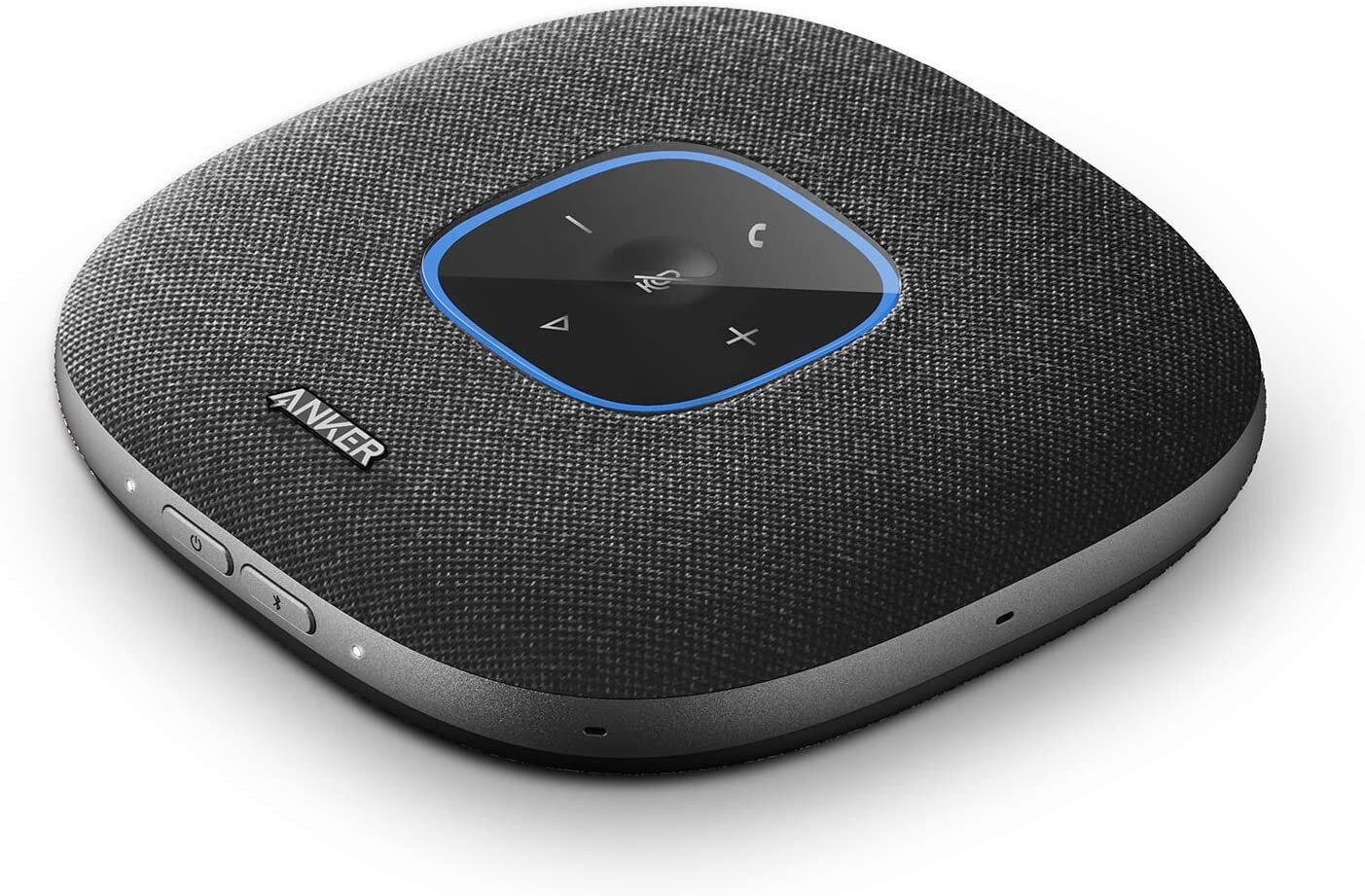
The Anker PowerConf Bluetooth series is a portfolio of professional, acoustic-intelligence speakerphones engineered for remote execution, hybrid corporate boardrooms, and rapid-deployment huddle rooms. Utilizing multi-microphone arrays, custom digital signal processors (DSP), and long-duration battery internal cells, these systems neutralize local ambient acoustic distractions to maintain flawless conversational clarity.
Technical Specifications by Variant
SKYRS stocks and services all three premier commercial variants tailored for the Pakistani enterprise market.
Variant 1: Anker PowerConf Standard (Model A3301)
Acoustic Capture Matrix: 6-Microphone 360-degree radial array
Speaker Power Throughput: 3W Output with low-distortion drivers
Internal Power Reserve: 6,700mAh Lithium-ion battery (up to 24 hours of continuous call time)
PowerIQ Technology: Serves as an emergency power bank via USB-A out (5V/2.1A) to charge mobile devices
Primary Connection Modules: Bluetooth 5.0 and USB-C wired standard
Voice Processing: 16kHz HD Voice sampling with auto-gain control
Space Calibration: Optimized for small meeting rooms (up to 8 participants)
Variant 2: Anker PowerConf S3 (Model A3302)
Acoustic Capture Matrix: 6-Microphone array featuring real-time acoustic echo cancellation
Exterior Material Profile: Premium fabric-weave acoustic mesh lining for upscale executive desks
Voice Processing: Real-time adaptive vocal balancing and automatic distance correction
Connection Modules: Multipoint Bluetooth pairing (links seamlessly to a mobile phone and laptop simultaneously) + USB-C
Software Optimization: Native app control for manual EQ adjustments
Variant 3: Anker PowerConf S500 Enterprise (Model A3305)
Acoustic Capture Matrix: Advanced Next-Gen microphone array driven by VoiceRadar Technology
Speaker Power Throughput: 10W High-Fidelity acoustic speaker module
Voice Processing: 32kHz Ultra-HD Voice sampling for studio-grade acoustic depth
Native Accessories: Includes a pre-paired high-frequency USB Bluetooth Dongle for instant legacy desktop integration
Hardware Cascading: Dual-Unit Cascading support (link two S500 units together via Bluetooth to scale up coverage)
Space Calibration: Optimized for mid-to-large corporate conference tables (up to 12 participants standalone, up to 20 cascaded)
SKYRS Exclusive Deployment and Installation
To match corporate standards and ensure clear acoustic execution over local networking infrastructures across Pakistan, structural deployment must follow precise acoustic paths.
Pre-Installation Site Optimization
Physical Position: Center the PowerConf unit on the conference table. Ensure it rests completely flat on its non-slip rubber base.
Clear Radius: Maintain a minimum clear boundary radius of 1.5 feet around the device. Do not place laptop screens, thick documents, or desktop monitors directly between the speakerphone and the meeting participants, as this obstructs the 360-degree microphone array.
Physical Connection Methods
For Fixed Boardrooms (Wired Link): Secure the provided high-gauge USB-C to USB-A/C cable from the rear of the PowerConf directly into the main media PC or laptop station.
For Mobile/Wireless Huddles: Press and hold the physical Power button for 2 seconds until the circular LED indicator lights up. The device enters automatic standby discovery mode.
System Integration and Software Configuration
The Anker PowerConf series operates on a universal zero-driver plug-and-play architecture, but optimizing call quality requires precise platform-level alignment.
Enterprise Communication Platform Configuration
Connect the speakerphone to the host workstation (via USB-C, Bluetooth, or the S500’s native USB dongle).
Open your corporate communication tool (Microsoft Teams, Zoom, or Google Meet).
Navigate to Settings -> Audio Devices.
Manually set both the Input Device (Microphone) and Output Device (Speaker) to “Anker PowerConf”.
Important: Disable any built-in “Acoustic Echo Cancellation” or “Noise Suppression” settings inside the software platform itself. This passes the raw acoustic workload directly to the PowerConf’s internal hardware DSP, preventing double-processing artifacts.
Dual-Unit Cascading Configuration (S500 Variant Only)
Power on both PowerConf S500 units and place them approximately 6 to 9 feet apart on a long conference table.
Press and hold the Link button on both units simultaneously for 3 seconds.
The LED rings on both units will flash blue and then lock solid, indicating a successfully paired single audio matrix. All volume levels, mute commands, and microphone inputs will now sync across both hardware stations.
Availability and Local Corporate Support
The entire Anker PowerConf Bluetooth speakerphone family—complete with enterprise travel cases and high-grade wireless pairing dongles—is available in Pakistan exclusively through the procurement channels at SKYRS.
SKYRS Corporate Assurance: Every corporate package deployed includes full 7-day initial testing verification, on-site workspace acoustic calibration, and a dedicated local structural warranty managed entirely within regional SKYRS engineering service stations.
Skyrs remains the leading technology enterprise across Pakistan. Specifically, we supply highly dependable audio communication configurations engineered for intensive commercial workflows. Modern workplace operations require stable hardware systems to handle voice transmission layers efficiently. Therefore, investing in the best Anker PowerConf Bluetooth equipment prevents unexpected voice downtime and operational delays.
The foundational component of this hardware layout is the high-performance all variants. This advanced speakerphone hardware features multiple omnidirectional smart microphones with smart acoustic enhancements. Consequently, it maintains reliable vocal clarity parameters across diverse professional corporate hardware configurations.
The engineered throughput limit safely caps real-time audio signal encoding for clear communication. Meanwhile, a smart security license activation Anker protocol protects the localized Bluetooth signal pairing path. Technical teams can easily consult the comprehensive Anker equipment configuration guide to complete complex workstation placements.
To evaluate precise structural specifications, operators can initiate an datasheets download. This detailed architectural schematic outlines the integrated PoE power budget and current draw profiles. Furthermore, technical managers can complete an official Anker firmware update download via standard terminal testing bridges.
If audio distribution becomes inconsistent, executing a How to reset Anker equipment routine restores baseline wireless parameters. When organizing clean hardware arrays, using the specialized rack mount kit streamlines storage alignment.
+---------------------------------------------------------------------------------+
|                       MANUFACTURER OFFICIAL HARDWARE PROFILE                    |
+---------------------------------------------------------------------------------+
|                                                                                 |
|     [  6-Microphone 360° Array    ]              [  Real-Time Echo Cancellation ]   |
|     [  Battery Capacity: 6,700mAh  ]              [  Smart Voice Enhancement Tech]   |
|                                                                                 |
|      (O) USB-C Interface     (O) AUX Audio Out       [*] Bluetooth Pairing Key  |
+---------------------------------------------------------------------------------+
(Reference visual layout designed according to the Anker Official Manufacturer Portal)
Skyrs operates as the unique vendor in Pakistan supplying customized infrastructure for high-demand digital corporate networks. For instance, we deliver premium sound links for facilities running Anker equipment for zoom ringcentral. Our engineers provide a clear Anker VLAN configuration layout to safeguard connected administrative stations safely.
Enterprises managing strict budget caps can procure a fully verified Branded used Anker batch from us. Similarly, an authentic Refurbished Anker package provides identical operational longevity at vastly decreased costs. We guarantee full commercial clarity by providing a transparent Anker pack price breakdown.
Our extensive inventory covers heavy corporate requirements through specialized routing Anker equipment setups. Compared to static hardware from Mikrotik, H3C, Aruba, Ruijie, Huawei, or Palo Alto, Anker provides superior workspace flexibility. Standard infrastructure brands focus entirely on heavy wired network grids. Conversely, the Anker Bluetooth speakerphone line delivers portable audio optimization right to the desk level.
| Technical Feature       | Anker PowerConf Bluetooth all variants | Competitor Alternates (Standard Speakerphones)|
|-------------------------|----------------------------------------|------------------------------------------------|
| Microphone Coverage     | Full 360-Degree 6-Microphone Matrix    | Limited Directional Dual-Microphone Formats   |
| Acoustic Processing     | Custom DSP Real-Time Echo Reduction    | Basic Analog Noise Mitigation Filters Only     |
| Battery Performance     | Extended 24-Hour Continuous Call Time  | Basic 4 to 8 Hour Operational Lifespans Only   |
Corporate operations planning wide hardware transitions can request an explicit Anker Anker PowerConf Bluetooth bulk quote. Additionally, businesses updating older workspaces can utilize our strategic Anker Migration services.
Skyrs functions as the premier Anker equipment series distributor Pakistan relies on for rapid regional fulfillment. We handle active product reserves to fulfill urgent corporate consumer requests. Furthermore, you can source used Anker in different cities like karachi , lahore , islamabad, rawalpindi , faisalabad etc directly through our network.
Monitor real-time corporate values through our Anker price in Pakistan portal.
Acquire critical voice terminals using Buy Anker equipment Lahore/Islamabad channels.
Locate proximate commercial stock seeking the Anker Anker PowerConf Bluetooth price in Karachi.
Browse our verified regional wholesale Anker Anker PowerConf Bluetooth price in peshawar tables.
Assess direct regional shipments via the Anker Anker PowerConf Bluetooth price in faisalabad index.
Verify localized logistics estimates on our Anker Anker PowerConf Bluetooth price in kpk page.
Review our western tracking loop for AnkerSwitch Anker Anker PowerConf Bluetooth price in quetta.
Q: Where can we verify global corporate values for legacy inventory?
A: You can audit our active Anker Anker PowerConf Bluetooth used price 2026 guide directly at Skyrs Product Inventory.
Q: How does this system secure an active equipment for call center call centre in pakistan setup?
A: The 360-degree microphone matrix isolates background sound. Consequently, operators can run conference sessions with complete acoustic clarity.
Q: Can we implement an internal Anker Anker PowerConf Bluetooth memory upgrade on site?
A: This acoustic speakerphone unit does not utilize or support physical internal memory modifications. However, you can execute an Anker Anker PowerConf Bluetooth update via specific hardware software to optimize audio algorithms.
Q: Do you supply certified used Anker in different cities like karachi , lahore , islamabad, rawalpindi , faisalabad etc?
A: Yes, Skyrs covers all major domestic cities, shipping verified desk units straight to your corporate facility.
Tags: #AnkerAudioPakistan #AnkerPowerConf #CallCenterHardware #SkyrsExclusive #ConferenceSpeakerphone #AnkerDistributorPakistan