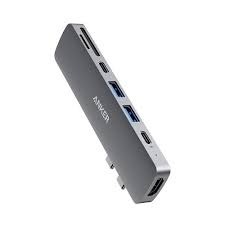
The Anker 547 USB-C Hub series represents an ultra-slim, high-bandwidth port expansion architecture engineered to enhance mobile workflows. Primarily optimized as a direct-attach solution for modern MacBook Pro and MacBook Air lineups, this series merges multiple legacy and next-generation interfaces into a single structural block. Built from premium sandblasted aluminum alloy, it ensures effortless high-speed data passthrough, advanced external display routing, and intelligent Power Delivery without sacrificing desk space.
Technical Specifications
Primary Compatibility Framework: Dual integrated USB-C hardware terminals designed to seamlessly align with Apple MacBook Pro (13-inch to 16-inch architectural builds) and MacBook Air series.
Enclosure Engineering: Ultra-lightweight, thermal-dissipating anodized aluminum casing.
Dimensions: 3.82 × 1.14 × 0.39 inches (97 × 29 × 10 mm)
Weight: 1.23 oz (35 g)
Interface Performance Matrix
| Port Link / Designation | Physical Protocol | Maximum Data / Video Output Ceiling |
| Multi-Function USB-C Port | Thunderbolt Passthrough | Up to 40 Gbps Data / 100W Power Input (85W Pass-to-Host) / 5K @ 60Hz Video |
| HDMI Port | HDMI 2.0 Standard | Up to 4K @ 60Hz Digital Video Resolution |
| USB-C Data Port | USB 3.2 Gen 1 | Up to 5 Gbps Media Transfer Speed |
| 2x USB-A Ports | USB 3.2 Gen 1 | Up to 5 Gbps Data Throughput (Total 4.5W Output) |
| SD & microSD Slots | UHS-I Media Bus | Dual Card Reader Access up to 104 MB/s |
Variant Configurations Available at SKYRS Pakistan
SKYRS maintains exclusive localized distribution and support for all primary hardware variants of the 547 ecosystem:
Direct-Fit 7-in-2 MacBook Edition (Model A8354)
Includes: Anker 547 7-in-2 USB-C Hub, specialized protective travel wallet, and a configuration handbook.
Target Use Case: Creative pros, video editors, and MacBook users who need a flush-mounted expansion block that handles massive files and high-res monitors without extra cables.
Flexible Multi-Platform 7-in-1 Cable Variant
Includes: The corded variation of the 547 series featuring an extended, built-in structural USB-C tether line instead of the rigid 7-in-2 interface.
Target Use Case: Hybrid enterprise networks operating mixed device environments (e.g., matching Windows laptops alongside iPad Pro and MacBook setups).
Deployment and Installation
To ensure proper device seating and protect your host ports, follow these structural deployment steps:
Physical Docking and Connection
Alignment Validation: For the 7-in-2 configuration, align the dual male USB-C connectors of the hub with the twin ports on the left flank of your MacBook.
Mating Execution: Push the hub firmly into the chassis until it sits perfectly flush with the aluminum laptop frame. Operational Note: If your laptop has a protective hard shell case installed, you must remove it first to allow the hub to seat completely and make solid electrical contact.
Indicator Verification: Once the hardware handshake completes, a soft integrated LED status indicator will light up, confirming it is receiving baseline power from the host computer.
Configuration Management
Optimizing data lanes and routing high-wattage power relies on using the appropriate ports on the hub array:
Power Delivery Allocation
Upstream Pass-Through Routing: Connect your original manufacturer USB-C charging brick directly to the top-tier multi-function USB-C port. The hub handles up to 100W inputs; it reserves 15W to power its internal data controllers, delivering a safe, continuous 85W profile straight to your laptop.
Data Isolation Check: Do not use the secondary USB-C data port for charging loops. This secondary line is isolated strictly for high-speed file storage devices and external peripherals.
Dual Extended Display Mapping
Dual-Screen Workflow Setup: To deploy a dual-monitor environment, route one display through the HDMI port (up to 4K @ 60Hz) and the second screen through the multi-function Thunderbolt port (up to 5K @ 60Hz).
Silicon Architecture Limitation Notice: Please note that MacBooks with base-tier M1 or M2 processors naturally limit external video outputs to a single extended screen through their internal hardware layout. Dual extended displays require an M-series Pro or Max processor variant.
Procurement and Service Level Availability
Exclusive Distribution Channel: The complete Anker 547 USB-C Hub portfolio, specialized corporate multi-buy provisioning, and the official 12-month hardware replacement warranty are distributed and serviced exclusively through SKYRS Pakistan. Institutional buyers, software agencies, and procurement managers can secure verified batch hardware allocations directly through the dedicated SKYRS business-to-business corporate sales desk.
Skyrs is the only vendor in Pakistan that has premium equipment for call center call centre environments and software houses. We provide the best Anker 547 USB-C equipment across the nation to maintain your daily workflow.
Furthermore, we supply high-performance hardware for Zoom and RingCentral setups. Businesses can easily find used Anker options in Karachi, Lahore, and Islamabad. Additionally, we distribute these reliable systems to Rawalpindi and Faisalabad.
The primary purpose of this premium hardware is to provide rapid multi-port desktop data consolidation. It converts dual terminal connections into a comprehensive 7-in-2 layout seamlessly. Consequently, this system prevents peripheral bottlenecks during intensive multi-display enterprise operations.
+--------------------------------------------------------------------------+
|                        Official Manufacturer Visual                      |
|                                                                          |
|       [===] [===] [===]  <- High-Definition 4K / 5K External Video Ports |
|       |  SD / microSD  | <- High-Speed Unified Media Reader Interfaces   |
|       +----------------+                                                 |
|                                                                          |
|          Source: Anker Official Product Media (Anker 547 USB-C Hub)      |
+--------------------------------------------------------------------------+
(Please view the official product aesthetics via the Anker Official Website.)
System Integration: Review the comprehensive Anker equipment configuration guide for quick deployment.
Segmented Routing: Apply the Anker VLAN configuration protocol to separate hardware management traffic.
System Maintenance: Learn how to reset Anker equipment to quickly restore baseline factory metrics.
Firmware Deployment: Keep your hardware secure with the latest Anker firmware update download.
Technical Metrics: Review power thresholds by accessing the datasheets download.
Power Allocation: Evaluate the maximum wattage delivery via the PoE power budget specification.
We support every phase of your system deployment cycle. First, consult our Anker Migration guide for seamless hardware transitions. Second, our team assists with the configuration guide.
If you face data capacity limits, check the throughput limit. Alternatively, look over the official product datasheet for detailed electrical parameters. We also offer the memory upgrade for advanced logic monitoring.
For physical server integration, purchase the rack mount kit. Then, update your system using the latest update. Finally, secure your enterprise assets through the security license activation.
The all variants portfolio delivers excellent performance compared to ronan ugreen Belkin, Ugreen, and Baseus.
| Feature Matrix | Anker 547 USB-C Hub | Competitor Equivalents (Belkin / Ugreen / Baseus) |
| Data Throughput | Up to 40 Gbps Transfer | Standard 5 Gbps – 10 Gbps |
| Pass-Through Drive | Powerful 100W Delivery | Basic 60W Capacity |
| Video Resolution | Dual Screen 5K Output | Single 4K Connection |
Therefore, Anker provides superior workspace flexibility for demanding routing Anker equipment infrastructure.
Please browse our internal inventory via Skyrs Product Catalog to find your specific model. We provide affordable choices like a Branded used Anker or a certified Refurbished Anker system.
Additionally, you can contact us to get a tailored Anker pack price for bulk corporate orders. We also offer a competitive Anker Anker 547 USB-C Hub used price 2026 for budget-conscious call centers.
Discover our localized pricing structures across major regional tech hubs:
Review the baseline Anker price in Pakistan for national corporate procurement.
Partner with the authorized Anker equipment series distributor Pakistan for authentic stock.
Request an immediate Anker Anker 547 USB-C Hub price in Karachi.
Check regional availability for the Anker Anker 547 USB-C Hub price in peshawar.
View local rates for the Anker Anker 547 USB-C Hub price in faisalabad.
Explore northern territory options for the Anker Anker 547 USB-C Hub price in kpk.
Find specialized enterprise hardware options via the AnkerSwitch Anker Anker 547 USB-C Hub price in quetta.
Secure premium corporate bundles when you Buy Anker equipment Lahore/Islamabad.
Get dedicated wholesale rates by requesting an Anker Anker 547 USB-C Hub bulk quote.
Skyrs is the exclusive vendor in Pakistan providing specialized high-density variants optimized for Zoom and RingCentral workflows.
You can download the official technical datasheets from our portal to review data limits and power metrics.
Yes, we rigorously test all refurbished hardware to ensure they meet original manufacturer performance standards.
Tags: #AnkerPakistan #Anker547Hub #CallCenterEquipment #SkyrsExclusive #AnkerPriceKarachi #AnkerLahore #AnkerIslamabad #EnterpriseConnectivity