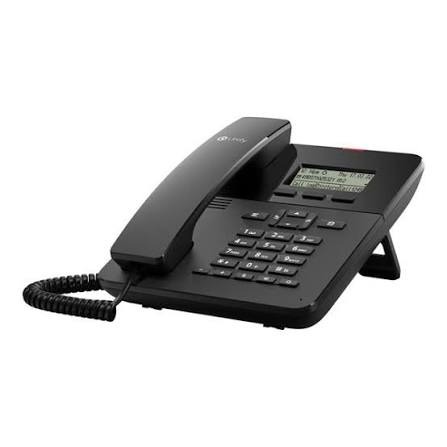
Data Sheet: OpenScape DeskPhone CP110 (SIP)
The OpenScape DeskPhone CP110 is a high-value, entry-level IP device designed for professional workplace scenarios [1.1.1, 1.1.3]. Combining an ergonomic, user-friendly design with advanced audio technology, it serves as a reliable communication tool that delivers crystal-clear sound quality and essential business features [1.1.3, 1.1.8].
Technical Specifications
Display and Design
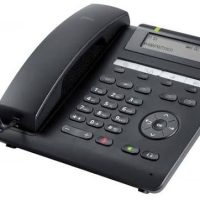
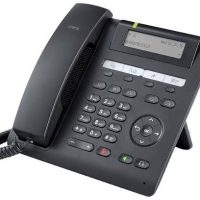
Display: Graphical three-line monochrome display (162 x 48 pixels) [1.1.1, 1.1.4].
Keys: 3 freely programmable function keys with soft labels on the LCD, 2 fixed function keys (menu/settings, messages), 3 audio keys (mute, loudspeaker, headset), and a 3-way navigator with an OK key [1.1.1, 1.1.6].
Audio: Full-duplex hands-free speaking with wideband codec support (G.722 and OPUS) for superior acoustic performance [1.1.3, 1.1.6].
Connectivity and Power
Networking: 10/100/1000 Base-T Ethernet switch (autosensing) [1.1.3, 1.1.6].
Power: IEEE 802.3af Power over Ethernet (Class 2) or external power supply [1.1.1, 1.1.10].
Interfaces: Dedicated headset port (DHSG/EHS support) [1.1.1, 1.1.6].
Energy Efficiency: Supports IEEE 802.3az Energy Efficient Ethernet [1.1.1, 1.1.6].
Deployment, Installation, and Configuration
The OpenScape DeskPhone CP110 is designed for straightforward integration into existing IP infrastructures [1.1.5].
Physical Installation: Connect the device to your IP infrastructure using a shielded LAN cable (Cat-5 for 100 Mbps or Cat-6 for 1000 Mbps) [1.1.7, 1.1.9]. Ensure the cable shielding is properly earthed in the building installation [1.1.9, 1.1.10].
Environment: Operate in a sheltered, dust-free environment with an ambient temperature between 5°C and 40°C [1.1.7, 1.1.10]. Avoid direct sunlight, moisture, and heat sources [1.1.9, 1.1.10].
Configuration: Deployment is supported via plug-and-play technologies [1.1.4, 1.1.8]. Initial setup, including SIP account registration and key programming, can be managed through the phone’s user-friendly interface or central administration tools [1.1.7].
Updates: Maintain a stable connection to power and the LAN during any firmware updates to ensure device integrity [1.1.9].
Availability at SKYRS
The OpenScape DeskPhone CP110 is available exclusively through SKYRS in Pakistan. SKYRS provides comprehensive support, including professional guidance on deployment, system configuration, and technical consultation to ensure your communication hardware is perfectly aligned with your business requirements. Contact the SKYRS team for all procurement and implementation inquiries.
Elevate your business communication with the best OpenScape DeskPhone equipment, specifically the versatile OpenScape DeskPhone CP110 (SIP). Skyrs is the only vendor in Pakistan that offers this high-quality OpenScape DeskPhone equipment for call centers, software houses, hospitals, and offices. We provide a wide range of variants to ensure your organization stays connected with maximum efficiency.
Whether you operate in Karachi, Lahore, Islamabad, Rawalpindi, Faisalabad, Quetta, Peshawar, Multan, Hyderabad, or Sialkot, we deliver reliable hardware. Our inventory includes Branded used OpenScape DeskPhone units and Refurbished OpenScape DeskPhone models that fit any budget. These devices are ideal for OpenScape DeskPhone Migration when updating your existing infrastructure to modern standards. You will find that our competitive OpenScape DeskPhone pack price helps businesses save while maintaining professional quality.
The OpenScape DeskPhone CP110 (SIP) configuration guide makes deployment simple for any IT team in Pakistan. You can manage the OpenScape DeskPhone CP110 (SIP) throughput limit to maintain network stability across your facility. Our experts also assist with OpenScape DeskPhone CP110 (SIP) memory upgrade and provide the necessary rack mount kit for installation. Furthermore, we facilitate OpenScape DeskPhone CP110 (SIP) update processes and offer security license activation for protected communication. For detailed technical specs, please refer to the official OpenScape DeskPhone CP110 datasheet.
Skyrs is the exclusive OpenScape DeskPhone equipment series distributor in Pakistan, supporting UCM, PBX, Grandstream, Asterisk, and various hosted call center platforms. Beyond phones, we supply essential gadgets like SSDs, RAM, and hard disks to keep your office operations running smoothly. Our team provides professional support for routing OpenScape DeskPhone equipment across factories, hospitals, and government forces. Visit our internal product page to see why we are the preferred partner for software houses nationwide.
Compared to basic competitor models, the OpenScape DeskPhone CP110 (SIP) features a superior graphical three-line display and Gigabit Ethernet. While other entry-level phones lack expandability, this unit supports high-strength RSA encryption for added workplace safety. It remains a high-value device for those needing reliability without compromising on performance or energy efficiency.
Where can I find the best OpenScape DeskPhone price in Pakistan? Skyrs offers the most competitive rates for the CP110 (SIP) series in Karachi, Lahore, and all major cities.
How do I perform an OpenScape DeskPhone VLAN configuration? Our support team provides step-by-step documentation to help you configure VLAN settings for your specific network.
Is there a specific OpenScape DeskPhone firmware update download available? Yes, we provide the latest firmware updates to ensure your devices remain secure and fully functional.
What is the PoE power budget for the CP110 (SIP)? The device is IEEE 802.3af compliant, supporting Class 2 PoE for efficient power management in your office.
How to reset OpenScape DeskPhone equipment to factory settings? You can easily reset your device through the settings menu or by using the reset guide provided by our team.
Top Ranking Tags: #OpenScapeDeskPhone #PakistanTech #CallCenterSolution #IPTelephony #Skyrs #DeskPhoneCP110 #UnifiedCommunications #BusinessCommunication #NetworkingHardware #RefurbishedTech