
$5,000.00
Linksys RE6300 AC750 BOOST Wi-Fi Range Extender Data Sheet Availability Notice: Genuine variants, complete deployment, installation, and configuration services are exclusively available via SKYRS in Pakistan.
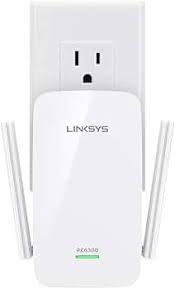
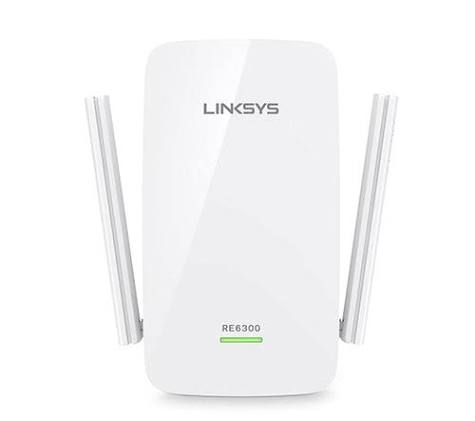
The Linksys RE6300 AC750 BOOST Wi-Fi Range Extender is engineered to eliminate dead zones and expand dual-band wireless coverage across large homes and offices. It delivers high-speed internet connectivity up to 6,500 square feet, ensuring seamless streaming, gaming, and browsing.
SKYRS maintains stock and support for all regional plug variants tailored to local Pakistani electrical standards:
Linksys RE6300-UK / RE6300-ME: Equipped with BS1363 (Type G 3-pin) plugs, perfect for standard Pakistani electrical outlets without requiring adapters.
Linksys RE6300-EU: Equipped with CEE 7/7 (Type C/F) plugs, suited for European-style round outlets.
| Feature | Specification |
|---|---|
| Wi-Fi Technology | 802.11ac (Wi-Fi 5) backward compatible with 802.11a/b/g/n |
| Wi-Fi Speed | AC750 (Simultaneous N300 Mbps on 2.4 GHz + AC433 Mbps on 5 GHz) |
| Wi-Fi Bands | Concurrent Dual-Band (2.4 GHz and 5 GHz) |
| Coverage Area | Up to 6,500 square feet |
| Antennas | 2x External non-detachable Dipole Antennas |
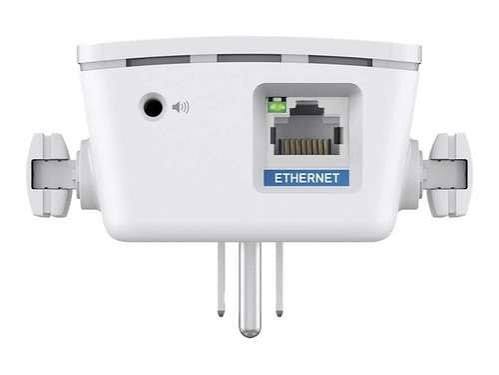
| Ports | 1x Gigabit Ethernet Port (10/100/1000 Mbps) |
| Security | Wi-Fi Protected Setup (WPS), WPA/WPA2 encryption, 128-bit AES |
| Advanced Features | Cross-Band Technology, Beamforming, Spot Finder Technology |
Expands your existing wireless signal into hard-to-reach areas. It utilizes Cross-Band Technology to maximize simultaneous data transfer using both bands instead of relying on a single channel.
Connects directly to your primary router via an Ethernet cable. This creates a fresh, dedicated Wi-Fi hotspot with zero performance loss over distance, maximizing localized data throughput.
SKYRS provides premium configuration support for all units. For self-setup, choose one of the options below:
Plug the Linksys RE6300 into an electrical outlet near your main router.
Wait for the indicator light on the front to change from blinking amber to solid amber.
Press the WPS button on your main router.
Immediately press the WPS button on the side of the Linksys RE6300.
The light will blink green while connecting and turn solid green once fully paired. Move the unit to an optimal mid-way location.
Plug in the extender close to the main router and wait for the light to blink amber.
Open the Wi-Fi settings on your phone or laptop and connect to the default open network: Linksys Extender Setup.
Launch a web browser and navigate to [http://extender.linksys.com](http://extender.linksys.com).
Follow the on-screen prompts. The integrated Spot Finder Technology will visually guide you to place the extender at the correct distance from your router.
Select your main network, enter your existing Wi-Fi security keys, and save changes.
Availability: Exclusively sourced, verified, and distributed in Pakistan via SKYRS network channels.
Deployment Assistance: SKYRS offers managed on-site physical site surveys and enterprise deployment plans to ensure optimal hardware placement without network interference.
Are you searching for the best Linksys RE6300 Wi-Fi Extender equipment to power your business or home? Skyrs stands as the exclusive premier vendor providing complete networking solutions across the country. We supply high-performance hardware to software houses, corporate offices, and call centers nationwide.
Whether you need a Linksys wifi pack price for home or heavy-duty hardware for industry, we deliver everywhere. Specifically, we supply genuine equipment to major hubs like Karachi, Lahore, Islamabad, Rawalpindi, Faisalabad, Quetta, Peshawar, Multan, Hyderabad, and Sialkot. Consequently, our inventory supports critical sectors including hospitals, factories, and defense forces.
Skyrs offers a diverse stock of top-tier hardware tailored to your specific infrastructure demands.
Branded used Linksys wifi systems for cost-conscious startups.
Refurbished Linksys wifi units undergoing rigorous quality testing.
Authentic Linksys wifi used price 2026 deals with full warranty support.
Furthermore, we stock essential performance upgrades like a Linksys wifi memory upgrade and a heavy-duty Linksys wifi rack mount kit. Our inventory also covers essential hardware expansions, including server-grade SSDs, high-speed RAM, and specialized storage components.
Additionally, our devices integrate seamlessly with diverse communication platforms. They provide flawless connectivity for Asterisk, Hosted Call Center setups, Zoom, RingCentral, and UCM PBX Grandstream networks.
Our routing Linksys wifi equipment handles high-density data traffic with ease. For example, you can download the official Linksys wifi datasheets download to review complete technical metrics.
Every enterprise unit maintains an impressive Linksys wifi throughput limit to eliminate data bottlenecks. Meanwhile, these devices provide a robust Linksys wifi PoE power budget to power your IP phones and surveillance cameras smoothly.
If you want to maximize network security, we provide immediate Linksys wifi security license activation. Additionally, we maintain a comprehensive online Skyrs Product Catalog for easy component browsing.
| Feature / Metric | Linksys Wifi Enterprise Variants | Competitor Brands (e.g., TP-Link / D-Link) |
|---|---|---|
| VLAN Management | Advanced Linksys wifi VLAN configuration | Basic network segmenting options |
| Signal Stability | Long-range Linksys wifi signals | Standard coverage zones |
| Maintenance | Easy Linksys wifi firmware update download | Complex patching interfaces |
We provide targeted regional pricing to match local market budgets across Pakistan. You can request a Linksys wifi bulk quote directly from our sales team today.
Find the competitive Linksys RE6300 price in Karachi or check the latest Linksys RE6300 price in KPK.
Discover the current Linksys wifi price in Pakistan for your corporate office.
Evaluate the verified Linksys wifi price in peshawar and Linksys wifi price in faisalabad.
Check the budget-friendly Linksys wifi Switch Linksys wifi price in quetta.
Easily Buy Linksys wifi equipment Lahore/Islamabad through our quick shipping channels.
How do I install or update my new hardware?
You can follow our step-by-step Linksys wifi equipment configuration guide for quick deployment. Moreover, you must perform a regular Linksys wifi update to keep your network completely safe from external vulnerabilities.
What should I do if the device stops responding?
First, read the guide on How to reset Linksys wifi equipment safely. After that, implement the standard Linksys wifi configuration guide to rebuild your network parameters.
Tags: #LinksysWifiPriceInPakistan #LinksysRE6300Karachi #BuyLinksysLahore #LinksysWifiDatasheet #LinksysBulkQuote #SkyrsPakistan


