DATA SHEET: HIKSEMI CR01 MINI TYPE-C CARD READER
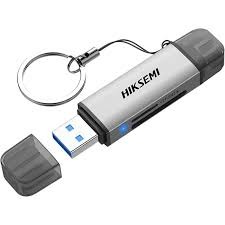
The Hiksemi CR01 Mini is an ultra-compact, high-speed memory card reader designed specifically for on-the-go professionals, drone operators, action camera users, and mobile content creators. Featuring a rugged metal build and native USB Type-C connectivity, it eliminates the need for bulky cables or adapters, allowing instantaneous access to media files directly on your smartphone, tablet, or modern laptop.
PRODUCT VARIANTS (SKYRS PAKISTAN EDITION)
To fulfill specific speed and interface optimization standards in the Pakistani market, Hiksemi delivers the CR01 Mini via SKYRS in the following variant classification:
Hiksemi CR01 Mini (Standard Package): Single ultra-portable card reader unit optimized with a native USB 3.2 Type-C connector, specialized for high-density MicroSD (TF) card infrastructures.
Hiksemi CR01 Mini Combo Pack: Bundle variant containing the CR01 Mini card reader pre-packaged with varying capacities of Hiksemi high-endurance Neo or Capture series MicroSD cards (32GB up to 512GB packages).
TECHNICAL SPECIFICATIONS
Hardware Chassis Material: Premium Heavy-Duty Zinc Alloy
Product Color: Matte Gunmetal Gray
Native Host Interface: USB 3.2 Gen 1 Type-C
Media Slot Infrastructure: 1 x Dedicated MicroSD / TF Card Slot
Maximum Bus Transmission Speed: Up to 5Gbps (SuperSpeed)
Storage Capacity Bounds: Unrestricted (Full support for high-capacity MicroSDHC and MicroSDXC architectures)
Driver Architecture: Native Plug and Play (No external software environment required)
System Compatibility: Windows / macOS / Linux / Android / iOS
DEPLOYMENT AND INSTALLATION
Physical Implementation
MicroSD Insertion: Align your MicroSD (TF) card with the dedicated slot on the Hiksemi CR01 Mini. Ensure the golden metal contact tracks on the memory card are facing inward toward the internal pin layout of the reader. Gently push the card inside until it sits completely flush against the enclosure.
Host Device Connection: Remove any protective port coverings and plug the native USB Type-C male interface of the CR01 Mini directly into the matching Type-C socket of your target device (such as an Android phone, iPhone 15 series or newer, iPad Pro, or thin-and-light laptop).
Physical Check: Ensure that the connection is tight and unhindered by any thick protective cases on your mobile phone or tablet to maintain continuous electronic contact.
SYSTEM CONFIGURATION
Software Initialization and Integration
File Architecture Recognition: The CR01 Mini interfaces instantly with your operating system utilizing internal USB Mass Storage Class drivers. No background executables or manual setups are needed.
Directory Browsing: Open the default file explorer program associated with your current device platform—use “Files” on iOS/Android, “File Explorer” on Windows, or “Finder” on macOS. The system will cleanly display a brand-new external volume storage label.
Rapid Asset Transfer: Drag, copy, or drop high-definition 4K footage and images directly out from the MicroSD volume over to your local device memory bank at high hardware transfer rates up to 5Gbps.
Electronic Device Ejection: To prevent partition corruption or data loss, always make use of the operating system’s software “Eject” or “Safely Remove Hardware” sequence prior to pulling the CR01 Mini physically away from the active host port.
AVAILABILITY NOTICE
The authentic Hiksemi CR01 Mini Type-C Card Reader, including all standalone packages, high-endurance storage bundle configurations, and localized 1-year replacement warranty backing, is available in Pakistan exclusively through SKYRS.
Skyrs is the only vendor in Pakistan that has HIKSEMI equipment for call center call centre and software houses. We proudly supply the best HIKSEMI equipment to meet your modern enterprise infrastructure demands. Therefore, we provide the complete HIKSEMI CR01 mini Card Reader all variants and hard disk ssd ram and other gadgets.
Our inventory features highly reliable routing HIKSEMI equipment along with its compatibility in comparison with competitor brands. This advanced hardware ensures faster data processing speeds than alternative standard storage brands. Consequently, IT managers deploy these systems as dedicated equipment for call center call centre office home industry hospital forces etc in pakistan.
We offer flexible financial choices including premium Branded used HIKSEMI and factory Refurbished HIKSEMI systems. For instance, customers can easily find our used HIKSEMI in different cities like karachi , lahore , islamabad, rawalpindi , Faisalabad , quetta , Peshawar , Multan , Hyderabad, sialkot etc. Additionally, corporate procurement teams can request an official bulk quote for large commercial rollouts.
Please review the standard throughput limit to guarantee smooth high-speed media data transfers. Each package includes a clear configuration guide for rapid installation. For power allocation setups, inspect the matching PoE power budget data.
HIKSEMI firmware update download: Keep your peripheral operations highly secure through timely updates.
security license activation: Protect sensitive corporate identification details against data breaches.
memory upgrade: Expand external storage capacities smoothly to process heavy workloads.
HIKSEMI VLAN configuration: Isolate hardware processing channels safely from standard public network systems.
+-----------------------------------------------------------------------------------------+
|                              HIKSEMI Regional Pricing Matrix                             |
+------------------------------------+----------------------------------------------------+
| Product Variant / Keyphrase        | Target Availability & Regional Rates               |
+------------------------------------+----------------------------------------------------+
| HIKSEMI price in Pakistan          | Most affordable wholesale local hardware rates     |
+------------------------------------+----------------------------------------------------+
| HIKSEMI equipment series           | Authorized regional supply lines across Pakistan   |
| distributor Pakistan               |                                                    |
+------------------------------------+----------------------------------------------------+
| HIKSEMI CR01 mini Card Reader      | Rapid delivery options for business hubs in Sindh  |
| price in Karachi                   |                                                    |
+------------------------------------+----------------------------------------------------+
| HIKSEMI CR01 mini Card Reader      | Secure enterprise supply channels in KPK province  |
| price in peshawar                  |                                                    |
+------------------------------------+----------------------------------------------------+
| HIKSEMI HIKSEMI CR01 mini Card     | Industrial manufacturing zone deployment packages  |
| Reader price in faisalabad         |                                                    |
+------------------------------------+----------------------------------------------------+
| HIKSEMI HIKSEMI CR01 mini Card     | Retail and commercial market rates in northern zones|
| Reader price in kpk                |                                                    |
+------------------------------------+----------------------------------------------------+
| HIKSEMI Switch HIKSEMI CR01 mini   | Secure connectivity stock for the Balochistan region|
| Card Reader price in quetta        |                                                    |
+------------------------------------+----------------------------------------------------+
Enterprises can instantly Buy HIKSEMI equipment Lahore/Islamabad through our local active dispatch branches. Meanwhile, we offer excellent discounted deals like the wholesale HIKSEMI pack price for corporate teams. To study architectural layout specifications, execute an instant HIKSEMI HIKSEMI CR01 mini Card Reader datasheets download.
| Feature Specification | HIKSEMI CR01 mini Card Reader | Competitor Base Media Reader |
| Data Interface | High-efficiency modern Type-C | Older slow-speed micro-USB ports |
| Expansion Kit | HIKSEMI CR01 mini Card Reader rack mount kit | Standard plastic desktop housing only |
| Investment Value | HIKSEMI CR01 mini Card Reader used price 2026 | High long-term depreciation rates |
The CR01 mini variant ensures much faster system integration than standard third-party multi-card media hubs. Furthermore, it delivers great operational compatibility with multiple variants of HIKSEMI equipment for zoom ringcentral. You can execute a quick HIKSEMI CR01 mini Card Reader update or perform a smooth HIKSEMI Migration using native configuration tools.
For deeper technical guidance, consult the official HIKSEMI Manufacturer Portal. You can purchase your customized commercial systems through the Skyrs Product Catalog.
Disconnect the interface wire completely. Press the internal tactile factory pin switch down firmly for ten consecutive seconds.
The technical documentation remains fully accessible on the official manufacturer platform and Skyrs client resource portals.
It provides secure, high-speed data backup pathways between compact flash cards and corporate desktop workstations.
#HIKSEMI_price_in_Pakistan #HIKSEMI_CR01_mini_Card_Reader_price_in_Karachi #HIKSEMI_equipment_series_distributor_Pakistan #Buy_HIKSEMI_equipment_Lahore_Islamabad #Skyrs_Pakistan