The Anker Nano Docking Station ecosystem brings an innovative, space-saving design language to professional workflows. Bridging the gap between high-performance stationary computing and rapid mobile deployment, these devices provide ultra-slim form factors, dynamic power distribution, and multi-display management. Engineered with advanced thermal monitoring and premium recycled composites, the Nano lineup maximizes connectivity while minimizing desktop footprints.
Technical Specifications
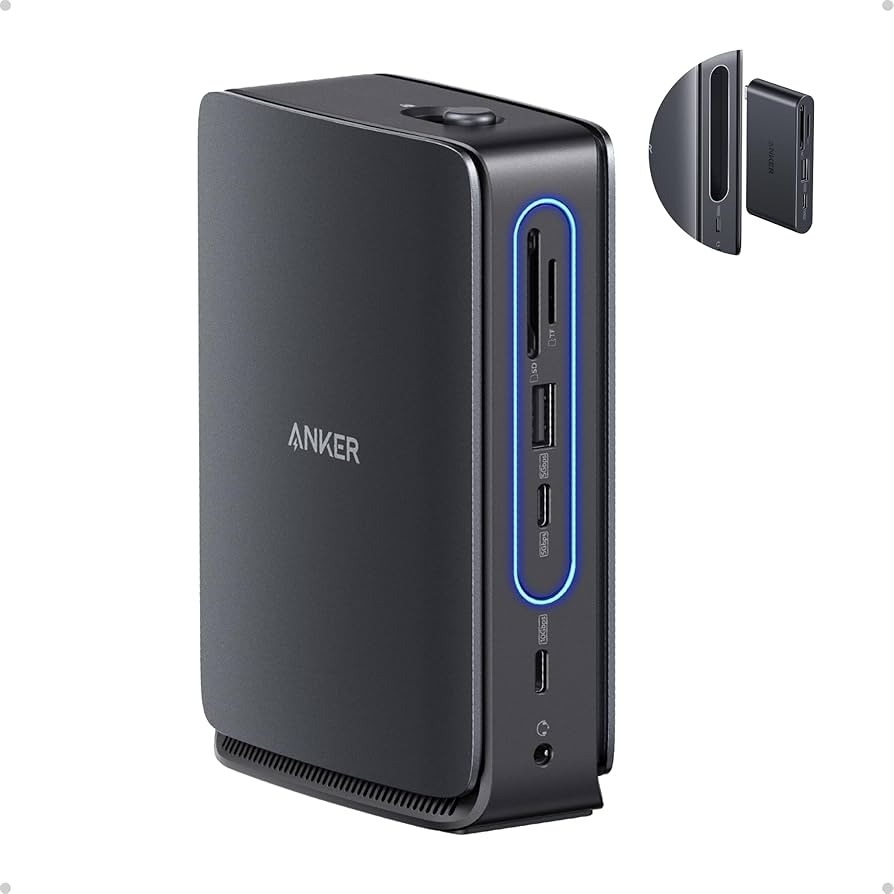
Anker Nano Docking Station (13-in-1, Triple Display, Built-In Removable Hub)
Primary Application: Enterprise Workstations / Multi-Monitor Power Users
Form Factor: Vertical desktop dock featuring an integrated, one-touch pop-out travel hub.
Host Power Delivery: 100W Max to laptop via the main base (85W via standalone portable hub).
Operating System Support: Windows 10 / 11 (Full MST Extended Desktop) and macOS 13.5 or later (SST Mirror Mode).
Anker Nano Charging & Docking Station (7-in-1, 100W)
Primary Application: Hybrid Workspaces / Minimalist Executive Desks
Cable Architecture: Dual built-in, high-durability retractable USB-C cables (Anker InstaCord rated for 18,000+ bends).
Integrated Display: 1.3-inch real-time LCD monitoring matrix for live port telemetry.
Interface Matrix
| Module / Port Connection | Data / Network Throughput | Power & Video Profile |
| Main Dock: USB-C Upstream | Data Pass-Through Link | Host Power Delivery up to 100W |
| Main Dock: 2x HDMI / 1x DP | N/A | Triple Monitor Output up to 4K @ 60Hz |
| Main Dock: 1x USB-C / 2x USB-A | 10 Gbps (USB-C) / 480 Mbps (USB-A) | Standard Downstream Device Operation |
| Main Dock: Ethernet Port | 1 Gbps Gigabit Lan | N/A |
| Detachable Hub: 1x HDMI | N/A | Single Monitor Output up to 4K @ 60Hz |
| Detachable Hub: Card Slots | SD / microSD (UHS-I 104 MB/s) | N/A |
| 7-in-1 Station: 3x AC Outlets | N/A | 125V-240V AC Power Strip Array (1,000W Max) |
Variant Configurations Available at SKYRS Pakistan
SKYRS guarantees authorized supply allocation for the complete professional Nano deployment variants:
Hybrid Desktop Command Variant (Model A83C3)
Includes: Vertical 13-in-1 Main Docking Base, Detachable 6-in-1 Travel Hub, 180W AC Power Supply Adapter, and a premium USB 3.2 Gen 2 host cable.
Target Use Case: Hot-desking spaces and agile remote workers who require a massive triple-display environment at the office but edit files on the fly via a modular, pocket-sized expansion hub.
Retractable Power Docking Variant (Model A91C8)
Includes: Nano 7-in-1 100W Charging Station with dual integrated retractable InstaCord USB-C lines, internal 3-port AC bus, and front-facing legacy USB-A ports.
Target Use Case: Executive conference rooms and clean-desk installations seeking to eliminate tangled peripheral cabling completely.
Deployment and Installation
To preserve full performance parameters, installation and setup must follow systematic architectural guidelines:
Physical Positioning
Vertical Footprint Orientation: Position the main 13-in-1 dock on a clear surface. Ensure the top-facing hub release mechanism remains unobstructed to facilitate smooth one-handed extraction of the 6-in-1 travel module.
AC Power Isolation: Connect the high-wattage external power brick directly to a grounded electrical main. Avoid daisy-chaining through unrated consumer extension lines to protect upstream laptop Power Delivery circuits.
Hardware Linkage
Host Tethering: Connect the docking station to your computer using the included USB 3.2 Gen 2 high-bandwidth cable. Inserting unrated third-party cables will drop display matrix signals and limit data speeds to legacy protocols.
Peripheral Mapping: Route primary display lines through the back-facing HDMI/DP array. Reserve the front-facing high-speed 10 Gbps USB-C ports strictly for storage media or high-definition camera arrays (these ports do not pass downstream video signals).
Configuration Management
Fine-tuning the software interface unlocks the hardware’s enterprise security and monitoring features:
Display Logic Mapping
Windows Environment Setup: Access the Intel Graphics Command Center or AMD Software suites to map multi-stream transport (MST). Set target refresh rates to 60Hz across all extended panels.
macOS Environment Setup: Note that due to hardware design constraints, external displays on macOS will operate in mirrored arrangements. Configure virtual desktops or primary monitor preferences in System Settings.
Intelligent Port Management
Priority Routing Matrix: When utilizing multi-port charging configurations, the secondary USB-C port containing the system priority icon automatically claims power ceiling priority. Connect high-draw laptops to this designated node.
ActiveShield Security Monitoring: The internal ActiveShield suite continuously samples core temperatures millions of times daily. No manual configuration is required; the hardware automatically scales thermal loads down if local airflow becomes restricted.
Procurement and SLA Availability
Exclusive Sourcing Channel: The entire Anker Nano Docking and Charging infrastructure, localized provisioning support, and official 18-month hardware replacement warranties are distributed and serviced exclusively through SKYRS Pakistan. Corporate buyers, institutional IT managers, and enterprise procurement teams can secure batch hardware allocations through the specialized SKYRS business-to-business fulfillment center.
Skyrs is the only vendor in Pakistan that has premium equipment for call center call centre environments and software houses. We provide the best Anker equipment across the nation to maintain your daily workflow.
Furthermore, we supply high-performance hardware for Zoom and RingCentral setups. Businesses can easily find used Anker options in Karachi, Lahore, and Islamabad. Additionally, we distribute these reliable systems to Rawalpindi and Faisalabad.
The primary purpose of this premium hardware is to provide uninterrupted desktop expansion. It features a unique 13-in-1 layout with a removable 6-in-1 hub for traveling professionals. Consequently, this system prevents connectivity bottlenecks during critical operations.
+--------------------------------------------------------------------------+
|                        Official Manufacturer Visual                      |
|                                                                          |
|       [===] [===] [===]  <- Multi-Screen Display Expansion Outputs       |
|       | Detachable Hub | <- Removable Pop-Out Module for Travel          |
|       +----------------+                                                 |
|                                                                          |
|   Source: Anker Official Product Media (Anker Nano Docking Station)      |
+--------------------------------------------------------------------------+
(Please view the official product aesthetics via the Anker Official Website.)
System Integration: Review the comprehensive Anker equipment configuration guide for quick deployment.
Segmented Routing: Apply the Anker VLAN configuration protocol to separate hardware management traffic.
System Maintenance: Learn how to reset Anker equipment to quickly restore baseline factory metrics.
Firmware Deployment: Keep your hardware secure with the latest Anker firmware update download.
Technical Metrics: Review power thresholds by accessing the Anker Anker Nano Docking Station datasheets download.
Power Allocation: Evaluate the maximum wattage delivery via the Anker Anker Nano Docking Station PoE power budget specification.
We support every phase of your system deployment cycle. First, consult our Anker Migration guide for seamless hardware transitions. Second, our team assists with the Anker Anker Nano Docking Station configuration guide.
If you face data capacity limits, check the Anker Anker Nano Docking Station throughput limit. Alternatively, look over the official product datasheet for detailed electrical parameters. We also offer the Anker Anker Nano Docking Station memory upgrade for advanced logic monitoring.
For physical server integration, purchase the Anker Anker Nano Docking Station rack mount kit. Then, update your system using the latest Anker Anker Nano Docking Station update. Finally, secure your enterprise assets through the Anker Anker Nano Docking Station security license activation.
The Anker Anker Nano Docking Station all variants portfolio delivers excellent performance compared to ronan ugreen Belkin, Ugreen, and Baseus.
| Feature Matrix | Anker Nano Docking Station | Competitor Equivalents (Belkin / Ugreen / Baseus) |
|---|---|---|
| Form Factor | Dual-Form Detachable | Static Solid Brick |
| Display Support | Triple 4K Display | Dual Display Only |
| Data Speeds | 10 Gbps High-Speed | Standard 5 Gbps |
Therefore, Anker provides superior workspace flexibility for demanding business applications.
Please browse our internal inventory via Skyrs Product Catalog to find your specific model. We provide affordable choices like a Branded used Anker or a certified Refurbished Anker system.
Additionally, you can contact us to get a tailored Anker pack price for bulk corporate orders. We also offer a competitive Anker Anker Nano Docking Station used price 2026 for budget-conscious call centers.
Discover our localized pricing structures across major regional tech hubs:
Review the baseline Anker price in Pakistan for national corporate procurement.
Partner with the authorized Anker equipment series distributor Pakistan for authentic stock.
Request an immediate Anker Anker Nano Docking Station price in Karachi.
Check regional availability for the Anker Anker Nano Docking Station price in peshawar.
View local rates for the Anker Anker Nano Docking Station price in faisalabad.
Explore northern territory options for the Anker Anker Nano Docking Station price in kpk.
Find specialized enterprise options via the AnkerSwitch Anker Anker Nano Docking Station price in quetta.
Secure premium corporate bundles when you Buy Anker equipment Lahore/Islamabad.
Get dedicated wholesale rates by requesting an Anker Anker Nano Docking Station bulk quote.
Skyrs is the exclusive vendor in Pakistan providing specialized high-density variants optimized for Zoom and RingCentral workflows.
You can download the official technical datasheets from our portal to review data limits and display metrics.
Yes, we rigorously test all refurbished hardware to ensure they meet original manufacturer performance standards.
Tags: #AnkerPakistan #AnkerNanoDock #CallCenterEquipment #SkyrsExclusive #AnkerPriceKarachi #AnkerLahore #AnkerIslamabad #EnterpriseConnecti