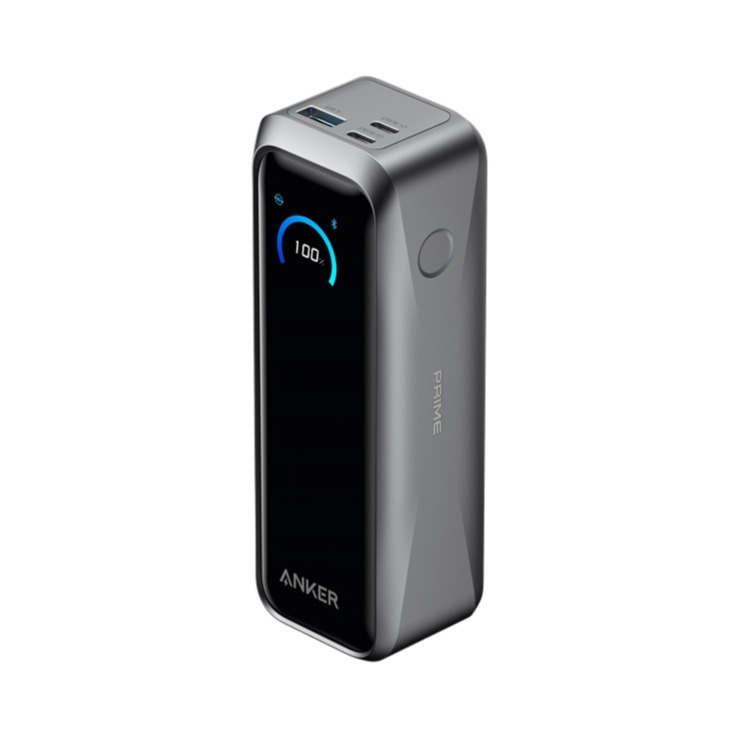
The Anker Prime 20,000mAh Power Bank (220W Max) represents the pinnacle of multi-device high-output portable energy. Engineered for modern workflows, this flight-approved solution delivers high-wattage power delivery to laptops, tablets, and smartphones simultaneously. It features an integrated smart digital display for real-time telemetry and advanced thermal protections.
Technical Specifications
Total Capacity: 20,100 mAh (72.36 Wh) — Fully compliant with TSA / aviation carry-on regulations under 100Wh.
Form Factor: Compact vertical design with integrated smart control screen.
Dimensions: 1.73 × 1.99 × 5.79 inches (44 × 50 × 147 mm)
Weight: 1.12 lbs (510 g)
Power Architecture & Interface Matrix
| Port Link | Power Profile Input | Power Profile Output |
| USB-C1 / USB-C2 | 5V⎓3A / 9V⎓3A / 12V⎓3A / 15V⎓3A / 20V⎓5A (100W Max) | 5V⎓3A / 9V⎓3A / 10V⎓2.25A / 12V⎓3A / 15V⎓3A / 20V⎓5A / 28V⎓5A (140W Max per port) |
| USB-A | N/A | 5V⎓3A / 9V⎓2A / 10V⎓2.25A / 12V⎓1.5A (22.5W Max) |
| Pogo Pin (Base) | 15V~25.2V⎓5A (100W Max) | N/A |
| Total Multi-Port Ceiling | 100W Max | 220W Max |
Variant Configurations Available at SKYRS Pakistan
SKYRS maintains exclusive stock allocation for all variants within this ecosystem:
Standalone Package (Model A110B)
Includes: Anker Prime Power Bank (20K, 220W), 3.3 ft USB-C to USB-C charging cable (240W rated), travel pouch, and welcome guide.
Target Use Case: Mobile professionals requiring ultra-fast charging via existing high-wattage USB-C wall bricks.
Desktop Docking Bundle (Model B110B)
Includes: Anker Prime Power Bank (20K, 220W) paired with the Anker Prime 100W Charging Base.
Target Use Case: Enterprise workstations, design studios, and users demanding drop-and-go wireless terminal recharges via magnetic Pogo pins.
Deployment and Installation
Unlike conventional legacy charging blocks, the deployment of this high-capacity unit involves system-level provisioning to unlock multi-port dynamic allocation and remote diagnostics:
Physical Deployment
Vertical Orientation: Place the power bank on a flat, non-slip surface. When paired with the wireless docking base, ensure the base is placed close to an AC outlet on a well-ventilated desk away from direct heat sources.
Docking Connection: Align the magnetic Pogo pins located at the bottom of the power bank with the receiving slot on the 100W charging base. The terminal will automatically snap into position and initiate high-speed charging.
Network & Ecosystem Provisioning
Application Linkage: Download and initialize the official Anker App on an iOS or Android device. Turn on the host device’s Bluetooth module.
Device Binding: Press the physical power button on the power bank once to wake the system. The integrated Bluetooth beacon will broadcast. Select “Add Device” within the app to lock the hardware to your secure account profile.
Charging Base IoT Gateway Integration: Connect the optional 100W Charging Base to a local 2.4GHz Wi-Fi network using the app interface. Once bound, dock the power bank to complete the device group linking process.
Configuration Management
Optimal performance relies on selecting the appropriate software profile based on environmental and operational needs:
Smart Power Modes
Smart Dynamic Allocation: Enabled by default via PowerIQ 4.0. The device monitors connected hardware demands in real-time, instantly adjusting and routing higher wattages to critical systems (e.g., matching a demanding laptop over a smartphone).
Trickle Charging Mode: Designed safely for low-power peripherals like wireless earbuds, smartwatches, or IoT trackers. To activate, press the power button twice. A blue indicator dot will appear on-screen. This prevents the auto-shutoff mechanism triggered by low-current draws. Press twice again to deactivate.
Power Saving Mode / Custom Profiles: Configurable directly via the app to optimize long-term battery health parameters, manage automatic overnight firmware downloads, or update customized standby screen styles.
Ecosystem Management and Cloud Monitoring
Through the SKYRS enterprise configuration matrix, the power bank acts as an intelligent endpoints terminal. When docked to the Wi-Fi base, IT managers or end-users can remotely audit battery health status, view real-time wattage histories, and check internal core temperatures (managed dynamically by ActiveShield 4.0 monitoring 10 million times daily).
Procurement and SLA Availability
Channel Partner: This specialized system profile, installation setup support, and comprehensive 24-month local replacement warranty are handled exclusively through SKYRS Pakistan. Corporate procurement inquiries, batch deployment, or diagnostic troubleshooting requests can be directed to the dedicated SKYRS business service desk.
Skyrs is the only vendor in Pakistan that has premium equipment for call center call centre environments and software houses. We provide the best Anker Prime 20K 220W Power Bank equipment across the nation to maintain your daily workflow.
Furthermore, we supply high-performance hardware for Zoom and RingCentral setups. Businesses can easily find used Anker options in Karachi, Lahore, and Islamabad. Additionally, we distribute these reliable systems to Rawalpindi and Faisalabad.
The primary purpose of this premium hardware is to provide uninterrupted power backup. It features dual-direction ultra-fast charging to maximize efficiency. Consequently, this system prevents critical downtime during sudden power outages.
+--------------------------------------------------------------------------+
|                        Official Manufacturer Visual                      |
|                                                                          |
|       [===] [===] [===]  <- Multi-Port Smart Power Distribution          |
|       |  Digital Display |  <- Real-Time Smart Monitoring (Watts)        |
|       +------------------+                                               |
|                                                                          |
|   Source: Anker Official Product Media (Anker Prime Power Bank Series)   |
+--------------------------------------------------------------------------+
(Please view the official product aesthetics via the Anker Official Website.)
System Integration: Review the comprehensive Anker equipment configuration guide for quick deployment.
Segmented Routing: Apply the Anker VLAN configuration protocol to separate hardware management traffic.
System Maintenance: Learn how to reset Anker equipment to quickly restore baseline factory metrics.
Firmware Deployment: Keep your hardware secure with the latest Anker firmware update download.
Technical Metrics: Review power thresholds by accessing the Anker datasheets download.
Power Allocation: Evaluate the maximum wattage delivery via the Anker PoE power budget specification.
We support every phase of your system deployment cycle. First, consult our Anker Migration guide for seamless hardware transitions. Second, our team assists with the Anker configuration guide.
If you face capacity limits, check the Anker throughput limit. Alternatively, look over the official product datasheet for detailed electrical parameters. We also offer the memory upgrade for advanced logic monitoring.
For physical server integration, purchase the rack mount kit. Then, update your system using the latest Anker Anker Prime Power Bank (20K, 220W) update. Finally, secure your enterprise assets through the security license activation.
The all variants portfolio delivers excellent performance compared to Belkin, Ugreen, and Baseus.
| Feature Matrix | Anker Prime (20K, 220W) | Competitor Equivalents (Belkin / Ugreen / Baseus) |
| Max Power Output | 220W Combined | Mostly 100W – 145W |
| Display Insight | Advanced Smart App Control | Simple Numerical LED |
| Recharge Speed | Ultra-Fast 100W Dual Input | Standard 65W Input |
Therefore, Anker provides superior multi-port power density for demanding business applications.
Please browse our internal inventory via Skyrs Product Catalog to find your specific model. We provide affordable choices like a Branded used Anker or a certified Refurbished Anker system.
Additionally, you can contact us to get a tailored Anker pack price for bulk corporate orders. We also offer a competitive Anker Anker Prime Power Bank (20K, 220W) used price 2026 for budget-conscious call centers.
Discover our localized pricing structures across major regional tech hubs:
Review the baseline Anker price in Pakistan for national corporate procurement.
Partner with the authorized Anker equipment series distributor Pakistan for authentic stock.
Request an immediate price in Karachi.
Check regional availability for the price in peshawar.
View local rates for the Anker Anker Prime Power Bank (20K, 220W) price in faisalabad.
Explore northern territory options for the Anker Anker Prime Power Bank (20K, 220W) price in kpk.
Find specialized enterprise switches via the AnkerSwitch Anker Anker Prime Power Bank (20K, 220W) price in quetta.
Secure premium corporate bundles when you Buy Anker equipment Lahore/Islamabad.
Get dedicated wholesale rates by requesting an Anker Anker Prime Power Bank (20K, 220W) bulk quote.
Skyrs is the exclusive vendor in Pakistan providing specialized high-density variants optimized for Zoom and RingCentral workflows.
You can download the official technical datasheets from our portal to review power limits and thermal metrics.
Yes, we rigorously test all refurbished hardware to ensure they meet original manufacturer performance standards.
Tags: #AnkerPakistan #AnkerPrime220W #CallCenterEquipment #SkyrsExclusive #AnkerPriceKarachi #AnkerLahore #AnkerIslamabad #EnterprisePower