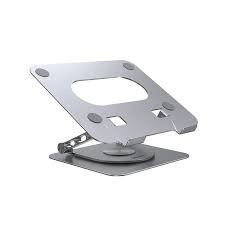
The UNITEK Laptop Stand series offers a premium range of ergonomic and functional solutions tailored for professionals, gamers, and remote workers. Specifically curated for SKYRS in Pakistan, these stands combine high-grade structural integrity with advanced connectivity and cooling features
Available Variants at SKYRS
SKYRS offers the full lineup of UNITEK stands, ranging from basic ergonomic risers to advanced multifunctional docking stations.
1. UNITEK OT155SL Mechanical Foldable Stand
-
Material: High-quality Aluminum Alloy
-
Features: 6-level tilt adjustment, stable triangular structure, and superior heat dissipation.
-
Best For: Portability and on-the-go professionals.
2. UNITEK OT180SL / OT172GY 360° Rotating Stand
-
Design: Features a 360-degree swivel base for effortless screen sharing.
-
Support: Heavy-duty carbon steel or aluminum construction supporting up to 4.5kg.
-
Best For: Collaborative workspaces and office meetings.
3. UNITEK OT1098AGY01 Stand with Cooling Fan
-
Cooling: Includes a magnetic, detachable cooling fan powered via USB.
-
Adjustment: Stepless height and angle adjustment with a 360° rotating base.
-
Best For: High-performance gaming laptops and heavy workloads.
4. UNITEK D1137A / D1109B 7-in-1 Docking Stand
-
Integrated Ports: 4K@60Hz HDMI, 2x USB-A (5Gbps), 1x USB-C (100W PD), and SD/MicroSD slots.
-
Connectivity: Transforms a single USB-C port into a full workstation.
-
Best For: Content creators and power users requiring multiple peripherals.
Technical Specifications
| Feature |
Basic Foldable |
Rotating Series |
Docking Station Variant |
| Material |
Aluminum Alloy |
Carbon Steel / Aluminum |
Anodized Aluminum |
| Rotation |
Fixed |
360° Swivel |
Fixed / Foldable |
| Max Load |
4.0 kg |
4.5 kg |
4.0 kg |
| Charging |
N/A |
N/A |
100W Power Delivery |
| Data Transfer |
N/A |
N/A |
5Gbps (USB 3.0/USB-C) |
| Compatibility |
10″ – 15.6″ |
8″ – 17.3″ |
10″ – 16″ |
Deployment, Installation, and Configuration
UNITEK products at SKYRS are designed for “Plug-and-Play” efficiency. Below are the deployment steps for various variants:
Physical Deployment
-
Unboxing: Each unit comes with a dedicated storage pouch (foldable models) or adjustment tools.
-
Assembly: Most units are pre-assembled. For the Rotating and Cooling variants, use the provided Hex Key and Socket Wrench to adjust the tension of the hinges to your laptop’s specific weight.
-
Positioning: Place the weighted base on a flat surface. Adjust the height to eye level to reduce neck strain.
Technical Configuration (Docking Models)
-
Host Connection: Connect the integrated 60cm USB-C cable to your laptop’s Thunderbolt or full-function USB-C port.
-
Power Delivery: Connect your original laptop charger to the USB-C PD port on the stand to enable pass-through charging up to 100W.
-
Display Setup: Connect an HDMI cable to the stand for 4K video output. Windows and macOS will automatically detect the secondary display.
-
Cooling Fan (If Applicable): Connect the USB-A to USB-C cable from the fan to any spare USB port on the stand or laptop to initiate active cooling.
Note: SKYRS is the exclusive destination in Pakistan for verified UNITEK laptop stand variants with full warranty support and configuration assistance.