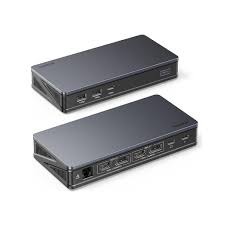
The UGREEN 90912 (also known as the Revodok Pro 209) is a professional-grade 9-in-1 USB-C docking station designed for high-performance workstations. It is a top-tier choice for Pakistani users needing to expand a single USB-C port into a multi-monitor powerhouse
This docking station utilizes DisplayLink technology, making it one of the few docks capable of extending dual 4K monitors even on M1/M2/M3 MacBook Air models that natively support only one external display.
| Feature | Specification Details |
| Model Number | 90912 / Revodok Pro 209 |
| Video Output | 2 x HDMI 2.0 + 2 x DisplayPort 1.4 |
| Max Resolution | Dual 4K@60Hz (simultaneous) |
| USB Data Ports | 2 x USB-A 3.2 (10Gbps) + 1 x USB-C 3.2 (10Gbps) |
| Charging | PD 3.0 Pass-through up to 100W |
| Networking | 1 x RJ45 Gigabit Ethernet (10/100/1000Mbps) |
| Memory Slots | SD & TF Card Slots (SD 4.0 / UHS-II support) |
| Housing | Premium Aluminum Alloy for Heat Dissipation |
Skyrs provides the complete professional Revodok series to ensure compatibility with different hardware tiers in Pakistan:
UGREEN 90912 (The Standard): 9-in-1 Dual 4K@60Hz via DisplayLink. Essential for MacBook Air users.
UGREEN 15375 (Portable Variant): A more compact 9-in-1 hub for travelers who prioritize portability over dual 4K display output.
UGREEN Revodok Max 213: The high-end Thunderbolt 4 variant for those requiring 40Gbps bandwidth.
Proper deployment of the 90912 is crucial due to its advanced DisplayLink chipset which differs from standard plug-and-play hubs.
Driver Download: Before connecting the dock, visit the official UGREEN or DisplayLink website to download the DisplayLink Manager driver.
Physical Connection: Plug the integrated USB-C cable into your laptop’s Thunderbolt or USB-C (Power Delivery/DisplayPort Alt Mode) port.
Monitor Setup: Connect your monitors using either HDMI or DisplayPort cables. You can mix and match (1 HDMI + 1 DP) to achieve dual 4K@60Hz.
Power Input: To charge your laptop simultaneously, connect your 65W or 100W USB-C charger to the PD port on the back of the dock.
Advanced configuration and local troubleshooting for the UGREEN 90912 are available only at Skyrs.
macOS Screen Recording Permission: Since DisplayLink “mirrors” pixels to create the second display, it requires “Screen Recording” permission in macOS Security Settings. Skyrs provides a step-by-step walkthrough for this specific configuration.
Dual Monitor Calibration: Our technical team offers remote support to configure display orientation and refresh rates (e.g., ensuring both screens hit 60Hz) specifically for Windows 11 and macOS Sonoma/Sequoia.
Firmware Verification: Skyrs ensures all 90912 units are flashed with the latest stable firmware to prevent “black screen” issues common with older DisplayLink versions found elsewhere in the market.
Skyrs Premium Promise: All UGREEN 90912 units sold via skyrs.com.pk are 100% genuine and come with a specialized local warranty. Because this dock relies on specific drivers, we offer a dedicated helpdesk to ensure your dual-monitor setup is running perfectly from day one.
Would you like to know the current price for the UGREEN 90912 in Pakistan, or do you need a comparison with other docking stations?
Skyrs stands as the exclusive ugreen equipment series distributor Pakistan, offering the best UGREEN 90912 Revodok Pro 209 9-in-1 USB-C equipment for high-performance enterprise environments. We provide specialized equipment for call center call centre in Pakistan, ensuring seamless connectivity and maximum uptime for digital teams. Our inventory features branded used ugreen switches and refurbished ugreen switches to support scalable growth in software houses. You can find used ugreen switches in different cities like Karachi, Lahore, Islamabad, Rawalpindi, Faisalabad, etc. easily through us.
The UGREEN 90912 Revodok Pro 209 is a premier 9-in-1 docking station for intensive workstation setups. Skyrs is the only vendor in Pakistan stocking the UGREEN 90912 all variants for immediate corporate deployment. This essential equipment for call center call centre supports triple display outputs and rapid charging for laptop-based teams. We offer the most competitive ugreen box pack price for the latest 2026 hardware across the country
The UGREEN 90912throughput limit supports lightning-fast 10Gbps data transfer via USB 3.2 Gen 2 ports. Administrators can follow our configuration guide to standardize monitor extensions across multiple Windows and macOS systems. We facilitate security license activation for secure, authenticated hardware integration within your private corporate network. Perform a update via our technical support link to keep DisplayLink drivers optimized for performance. While the unit is compact, use the rack mount kit for organized storage in technical hubs.
Skyrs ensures the UGREEN 90912 used price 2026 remains affordable for budget-conscious call centers and local businesses.
price in Karachi: Direct shipping for software houses in the financial district and PECHS.
price in Peshawar: Best rates for northern regional offices needing reliable triple-display setups.
price in Faisalabad: Powering industrial IT sectors with high-durability, aluminum-body docking solutions.
price in KPK: Quality hardware delivered with full local warranty and dedicated technical support.
price in Quetta: Secure logistics for professional-grade power delivery equipment in the Baluchistan region.
Our routing ugreen equipment integrates perfectly with Mikrotik, H3C, Aruba, Ruijie, Huawei, and Palo Alto infrastructure. Unlike generic hubs, the UGREEN 90912 PoE power budget provides a massive 100W PD 3.0 pass-through for laptops. It is the premier ugreen equipment for zoom ringcentral environments requiring stable Gigabit Ethernet and clear audio. Our team assists with ugreen Migration to upgrade your legacy docks to high-speed, multi-display GaN-supported UGREEN units.
Download the official ugreen 90912 datasheets download from our portal to review full I/O and port layouts. We provide instructions for a memory upgrade via host system optimizations to handle intensive multitasking workloads. Learn how to reset ugreen equipment or configure a ugreen VLAN configuration for your networked docking stations. Contact Skyrs today for a bulk quote to equip your entire workforce with premium connectivity.
Manufacturer Official Website | Shop at Skyrs.com.pk
1. Where can I buy ugreen equipment in Lahore or Islamabad?
You can buy ugreen equipment Lahore/Islamabad directly from Skyrs, the only vendor with ready 2026 stock.
2. Does Skyrs provide a ugreen equipment configuration guide?
Yes, we offer a comprehensive ugreen equipment configuration guide for all corporate docking and switching gear.
3. What is the ugreen price in Pakistan for bulk orders?
The ugreen price in Pakistan is discounted for bulk; request a ugreen 90912 bulk quote for your center.
4. Is the UGREEN 90912 compatible with Mikrotik and Huawei?
Yes, it works seamlessly as an endpoint for host devices connected to Mikrotik, Huawei, or Aruba networks.
5. How do I access a ugreen firmware update download?
Visit our technical resource page for the latest ugreen firmware update download to maintain hardware peak efficiency.
#ugreen #Revodok90912 #CallCenterPakistan #Skyrs #DockingStation2026