Yealink W59R Ruggedized Enterprise DECT Handset Datasheet
Exclusively Available and Supported by SKYRS Pakistan
The Yealink W59R is a professional-grade, shock-proof, and heavily rubberized wireless DECT handset designed for hazardous, high-impact, or demanding heavy-industry locations. Tailored to withstand harsh conditions across Pakistan—such as heavy manufacturing plants, outdoor oil and gas fields, processing yards, and massive logistics hubs—this handset guarantees absolute voice clarity and proactive personal safety features under heavy duress.
Yealink W59R Product Variants Available Exclusively at SKYRS
SKYRS provides localized stock for all structural deployment configurations within this rugged ecosystem:
Yealink W59R Standalone Expansion Handset: The drop-proof, certified handset supplied with a heavy-duty rotatable belt clip, an impact-resistant lithium battery pack, an independent desktop charging cradle, and a dedicated 5V power adapter. It scales easily within an existing DECT wireless cell setup.
Yealink W59R Pro Hardware Variant: The premium enterprise-tier variation featuring enhanced Bluetooth 5.2 architecture, a larger 2.4-inch display layout, specialized disinfectant-resistant protective casing, and upgraded scratch-proof coatings for sterile medical environments or heavy chemical processing installations.
Key Technical Specifications and Performance Capabilities
Rigorous IP67 Protection Rating: Certified completely dust-tight and fully waterproof against submersion in up to 1 meter of water for 30 minutes, combined with a rubberized outer frame that absorbs falls up to 2.5 meters.
Advanced Occupational Health and Safety Alarms: Integrates a physical emergency top button and internal G-sensors supporting automatic alarms: Man-Down (posture fall alert), No-Movement (immobilization), Running (panic alert), and Push-Button emergency broadcasts.
Built-in Bluetooth and Vibration Profiles: Native Bluetooth connectivity links wireless headsets seamlessly. Features a powerful vibration motor to ensure alerts are felt clearly in noisy industrial environments.
Noise-Cancellated HD Voice Performance: Implements Flexible Noise Reduction (FNR), full-duplex acoustic engineering, and standard Opus codec mapping to mask heavy background machinery hums.
Prolonged Operations Battery: Delivering up to 28 hours of talk time and up to 360 hours of standby time, reinforced by smart quick-charge engineering.
Industrial Hardware Deployment and Site Installation Blueprint
SKYRS delivers end-to-end turn-key professional deployment services across Pakistan:
1. Industrial RF Surveying and Multi-Cell Mapping
Industrial environments feature severe radio blockages from metal structural beams and high-density inventory racking. SKYRS engineers deploy specialized toolkit transponders to map the precise signal paths for the W59R. This ensures flawless roaming handovers across linked multi-cell frameworks.
2. Physical Mount and Base Stations Placement
Handsets link with single-cell base nodes or high-capacity multi-cell arrays (such as the Yealink W80 or W90 system) mounted high out of physical harm’s way.
All infrastructure base systems leverage Power over Ethernet (PoE) drops directly from local network rooms, completely removing the requirement for AC electrical line routing in industrial areas.
Advanced Wireless Configuration and Safety Provisioning
The device ecosystem is fully orchestrated remotely through secure master platforms:
1. Remote Emergency and Alarm Automation
The complex OH&S alarm parameters (trigger delay timers, fallback emergency escalation numbers, and mass siren behavior) are configured centrally on the master controller dashboard. Device configurations sync over-the-air, meaning individual handsets require zero manual configuration on the factory floor.
2. Over-The-Air Provisioning and Handset Synchronization
W59R devices feature secure Over-The-Air (OTA) firmware upgrade methods, allowing rolling software updates to deploy automatically across entire fleets without any device collection or downtime.
Handset pairing utilizes secure International Portable User Identity (IPUI) tokens managed directly through a unified web-based administration screen. This protects operational security and restricts unauthorized hardware additions.
Exclusive Procurement and Local SLA Availability in Pakistan
Availability Notice: The comprehensive Yealink W59R and W59R Pro rugged portfolios—including official local warranties, replacement components (such as industrial belt clips and battery packs), pre-sales structural RF environment checking, and post-installation technical SLA contract support—are available in Pakistan exclusively through SKYRS.
Skyrs proudly operates as the leading supplier of ruggedized enterprise communications hardware nationwide. Consequently, businesses can upgrade their workplace setups effectively. Skyrs is the only vendor in pakistan that has Yealink W59R equipment for call center call centre and software houses with different variants of Yealink W59R equipment for ucm pbx grandstream Yealink W59R dintar asterisk hosted call center office factory zoom ringcentral. Furthermore, we stock critical storage items like server hard disk options, high-speed SSD models, and dynamic system RAM modules.
This heavy-duty inventory satisfies communication demands for a busy call center call centre, professional office, home workspace, heavy factory industry, hospital, or defence forces environment.
We support regional telecom infrastructure projects across the nation continuously. Therefore, corporate customers can procure hardware across major urban zones comfortably:
Federal Territory & Punjab: Buy Yealink W59R equipment Lahore/Islamabad directly to acquire the best official Yealink W59R price in Pakistan.
Sindh Region: Request a verified Yealink W59R Yealink W59R W59R price in Karachi for expanding industrial lines.
KPK Districts: Check our current Yealink W59R Yealink W59R W59R price in kpk or verify the Yealink W59R price in peshawar.
Industrial Capitals: Acquire an accurate Yealink W59R Yealink W59R price in faisalabad or arrange shipments to Sialkot and Rawalpindi.
Balochistan & South Punjab: Contact us to get a competitive Yealink W59R Switch Yealink W59R price in quetta, Multan, or Hyderabad.
Bulk Procurement: Reach out to our sales desk for a custom Yealink W59R bulk quote tailored for large deployments.
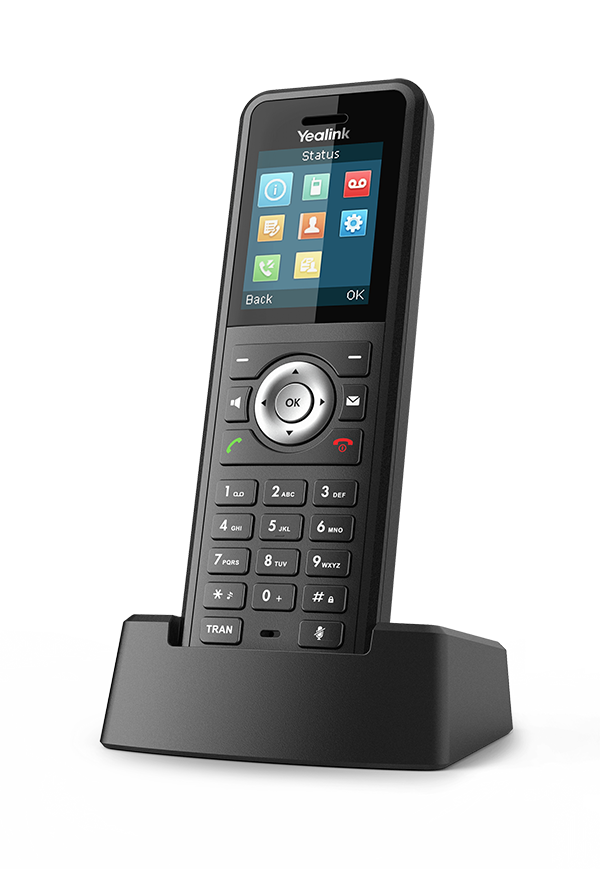
Figure 1: Original physical view of the shockproof wireless DECT handset from the manufacturer website.
The system provides premium drop-resistant voice clarity across extreme enterprise environments. For example, the integrated antennas process stable Yealink W59R signals over vast factory floors without dropping active calls.
[Main IP-PBX Server] ---> [DECT Multi-Cell Base] - - - (Wireless Link) - - -> [Yealink W59R Handset]
Network managers can use the standard Yealink W59R equipment configuration guide to provision handsets automatically. Additionally, the network hardware enforces an optimized Yealink W59R throughput limit to safeguard essential audio data streams.
To protect call traffic, engineers can apply a custom Yealink W59R VLAN configuration within the local switch setup. Furthermore, base units run reliably within a safe Yealink W59R PoE power budget over standard data cables.
| Operational Metrics | Yealink W59R All Variants | Basic Competitor Handsets |
| Ingress Protection | Certified IP67 dust and water resistance | Vulnerable to moisture and shocks |
| Bluetooth Function | Built-in Bluetooth for wireless headsets | Lacks integrated mobile audio links |
| Hardware Upgrades | Supports a dedicated Yealink W59R memory upgrade | Fixed legacy hardware profiles only |
| Mounting Options | Compatible with an original Yealink W59R rack mount kit | Missing standard central rack mounts |
Whether you buy a Branded used Yealink W59R handset or a certified Refurbished Yealink W59R model, we guarantee quality. Every package features an attractive Yealink W59R used price 2026 structure.
This ensures that you receive a reduced Yealink W59R pack price for large multi-site rollouts. Check the complete technical datasheet parameters on the official Yealink Product Resource Page. Alternatively, browse complete packages via our Skyrs Online Product Portfolio today.
Q1: How to reset Yealink W59R equipment back to factory status?
First, open the main handset menu screen. Next, navigate to the system settings directory, select factory reset, and enter the default PIN.
Q2: Where can I complete a secure Yealink W59R Yealink W59R datasheets download?
You can download official engineering documents directly from skyrs.com.pk or through the manufacturer portal resource center.
Q3: How do I manage a Yealink W59R update or security license activation?
First, get the necessary system files via a Yealink W59R firmware update download. After that, process the file through the base web console.