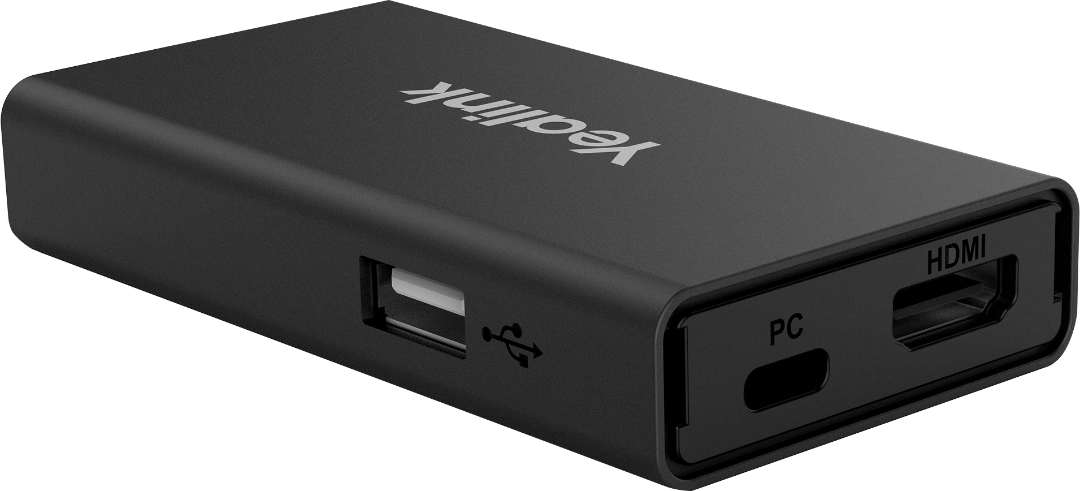
The Yealink VCH51 Sharing Box is a compact, high-performance interface designed to facilitate wired content sharing and BYOD (Bring Your Own Device) mode for Yealink video conferencing systems. It allows users to easily bridge their laptops to professional room hardware like the MeetingBar or MeetingEye series.
| Feature | Details |
| Max Resolution | Up to 4K @ 15Hz (Standard) / Up to 4K @ 60Hz (Pro version) |
| Video Inputs | 1 x HDMI and 1 x USB-C (DP video input) |
| Network Port | 1 x RJ45 (Connects to Yealink Codec/VCH port) |
| USB Support | 1 x USB 2.0 Type-A |
| Power Supply | Powered via PoE (from the Yealink system) |
| Dimensions | 123mm x 49mm x 16.8mm (Ultra-compact) |
Wired BYOD Mode: Transform your room system (MeetingBar A20/A30, MeetingEye 400/600) into a USB peripheral. Simply plug your laptop into the VCH51 to use the room’s high-end camera, microphones, and speakers for any PC-based meeting (Zoom, Webex, Google Meet).
Instant Content Sharing: Enables stable, low-latency 4K screen sharing via HDMI or USB-C without needing to install additional drivers.
Simplified Cabling: Uses a single Cat5e cable to connect the VCH51 hub to the main video bar, allowing you to place the sharing hub on the conference table even if the camera is mounted far away.
Plug-and-Play: Automatically switches between the native Room OS (Teams/Zoom) and BYOD mode when a laptop is connected.
Compatibility: Supported on Windows 7/8.1/10/11 and macOS 10.6 or higher.
HDMI In: For standard laptop screen sharing.
USB-C In: Supports DP video input and BYOD data (also supports 65W PD charging on the VCH51 Pro model).
RJ45 Port: Connects to the “VCH” port on the back of your Yealink MeetingBar or Room PC.
USB-A: For connecting additional USB peripherals like a mouse or keyboard to the host laptop.
Scenario: You have a Microsoft Teams Room (MTR) setup but need to join a proprietary client’s GoToMeeting call. By plugging your laptop into the VCH51, the room’s 4K camera and professional audio array immediately become the “webcam” for your laptop, ensuring a high-quality experience for any platform.
Would you like me to check if your specific Yealink firmware version supports the “Auto-Switch to BYOD” feature for the VCH51?
The Yealink VCH51 is a high-performance video conferencing sharing hub designed for professional meeting environments. This product enables users to share content from their laptops to Yealink video conferencing endpoints effortlessly. It features a compact design that integrates perfectly into any office setup in Karachi or Lahore. This product supports 4K ultra-high-definition resolution to ensure your presentations look incredibly sharp and clear. It offers both HDMI and USB-C input ports to accommodate modern devices in Islamabad and Faisalabad. The product allows for seamless wired screen sharing without the need for complex software installations or drivers. You can also utilize the product for BYOD (Bring Your Own Device) mode to use the room camera. This versatility makes the product an essential tool for hybrid teams working across Multan and Peshawar. It ensures a stable and lag-free connection for every important business meeting in Sialkot and Gujranwala.
The product works seamlessly with leading hosted PBX systems like RingCentral, AT&T Business, and Vonage. It allows companies to integrate their existing cPhone or cloud-based communication platforms with Yealink hardware. Taxi services in Rawalpindi and Hyderabad use this product to display real-time dispatch data during briefings. The product simplifies the user experience by providing a plug-and-play interface for visiting guests and consultants. It utilizes a single Category cable to connect back to the main codec, reducing messy table clutter. This product enhances collaboration by allowing audio and video sharing through a single, reliable connection. It supports various operating systems, including Windows and macOS, for maximum device compatibility in Pakistan. The product helps maintain a professional aesthetic by hiding neatly under the conference table or behind displays.
While the Logitech Swytch offers similar BYOD capabilities, the Yealink VCH51 provides a more native integration for Yealink users. This product is specifically optimized for Yealink MeetingBar and MVC series systems to ensure total reliability. Furthermore, the product offers a more cost-effective solution for businesses scaling their video infrastructure in Pakistan. In contrast, the Logitech Swytch requires a more complex hub-and-cable management system for full functionality. Therefore, choosing this product ensures a smoother setup for organizations already invested in the Yealink ecosystem.
| Feature | Yealink VCH51 | Logitech Swytch |
| Max Resolution | 4K UHD | 4K UHD |
| Native Integration | Yealink MVC/MeetingBar | Universal |
| Ports | HDMI & USB-C | HDMI & USB-A/C |
| Connection Type | RJ45 (PoE) | Proprietary Hub |
The product ensures secure data transmission by adhering to strict enterprise-level encryption and security standards. Businesses in Quetta and Bahawalpur choose this product for its durability and long-term hardware support. It features an intuitive LED indicator to show the current connection status to the meeting room participants. You can easily manage the product remotely through the Yealink Device Management Platform for bulk updates. It represents a significant upgrade over traditional wireless dongles that often suffer from signal interference and latency. This product provides the consistency required for high-stakes executive boardrooms and training centers in Pakistan. It comes with all necessary cables to start sharing content immediately after a quick installation.
Manufacturer Link: Official Yealink VCH51 Product Details
Local Supplier Link: Buy Yealink VCH51 at SKYRS Pakistan
1. Does the Yealink VCH51 support 4K resolution? Yes, this product supports 4K resolution for crystal-clear content sharing during your video meetings.
2. Can I use the VCH51 for BYOD (Bring Your Own Device) mode? Absolutely, this product allows you to use the room’s camera and audio with any PC application.
3. Is the Yealink VCH51 compatible with RingCentral? Yes, this product integrates perfectly with RingCentral Rooms when used with Yealink MVC or MeetingBar systems.
4. What cables do I need to connect to the VCH51? The product features HDMI and USB-C inputs, allowing you to connect almost any modern laptop easily.
5. Does it require a separate power supply? No, the product typically receives power over the network cable (PoE) from the main Yealink codec.
6. Where can I buy the Yealink VCH51 in Pakistan? You can purchase the authentic product with local warranty and support from SKYRS, serving all major cities.
Tags: #YealinkVCH51 #ScreenSharing #VideoConferencingPakistan #Skyrs #BYOD #4KContentSharing #KarachiBusiness #LahoreIT #RingCentral #Vonage #OfficeTech
Would you like me to create a comparison between the VCH51 and the wireless Yealink WPP30 pod?